
Android DeepLink跳转
网页通过超链接跳转到APP指定页面,或者通过DeepLink打开特定的应用页面,都是通过Android DeepLink技术实现的。搜索跳转例子
1、<data />
要想让自己的应用能够通过DeepLink跳转,需要先了解AndroidManifest中的<data />标签。关于<data />及更多AndroidManifest标签详见Android Developers > Guides > App Manifest Overview
1.1、语法结构
<data />节点的配置结构如下,有scheme、host、port、path等诸多参数可以配置。
<data android:scheme="string"
          android:host="string"
          android:port="string"
          android:path="string"
          android:pathPattern="string"
          android:pathPrefix="string"
          android:mimeType="string" />
1.2、属性含义
①android:scheme:Uri的scheme部分
②android:host:Uri authority的主机部分
③android:port:Uri authority的端口部分
④android:path:Uri的路径部分,path属性指定与Intent对象中的完整路径匹配的完整路径
⑤android:pathPrefix:pathPrefix属性指定部分路径,该部分路径仅与Intent对象中路径的初始部分匹配。
⑥android:pathPattern:pathPattern属性指定与Intent对象中的完整路径匹配的完整路径,但它可以包含以下通配符
⑦android:mimeType:MIME媒体类型,例如image/jpeg或audio/mpeg4-generic。子类型可以是星号通配符(*),表示任何子类型都匹配。注意:与正式的RFC MIME类型不同,Android框架中的MIME类型匹配区分大小写。因此,您应始终使用小写字母指定MIME类型。
2、应用配置DeepLink
开发者自己需要在应用的AndroidManifest中添加<data />配置,系统处理DeepLink跳转是会寻找那些应用能够处理该DeepLink。
2.1、AndroidManifest中添加<data />
<data />标签在<intent-filter>节点下,在<intent-filter>节点中添加<data />数据即可。详见Google开发者官方指南Create Deep Links to App Content。
<activity
        android:name=".activity.DeepLinkActivity"
        android:enabled="true"
        android:exported="true">

        <intent-filter>

            <action android:name="android.intent.action.VIEW" />

            <category android:name="android.intent.category.BROWSABLE" />
            <category android:name="android.intent.category.DEFAULT" />

            <data
                android:host="quibbler"
                android:scheme="zhao" />
        </intent-filter>
</activity>关键是其中的<data/>节点,配置host和scheme。网页超链接跳转到APP的这个页面就需要配置host和scheme超链接。这些配置有没有发现有点眼熟,没错就是Uri,关于Uri终于算是系统的了解了一下,详见Android Uri。
<activity>

        <intent-filter>
            <category android:name="android.intent.category.DEFAULT" />
            <action android:name="android.intent.action.VIEW" />

            <data
                android:host="quibbler"
                android:path="/form/2020/data/cache/"
                android:port="3000"
                android:scheme="com" />

        </intent-filter>

    </activity>
2.2、通过DeepLink跳转到应用
根据scheme、host、port构造Uri,设置给Intent就可以启动指定的Activity。
Uri jumpUri = Uri.parse("com://quibbler:3000/form/2020/data/cache/");
    Intent intent = new Intent(Intent.ACTION_VIEW, jumpUri);
startActivity(intent);上面只是最简单的示例,线上的项目中,情况非常复杂,要用ResolveInfo查询Intent做很多判断。只携带DeepLink的Intent往往意图不明显,可能有多个应用可以处理这个DeepLink,所以最好加上包名指定跳转的应用。但是有些应用如果不支持,则另做处理:比如跳转浏览器使用网页打开DeepLink网页版。
2.3、应用处理DeepLink
点击WebView加载的页面中超链接,系统就会根据指定的host和schem寻找能够处理的页面。打开APP指定的Activity页面。
Intent中携带了由DeepLink构造的Uri,获取跳转的参数等相关信息。Uri中的数据字段提取详见《Android Uri》。
Intent intent = getIntent();
    Uri uri = intent.getData();
    String scheme = uri.getScheme();
    String host = uri.getHost();
    List<String> paths = uri.getPathSegments();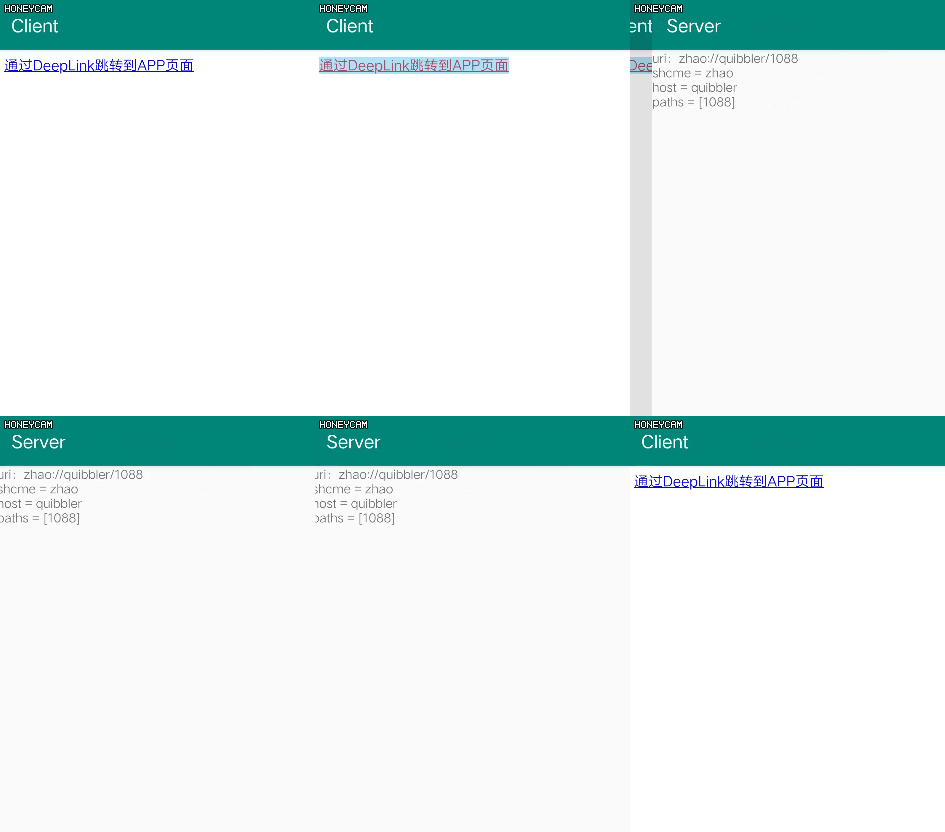
3、HTML网页配置DeepLink
手机浏览器中打开一些网页,有时候会弹出“使用应用打开”,是如何做到的呢?网页中配置了DeepLink超链接。
3.1、超链接
网页中超链接的按照Uri的标准写法添加打开指定应用的Uri即可,并且可以携带参数。关于Uri详见《Android Uri》。
<!DOCTYPE html>
    <html>
        <head>
            <meta charset="UTF-8">
         <title>Document</title>
        </head>

        <body>
            <a href="zhao://quibbler/1088">通过DeepLink跳转到APP页面</a>
        </body>
    </html>
3.2、加载本地网页
通过WebView加载上述页面,注意以前WebView调用loadUrl()方法之后,需要setWebViewClient()。但是这里不需要设置WebViewClient,否则不会跳转到APP,而是直接用WebView打开超链接。
mWebView.loadUrl("file:///android_asset/" + "deeplink.html");
    //加上后面这句就不能正常跳转到其它Activity,而是使用WebView继续加载
    //mWebView.setWebViewClient(new WebViewClient());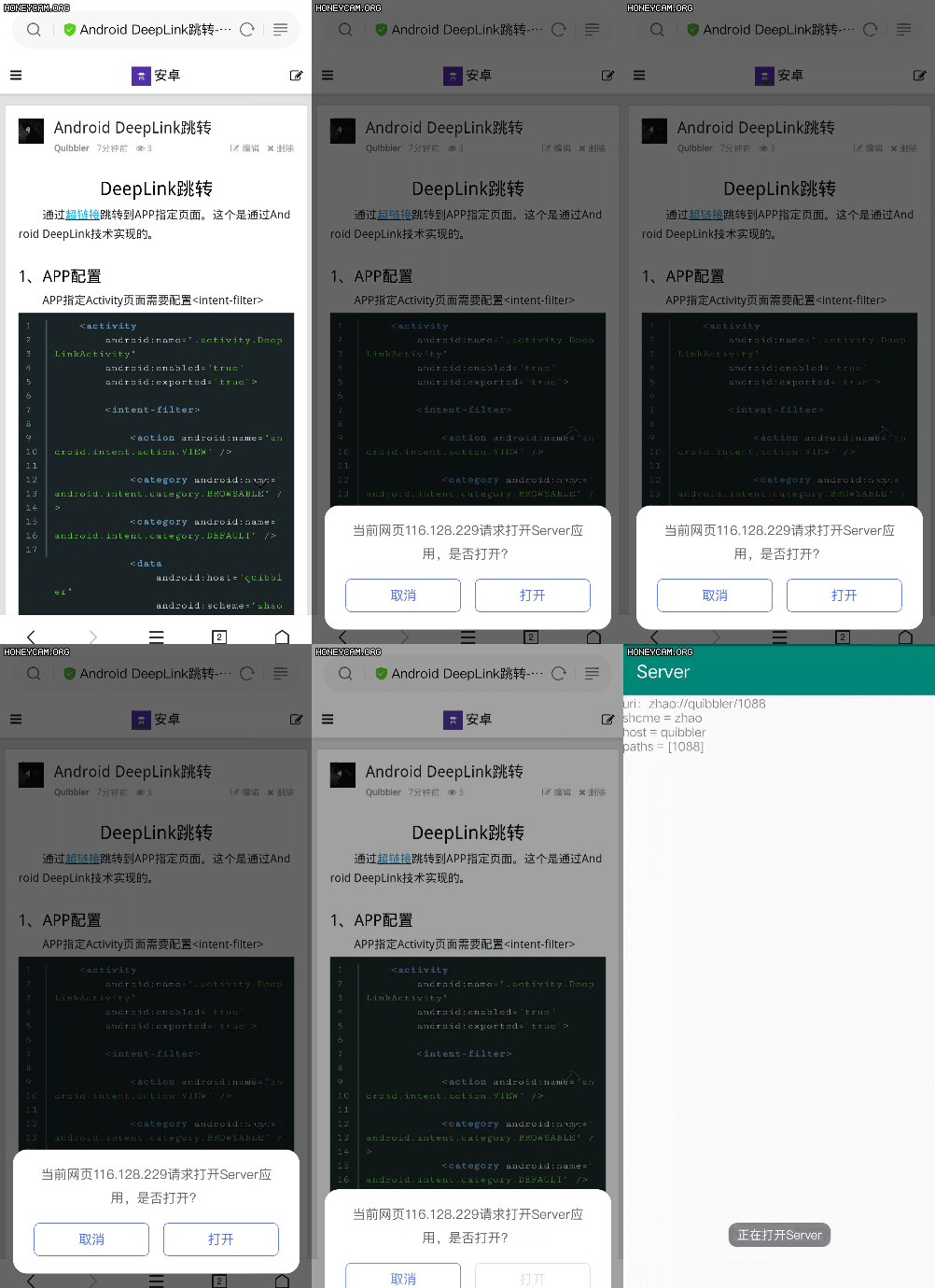
4、主流DeepLink*
网上有很多微信、QQ、抖音的跳转DeepLink。如果是个人开发者可以自己搜集一些,但是正式商业的应用最好是公司提供的专用DeepLink实现友商间应用的DeepLink跳转。
腾讯微博:TencentWeibo://
    淘宝:taobao://
    支付宝:alipay://
    微博:sinaweibo://
    weico微博:weico://
    QQ浏览器:mqqbrowser://
    uc浏览器:ucbrowser://
    海豚浏览器:dolphin://
    搜狗浏览器:SogouMSE://
    百度地图:baidumap://
    Chrome:googlechrome://
    优酷:youku://
    京东:openapp.jdmoble://
    人人:renren://
    美团:imeituan://
    1号店:wccbyihaodian://
    我查查:wcc://
    有道词典:ddictproapp://
    点评:dianping://
    微盘:sinavdisk://
    豆瓣fm:doubanradio://
    网易公开课:ntesopen://
    名片全能王:camcard://
    淘宝宝贝搜索:taobao://http://s.taobao.com/?q=[prompt]
    淘宝店铺搜索:taobao://http://shopsearch.t
参考资料:
Create Deep Links to App Content
A Guide to Deep Links in Android


