
Annotation processors must be explicitly declared now
可能是因为昨天晚上更新了AndroidStudio,第二天早上打开编译运行不了,报错(为什么每次更新AndroidStudio总会搞些事情):
Annotation processors must be explicitly declared now. The following dependencies on the compile classpath are found to contain annotation processor. Please add them to the annotationProcessor configuration.
- jetified-compiler-4.11.0.jar (com.github.bumptech.glide:compiler:4.11.0)
- jetified-butterknife-compiler-10.2.1.jar (com.jakewharton:butterknife-compiler:10.2.1)
Alternatively, set android.defaultConfig.javaCompileOptions.annotationProcessorOptions.includeCompileClasspath = true to continue with previous behavior. Note that this option is deprecated and will be removed in the future.See https://developer.android.com/r/tools/annotation-processor-error-message.html for more details.
build.gradle中还提示修改一些依赖库的编译选项,不要使用implementation,换成annotationProcessor:
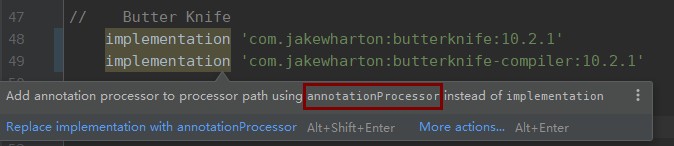
好吧,既然官方推荐这么做,就将提示的全部换成annotationProcessor。没想到编译各种找不到库,为什么一团乱码,参考《AndroidStudio各种中文乱码 》
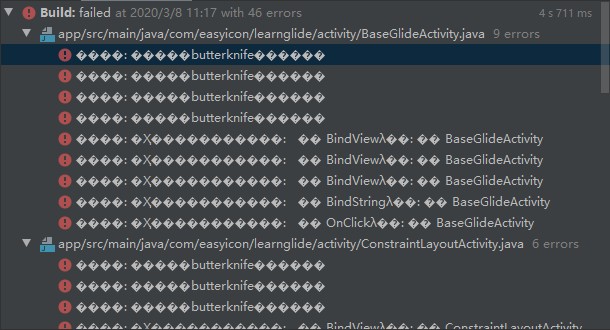
看来提示也是有问题的,AndroidStudio老毛病了。compiler库用关键字annotationProcessor,代码库用implementation关键字导入。
//Butter Knife
    //noinspection AnnotationProcessorOnCompilePath    如果还嫌提示烦就Supress
    implementation 'com.jakewharton:butterknife:10.2.1'
    annotationProcessor 'com.jakewharton:butterknife-compiler:10.2.1'

    //Glide依赖
    implementation 'com.github.bumptech.glide:glide:4.11.0'
annotationProcessor 'com.github.bumptech.glide:compiler:4.11.0'还有另一种方法,报错信息以及给出了:android.defaultConfig.javaCompileOptions.annotationProcessorOptions.includeCompileClasspath = true,不过这种方式已经被标记为deprecate。
android {
        ...
        defaultConfig {
            ...
            javaCompileOptions {
                annotationProcessorOptions {
                    includeCompileClasspath = true
                }
            }
        }
        ...
    }
