
短信操作:原来用户隐私这么容易暴露
Android电话通讯讯息管理相关的模块是Telephony。其源码在../frameworks/base/telephony路径中,目录结构如下。
./telephony/java/android
                            ../telephony
                            ../provider
    ./telephony/java/com/android
                            ../internal
                            ../ims
1、短信模块
手机应用很多都会有短信读取识别功能,主要就是通过短信模块提供的TelephonyProvider对短信进行查询等操作,由系统维护的Provider,位于系统/packages/providers/目录下,诸如MediaStore的查询也是通过该目录下的Provider。短信表结构定义为Sms类。
/**
     * Contains all text-based SMS messages.
     */
    public static final class Sms implements BaseColumns, TextBasedSmsColumns {
        //定义大量的字段及URI
}查看这个类中系统定义了哪些字段给我们查询使用。注意这里稍微提一下BaseColumns这个接口,里面定义了两个SQL隐藏的字段_id和_count。
public interface BaseColumns {
        /**
         * The unique ID for a row.
         */
        public static final String _ID = "_id";

        /**
         * The count of rows in a directory.
         */
        public static final String _COUNT = "_count";
    }
1.1、字段
①type:短信类型
/** Message type: all messages. */
    public static final int MESSAGE_TYPE_ALL    = 0;

    /** Message type: 收件箱. */
    public static final int MESSAGE_TYPE_INBOX  = 1;

    /** Message type: 已发送. */
    public static final int MESSAGE_TYPE_SENT   = 2;

    /** Message type: 草稿. */
    public static final int MESSAGE_TYPE_DRAFT  = 3;

    /** Message type: 发件箱. */
    public static final int MESSAGE_TYPE_OUTBOX = 4;

    /** Message type: 发送失败. */
    public static final int MESSAGE_TYPE_FAILED = 5;

    /** Message type: 待发送. */
    public static final int MESSAGE_TYPE_QUEUED = 6;
②thread_id:序号,同一发信人的id相同
③address:发件人手机号码(根据这个查找联系人姓名)
④date:收到消息的日期。
⑤date_sent:发件日期,单位是milliseconds,从1970/01/01至今所经过的时间
⑥read:是否已读。0未读, 1已读。
⑦seen:消息是否已被用户看到? “已看到”标志确定我们是否需要显示通知。
⑧status:TP-状态
/** TP-Status: 没有收到状态. */
    public static final int STATUS_NONE = -1;

    /** TP-Status: 完成. */
    public static final int STATUS_COMPLETE = 0;

    /** TP-Status: 待定. */
    public static final int STATUS_PENDING = 32;

    /** TP-Status: 失败. */
    public static final int STATUS_FAILED = 64;
⑨subject:短信的主题
⑩body:短信内容
⑪person:对话发件人的ID(如果有)
⑫protocol:协议标识符代码。
⑬reply_path_present:是否设置了{@code TO-Reply-Path}标志?
⑭service_center:The service center (SC) through which to send the message, if present.
⑮locked:消息是否被锁定?
⑯sub_id:消息所属的订阅
⑰mtu:APN连接到的移动接口的MTU大小
⑱error_code:与发送或接收此消息相关的错误代码
⑲creator:已发送消息的发送者的身份。 通常是发送消息的应用程序的程序包名称。此列为只读,它由提供商设置,不能由应用程序更改。
1.2、URI
在Sms中定义了一个顶级Uri,使用此Uri通过ContentProvider查询所有短信。
/**
     * The {@code content://} style URL for this table.
     */
    public static final Uri CONTENT_URI = Uri.parse("content://sms");
除此之外,还可以使用几个子Uri查询不同子type的短信。它们都定义在不同的静态内部类中。
//收件箱
    public static final Uri CONTENT_URI = Uri.parse("content://sms/inbox");

    //已发送
    public static final Uri CONTENT_URI = Uri.parse("content://sms/sent");

    //草稿
    public static final Uri CONTENT_URI = Uri.parse("content://sms/draft");

    //发件箱
    public static final Uri CONTENT_URI = Uri.parse("content://sms/outbox");

    //在SMS应用程序中包含所有已发送的基于文本的SMS消息:对话
    public static final Uri CONTENT_URI = Uri.parse("content://sms/conversations");

    content://sms/failed        发送失败

    content://sms/queued        待发送列表
2、短信相关权限
短信读写属于危险权限,需要在AndroidManifest中声明相应的权限,并且在用的时候动态申请。申请权限参考动态Permission申请权限,附检查、申请权限工具类。
<!--  发送消息-->
    <uses-permission android:name="android.permission.SEND_SMS" />

    <!--  阅读消息-->
    <uses-permission android:name="android.permission.READ_SMS" />

    <!--  写入消息-->
    <uses-permission android:name="android.permission.WRITE_SMS" />

    <!-- 接收消息 -->
    <uses-permission android:name="android.permission.RECEIVE_SMS" />
3、短信相关操作
短信查询、接收的具体操作。需要的Uri和字段都定义在Telephony类中,可以直接使用无需重复定义。
3.1、搜索短信
借助ContentProvider使用上面提供的Uri查询感兴趣字段的短信。
例:查询发件箱中短信的“body”、“date”、“read”、“address”四个字段。
ContentResolver contentResolver = getContentResolver();
    String[] projection = new String[]{Telephony.TextBasedSmsColumns.BODY,
                                       Telephony.TextBasedSmsColumns.DATE,
                                       Telephony.TextBasedSmsColumns.READ,
                                       Telephony.TextBasedSmsColumns.ADDRESS};
    Uri uri = Uri.parse("content://sms/sent");
    Cursor cursor = contentResolver.query(uri, projection, null, null, Telephony.Sms.DEFAULT_SORT_ORDER);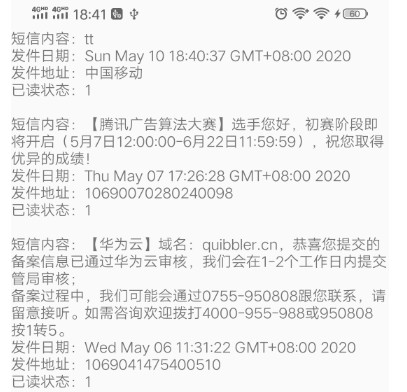
做过一个短信搜索的demo,在查询数据库的时候使用like关键字查询短信数据。部分代码如下:
Cursor cursor = getContentResolver().query(
            Uri.parse("content://sms"), new String[]{"address", "body"},
            //通过where body like %key%进行模糊查询
"body like ?", new String[]{"%" + keyword + "%"}, null);获取到Cursor,就可以进行下面的循环操作拿到指定字段的数据了:
if (cursor.moveToFirst()) {
        do {
            //短信数据
        } while (cursor.moveToNext());
    }
3.2、接收
收到短信的时候,系统会进行广播。注册下面广播的Action以接收短信。
<action android:name="android.provider.Telephony.SMS_RECEIVED"/>自定义短信广播接收器:
private class SmsReceiver extends BroadcastReceiver {

        @Override
        public void onReceive(Context context, Intent intent) {
            if ("android.provider.Telephony.SMS_RECEIVED".equals(intent.getAction())) {
                Bundle bundle = intent.getExtras();
                if (bundle != null) {
                    //通过pdus获得接收到的所有短信消息,获取短信内容
                    Object[] objects = (Object[]) bundle.get("pdus");
                    //构建短信对象数组
                    SmsMessage[] smsMessages = new SmsMessage[objects.length];
                    for (int i = 0; i < objects.length; i++) {
                        //获取单条短信内容,以pdu格式存,并生成短信对象
                        smsMessages[i] = SmsMessage.createFromPdu((byte[]) objects[i]);
                        //发送方的电话号码
                        String number = smsMessages[i].getDisplayOriginatingAddress();
                        //获取短信的内容
                        String content = smsMessages[i].getDisplayMessageBody();
                    }
                }
            }
        }
    }
动态注册广播,监听短信。
IntentFilter intentFilter = new IntentFilter();
    intentFilter.addAction("android.provider.Telephony.SMS_RECEIVED");
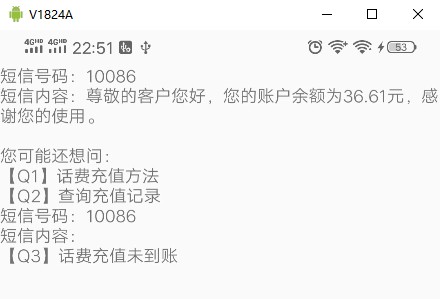
registerReceiver(smsReceiver, intentFilter);当收到任何短信的时候都能监听到,可见应用也能偷偷摸摸在后台监听用户的短信内容。
3.3、发送短信
应用发送短信,有些应用需要发送验证短信等操作。发送短信途径很多:可以应用自己直接发送短信,也可以跳转到系统短信发送界面。
3.3.1、直接发送
短信发送使用SmsManager,在包android.telephony中,低版本API在包android.telephony.gsm中已经deprecated。新的SmsManager同时支持GSM和CDMA。
①现获取SmsManager实例。
SmsManager smsManager = SmsManager.getDefault();②获取到SmsManager之后,先构造短信发送后的PendingIntent。
Intent intent = new Intent("com.android.TinySMS.RESULT");
PendingIntent pendingIntent = PendingIntent.getBroadcast(this, 0, intent, PendingIntent.FLAG_ONE_SHOT);③这种方式发送短信,每条字数不能超过70个,使用divideMessage()方法自动将短信内容切割(如果太长的话)。
List<String> smsLists = smsManager.divideMessage(message);④然后循环调用sendTextMessage()方法发送短信内容。
for (String msg : smsLists) {
        smsManager.sendTextMessage("+86 10086", null, msg, pendingIntent, null);
}如果消息太长,不想一条一条的发送/收到,可以用sendMultipartTextMessage()方法。这里不再多述,看源码即可知道具体用法。
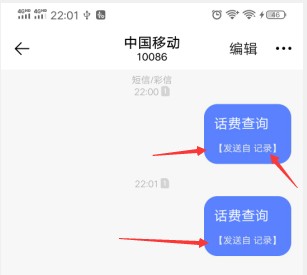
这样就悄无声息的发送了一条短信,当然应用需要发送短信的权限。一但应用拥有了短信的权限,完全可以在用户不之情的情况下发送短信。好在国内厂商会记录并且提示用户是哪些APP在后台偷偷摸摸发送短信。
源码:参数含义
/**
     * @param destinationAddress 短信接收号码
     * @param scAddress  服务中心地址或为null以使用当前的默认SMSC
     * @param text 短信正文
     * @param sentIntent 如果不为NULL,则在成功发送或失败时广播此PendingIntent。
     * @param deliveryIntent 如果不为NULL,则在将短信传递给收件人时广播此PendingIntent。
     */
    public void sendTextMessage(
            String destinationAddress, String scAddress, String text,
            PendingIntent sentIntent, PendingIntent deliveryIntent) {
        sendTextMessageInternal(destinationAddress, scAddress, text, sentIntent, deliveryIntent,
                true, ActivityThread.currentPackageName());
    }
3.3.2、调用系统短信界面发送
方法一:通过 vnd.android-dir/mms-sms 调起系统短信编辑发送界面。
Intent sendMessageIntent = new Intent(Intent.ACTION_VIEW);
    sendMessageIntent.setType("vnd.android-dir/mms-sms");
    startActivity(sendMessageIntent);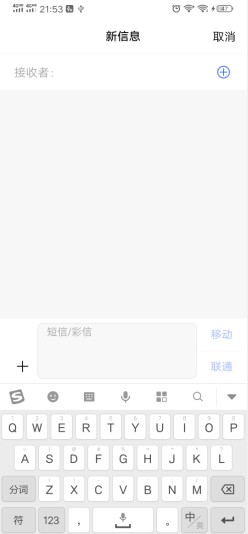
方法二:(推荐)这种能直接传递草稿信息,跳转到短信发送界面。用户直接点击发送即可。PhoneNumberUtils类的isGlobalPhoneNumber(String )静态方法用来校验是否加上区号。
if (PhoneNumberUtils.isGlobalPhoneNumber(phoneNumber)) {
        Intent intent = new Intent(Intent.ACTION_SENDTO, Uri.parse("smsto:" + phoneNumber));
        intent.putExtra("sms_body", message);
        startActivity(intent);
    }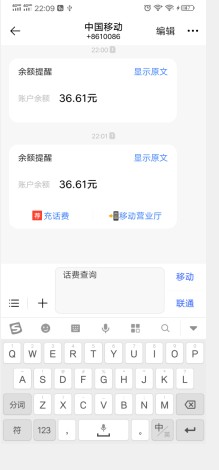
方法三:通过Uri跳转。跳转过去自动填写号码,但是没有内容。
Uri uri = Uri.parse("smsto:" + 10086);
    Intent intentMessage = new Intent(Intent.ACTION_VIEW, uri);
    startActivity(intentMessage);
*3.4、写入短信数据库
目前第三方应用已经无法实现写入短信了,除非设置成默认的短信APP,才能写入短信。可以设置和查询当前APP是否是默认的短信应用,这里不再详述。不推荐,大部分手机已经不再允许第三方应用操作短信这种危险的信息。
Intent intent = new Intent(Telephony.Sms.Intents.ACTION_CHANGE_DEFAULT);
    intent.putExtra(Telephony.Sms.Intents.EXTRA_PACKAGE_NAME, "应用包名");
    startActivity(intent);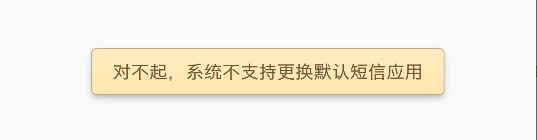
Telephony.Sms类中提供了Telephony.Sms.getDefaultSmsPackage(Context context)方法获取当前默认短信的包名:
/**
     * Used to determine the currently configured default SMS package.
     * @param context context of the requesting application
     * @return package name for the default SMS package or null
     */
    public static String getDefaultSmsPackage(Context context) {
        ComponentName component = SmsApplication.getDefaultSmsApplication(context, false);
        if (component != null) {
            return component.getPackageName();
        }
        return null;
    }
写入短信也不难,同样是借助ContentProvider。
try{
        ContentValues values = new ContentValues();
        // 发送时间
        values.put("date", System.currentTimeMillis());
        // 阅读状态
        values.put("read", 0);
        // 类型:1为收,2为发
        values.put("type", 2);
        // 发送号码
        values.put("address",number);
        // 发送内容
        values.put("body", content);
        // 插入短信库
        getContentResolver().insert(Uri.parse("content://sms/sent"), values);
    }catch (Exception e) {
        Log.d("Exception", e.getMessage());
    }
需要短信写权限:
<uses-permission android:name="android.permission.WRITE_SMS"/>参考博客:


