
创建桌面快捷方式
创建桌面快捷方式,方便用户直达页面。比如微信的联系人快捷方式,点击直接进入聊天界面,省去很多步骤。Android API升级过程中也对创建桌面快捷方式的方式进行了改进。有两种创建桌面快捷方式的途径,详见第二和第三节,开发中要做好兼容,这就是安卓最麻烦的地方。
1、所需权限
创建桌面快捷方式也需要声明权限,不然不能正确在桌面创建快捷方式。
<!-- 添加快捷方式 -->
    <uses-permission android:name="com.android.launcher.permission.INSTALL_SHORTCUT" />

    <!-- 移除快捷方式 -->
    <uses-permission android:name="com.android.launcher.permission.UNINSTALL_SHORTCUT" />
2、Android N之前创建快捷方式(废弃)
Android 7.1(N,API 25)推出了ShortcutManager管理图标触摸菜单和快捷方式,到此阶段,都可以通过Intent广播创建桌面快捷方式。
先初始化Intent,action必须为com.android.launcher.action.INSTALL_SHORTCUT
Intent createShortcutIntent = new Intent("com.android.launcher.action.INSTALL_SHORTCUT");

    // 是否允许重复创建相同的快捷方式,不是根据快捷方式的名字判断重复的
    createShortcutIntent.putExtra("duplicate", false);
    //设置快捷方式名称
    createShortcutIntent.putExtra(Intent.EXTRA_SHORTCUT_NAME, "快捷方式名");
    //图标
    createShortcutIntent.putExtra(Intent.EXTRA_SHORTCUT_ICON_RESOURCE,
                                  Intent.ShortcutIconResource.fromContext(context, R.drawable.icon));
    // 设置桌面快捷方式的启动Intent
    Intent startIntent = new Intent();
    startIntent.setClass(context, 启动的Activity.class);
    createShortcutIntent.putExtra(Intent.EXTRA_SHORTCUT_INTENT, startIntent);

    // 发送广播
context.sendBroadcast(createShortcutIntent);附:与之相关的几个ACTION都定义在Intent类中,不过这种方式以及被废弃
public static final String ACTION_CREATE_SHORTCUT = "android.intent.action.CREATE_SHORTCUT";

    /**
     * 用于定义快捷方式意图的附加项的名称。
     */
    @Deprecated
    public static final String EXTRA_SHORTCUT_INTENT = "android.intent.extra.shortcut.INTENT";
    /**
     * 附加项的名称,用于定义快捷方式的名称。
     */
    @Deprecated
    public static final String EXTRA_SHORTCUT_NAME = "android.intent.extra.shortcut.NAME";
    /**
     * 用于将图标定义为快捷方式的附加项目的名称。
     */
    @Deprecated
    public static final String EXTRA_SHORTCUT_ICON = "android.intent.extra.shortcut.ICON";
    /**
     * 用于将图标定义为快捷方式的ShortcutIconResource的附加名称。
     */
    @Deprecated
    public static final String EXTRA_SHORTCUT_ICON_RESOURCE = "android.intent.extra.shortcut.ICON_RESOURCE";
3、Android O之后创建快捷方式
但Android 8.0(O,API 26)开始只能通过ShortcutManager创建和管理桌面快捷方式。
3.1、ShortcutManager创建快捷方式
获取系统Service的方式获取ShortcutManager对象:
ShortcutManager shortcutManager = (ShortcutManager) getSystemService(Context.SHORTCUT_SERVICE);if (shortcutManager.isRequestPinShortcutSupported()) {
Intent shortcutInfoIntent = new Intent(context, SecondActivity.class);
shortcutInfoIntent.setAction(Intent.ACTION_VIEW);
ShortcutInfo info = new ShortcutInfo.Builder(context, "快捷方式的ID")
.setIcon(Icon.createWithResource(context, R.drawable.icon))
.setShortLabel("快捷方式名")
.setIntent(shortcutInfoIntent)
.build();
//添加快捷方式的确认弹框弹出来时,将被回调。这个因系统而异。
PendingIntent shortcutCallbackIntent = PendingIntent.getBroadcast(context, 0, new Intent(context, MyReceiver.class),
PendingIntent.FLAG_UPDATE_CURRENT);
shortcutManager.requestPinShortcut(info, shortcutCallbackIntent.getIntentSender());
}3.2、创建快捷方式的系统差异
国内各大厂商对系统的深度定制导致安卓的标准API在不同的厂商手机上运行有不同的行为,这很正常。
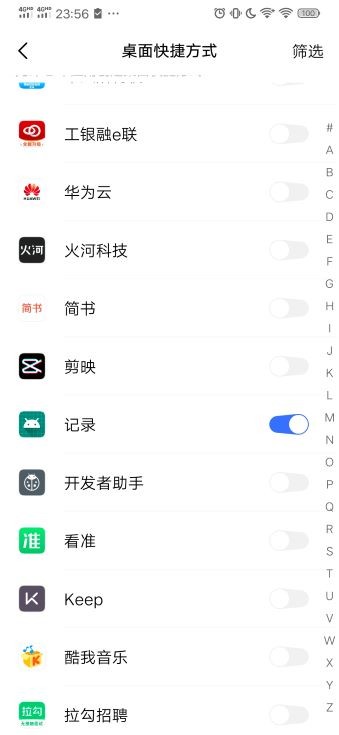
①比如vivo的手机,一般三方应用是没有创建桌面快捷方式的权限(连微信也不能正常创建联系人快捷方式),默认关闭,需要手动打开或者跳转到设置界面提示用户打开。
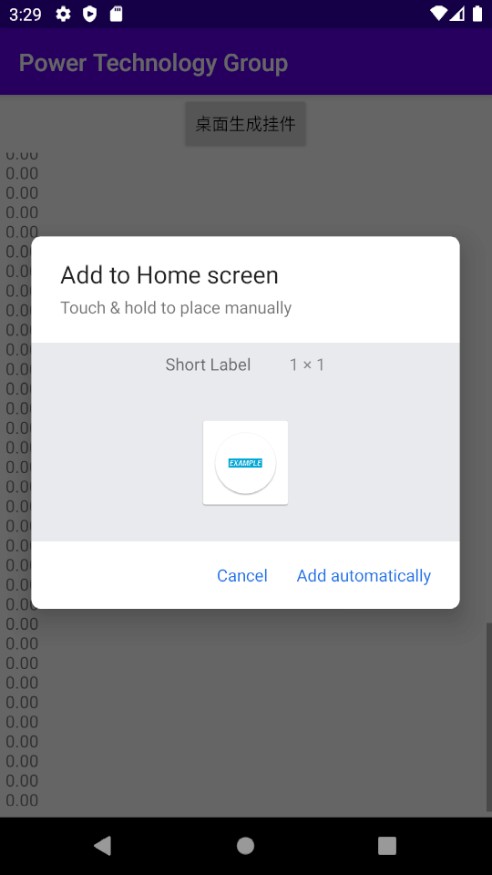
②而且不会有弹框,像标准的Google设备以及OPPO手机用这种方式创建会有弹框提示:
③锤子手机更神奇,点击桌面快捷方式。如果应用已经打开过,在后台,只是把应用调到前台,而不是打开指定的Intent中设置的Activity页面。
4、ShortcutManagerCompat兼容(推荐)
适配不同的系统可以使用,但是比较麻烦,好在官方又又推荐了一个创建桌面快捷方式的AndroidX兼容库的。用ShortcutManagerCompat进行快捷方式的版本适配。
4.1、添加依赖
//ShortcutManagerCompat
    implementation 'androidx.appcompat:appcompat:1.1.0'
4.2、使用兼容包
使用ShortcutManagerCompat实现不同安卓系统版本创建桌面快捷方式的兼容。
if (ShortcutManagerCompat.isRequestPinShortcutSupported(context)) {
        Intent shortcutInfoIntent = new Intent(context, 快捷方式打开的Activity.class);
        //action必须设置,不然报错
        shortcutInfoIntent.setAction(Intent.ACTION_VIEW);
        ShortcutInfoCompat info = new ShortcutInfoCompat.Builder(context, "快捷方式的ID")
                .setIcon(IconCompat.createWithResource(context, R.drawable.icon))
                .setShortLabel("快捷方式名")
                .setIntent(shortcutInfoIntent)
                .build();

        //当添加快捷方式的确认弹框弹出来时,将被回调
        PendingIntent shortcutCallbackIntent = PendingIntent.getBroadcast(context, 0, new Intent(context, MyReceiver.class),
                                                                          PendingIntent.FLAG_UPDATE_CURRENT);
        ShortcutManagerCompat.requestPinShortcut(context, info, shortcutCallbackIntent.getIntentSender());
    }
参考资料:
Android创建桌面快捷方式(兼容Android 8.0)
Android 仿微博,探索使用ShortcutManager添加应用程序的快捷方式


