
路径Path的使用
路径在View开发中是比较重要且基础的一个工具,借助Path可以Path路径">绘制各种线段(drawPath)、可以在指定的路径上绘制文字(drawTextOnPath)、从画布上Canvas裁剪">裁剪指定的路径区域(clipPath、clipOutPath)... ...
1、Path
Path类封装由直线段,二次曲线和三次曲线组成的复合(多个轮廓)几何路径。可以使用canvas.drawPath(path,paint)进行填充或描边绘制(基于Paint的Style),也可以用于剪切或在路径上绘制文本。
1.1、构造Path
路径Path有两个构造方法。
//构造空路径
    Path path = new Path();

    //利用已有的Path构造
    Path another = new Path(path);
2、绘制路径 To
和后面要说的add方法簇不同,To方法簇是将Path移动到指定位置,并且能在移动的路径上绘制线条:直线、弧形、贝塞尔曲线等。
2.1、移动
①moveTo(float x, float y):移动路径起点位置,从当前位置相对原点(0,0)移动到(x,y)
/**
     * Set the beginning of the next contour to the point (x,y).
     *
     * @param x The x-coordinate of the start of a new contour
     * @param y The y-coordinate of the start of a new contour
     */
    public void moveTo(float x, float y) {
        nMoveTo(mNativePath, x, y);
    }
②rMoveTo(float dx, float dy)
/**
     * 设置相对于上一个轮廓的最后一个点的下一个轮廓的起点。
     * 如果没有先前的轮廓,则将其与moveTo()相同。
     * @param dx The amount to add to the x-coordinate of the end of the
     *           previous contour, to specify the start of a new contour
     * @param dy The amount to add to the y-coordinate of the end of the
     *           previous contour, to specify the start of a new contour
     */
    public void rMoveTo(float dx, float dy) {
        nRMoveTo(mNativePath, dx, dy);
    }
2.2、弧形
①arcTo(RectF oval, float startAngle, float sweepAngle)
②arcTo(RectF oval, float startAngle, float sweepAngle,boolean forceMoveTo)
/**
     * Append the specified arc to the path as a new contour. If the start of
     * the path is different from the path's current last point, then an
     * automatic lineTo() is added to connect the current contour to the
     * start of the arc. However, if the path is empty, then we call moveTo()
     * with the first point of the arc.
     *
     * @param oval        椭圆的边界RectF定义了弧的形状和大小
     * @param startAngle  弧开始的起始角度(度)
     * @param sweepAngle  顺时针测量的后掠角(以度为单位),mod 360。
     * @param forceMoveTo 如果为true,则以圆弧起始点作为绘制的起始位置,不会连接先前的绘制终点
     */
    public void arcTo(@NonNull RectF oval, float startAngle, float sweepAngle,boolean forceMoveTo) {
        arcTo(oval.left, oval.top, oval.right, oval.bottom, startAngle, sweepAngle, forceMoveTo);
    }
③arcTo(float left, float top, float right, float bottom, float startAngle,float sweepAngle, boolean forceMoveTo)
2.3、Line
①lineTo(float x, float y)
②rLineTo(float dx, float dy)
/**
     * 与lineTo相同,但坐标相对于该轮廓的最后n个。
     * 如果没有先前的点,则将自动插入moveTo(0,0)。
     *
     * @param dx The amount to add to the x-coordinate of the previous point on
     *           this contour, to specify a line
     * @param dy The amount to add to the y-coordinate of the previous point on
     *           this contour, to specify a line
     */
    public void rLineTo(float dx, float dy) {
        isSimplePath = false;
        nRLineTo(mNativePath, dx, dy);
    }
2.4、二阶贝塞尔曲线
①quadTo(float x1, float y1, float x2, float y2):以(x₁,y₁)为控制点,向终点(x₂,y₂)绘制一条二阶贝塞尔曲线
/**
     * Add a quadratic bezier from the last point, approaching control point
     * (x1,y1), and ending at (x2,y2). If no moveTo() call has been made for
     * this contour, the first point is automatically set to (0,0).
     *
     * @param x1 The x-coordinate of the control point on a quadratic curve
     * @param y1 The y-coordinate of the control point on a quadratic curve
     * @param x2 The x-coordinate of the end point on a quadratic curve
     * @param y2 The y-coordinate of the end point on a quadratic curve
     */
    public void quadTo(float x1, float y1, float x2, float y2) {
        isSimplePath = false;
        nQuadTo(mNativePath, x1, y1, x2, y2);
    }
②rQuadTo(float dx1, float dy1, float dx2, float dy2)
2.5、三阶贝塞尔曲线
①cubicTo(float x1, float y1, float x2, float y2,float x3, float y3):从当前Path位置出发,以(x1,y1)为控制点1,以(x2,y2)为控制点2,向终点(x3,y3)绘制一条三阶贝塞尔曲线
②rCubicTo(float x1, float y1, float x2, float y2,float x3, float y3)
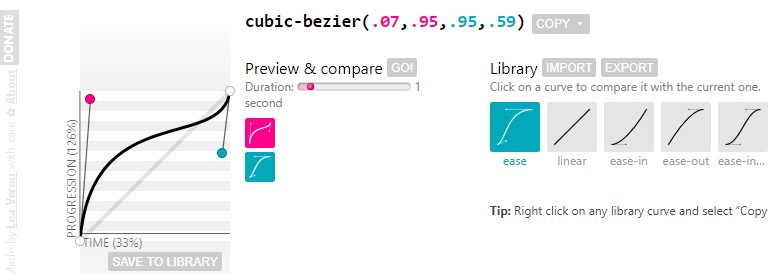
关于贝塞尔曲线以后再深入学习,推荐一个在线构造贝塞尔曲线的网站:cubic-bezier
2.6、‘r’前缀
前面注意到每个绘制Path的方法都有一个带r前缀的同名方法,‘r’的意思是relative。和不带‘r’前缀的方法相比,绘制Path时是以当前Paint位置为坐标原点。而普通不带‘r’前缀的方法则是以Canvas坐标原点为参考。
①rMoveTo(float dx, float dy)
②rLineTo(float dx, float dy)
③rQuadTo(float dx1, float dy1, float dx2, float dy2)
④rCubicTo(float x1, float y1, float x2, float y2,float x3, float y3)
⑤arcTo(RectF oval, float startAngle, float sweepAngle,boolean forceMoveTo):forceMoveTo为true时和前面几个方法意思一样
3、添加路径 add
向Path中添加路径,Android提供了几个API,可以向已有的路径中添加直线、弧线、贝塞尔曲线等路径。
3.1、弧形
①addArc(RectF oval, float startAngle, float sweepAngle)
②addArc(float left, float top, float right, float bottom, float startAngle,float sweepAngle)
3.2、圆形
①addCircle(float x, float y, float radius, @NonNull Direction dir)
其中对于添加的闭合路径,需要指定绘制的方向,顺时针CW还是逆时针CCW绘制路径。
/**
     * 指定方向将闭合形状(例如矩形,椭圆形)添加到路径。
     */
    public enum Direction {
        /** 顺时针 */
        CW  (0),    // must match enum in SkPath.h
        /** 逆时针 */
        CCW (1);    // must match enum in SkPath.h
    }
3.3、椭圆
①addOval(RectF oval,Direction dir)
②addOval(float left, float top, float right, float bottom,Direction dir)
3.4、矩形(圆角矩形)
①addRect(RectF rect,Direction dir)
②addRect(float left, float top, float right, float bottom,Direction dir)
/**
     * 将闭合的矩形轮廓添加到Path

     *
     * @param rect 矩形区域
     * @param dir  线的闭合方向:CW顺时针方向 , CCW逆时针方向
     */
    public void addRect(@NonNull RectF rect, @NonNull Direction dir) {
        addRect(rect.left, rect.top, rect.right, rect.bottom, dir);
    }
③addRoundRect(RectF rect, float rx, float ry,Direction dir)
④addRoundRect(float left, float top, float right, float bottom, float rx, float ry,Direction dir)
/**
     * 添加统一圆角的圆角矩形
     *
     * @param rect 矩形区域
     * @param rx   椭圆圆角的横轴半径
     * @param ry   圆圆角的纵轴半径
     * @param dir  线的闭合方向:CW顺时针方向 , CCW逆时针方向
     */
    public void addRoundRect(@NonNull RectF rect, float rx, float ry, @NonNull Direction dir) {
        addRoundRect(rect.left, rect.top, rect.right, rect.bottom, rx, ry, dir);
    }
⑤addRoundRect(RectF rect,float[] radii,Direction dir)
⑥addRoundRect(float left, float top, float right, float bottom,float[] radii,Direction dir)
/**
     * 将闭合的圆角矩形轮廓添加到路径。
     * 每个角接收两个半径值[X,Y]。
     * 角按顺序排列为左上,右上,右下,左下
     *
     * @param rect  矩形区域
     * @param radii 矩形四个椭圆圆角的横轴半径和纵轴半径的数组,一共8个数值
     * @param dir   线的闭合方向:CW顺时针方向 , CCW逆时针方向
     */
    public void addRoundRect(@NonNull RectF rect, @NonNull float[] radii, @NonNull Direction dir) {
        if (rect == null) {
            throw new NullPointerException("need rect parameter");
        }
        addRoundRect(rect.left, rect.top, rect.right, rect.bottom, radii, dir);
    }
3.5、Path
①addPath(Path src):将src副本添加到当前Path
②addPath(Path src, float dx, float dy):添加一组平移(+dx,+dy)距离后的Path
③addPath(Path src, Matrix matrix):添加一组经过矩阵变换后的Path
4、填充模式:FillType
路径可以是闭合的,那么对于闭合的区域可以设置填充模式。并且还能获取、判断、切换Path的填充模式。
4.1、setFillType(FillType ft)
设置Path的填充类型。定义闭合区域“内部”的填充计算方式。关于FillType枚举类型的定义如下:
/**
     * 路径的填充方式Enum类型
     */
    public enum FillType {
        /**
         * 指定“内部”是通过有符号的边缘交叉点的非零总和来计算的。
         */
        WINDING         (0),
        /**
         * 指定“内部”是通过奇数个边缘交叉来计算的。
         */
        EVEN_ODD        (1),
        /**
         * 与WINDING相同,但绘制在路径的外部,而不是内部。
         */
        INVERSE_WINDING (2),
        /**
         * 与EVEN_ODD相同,但绘制路径的外部而不是内部。
         */
        INVERSE_EVEN_ODD(3);
    }
4.2、getFillType()
返回路径的填充类型。 默认值为WINDING。
4.3、isInverseFillType()
判断当前Path填充模式是否是反向模式INVERSE_WINDING或者INVERSE_EVEN_ODD。
4.4、toggleInverseFillType()
切换Path的填充类型,即反转Path的填充类型。
5、路径裁剪
对两个Path进行逻辑运算或者用当前Path和另一个Path进行运行,通过Op指定运算逻辑。
5.1、op裁剪
①op(Path path,Op op):用当前Path和传入的参数path进行运算
/**
     * 将此路径设置为将Op应用于此路径和指定路径的结果,
     * 结果路径将由不重叠的轮廓构成,并在可能的情况下减小曲线顺序,
     * 以便将三次方转换为二次方,并可能将二次方转换为二次方 成行。
     *
     * @param path 第二个操作数(for difference, the subtrahend)
     * @return 如果操作成功,则为true,否则为false,并且此路径保持不变。
     */
    public boolean op(@NonNull Path path, @NonNull Op op) {
        return op(this, path, op);//调用第二个方法
    }
②op(Path path1,Path path2,Op op):将此路径设置为将Op应用于两个指定路径的返回结果
/**
     * Set this path to the result of applying the Op to the two specified paths.
     * The resulting path will be constructed from non-overlapping contours.
     * The curve order is reduced where possible so that cubics may be turned
     * into quadratics, and quadratics maybe turned into lines.
     *
     * @param path1 第一个操作数 (for difference, the minuend)
     * @param path2 第二个操作数 (for difference, the subtrahend)
     *
     * @return 如果操作成功,则为true,否则为false,并且此路径保持不变。
     *
     * @see Op 组合两个路径时执行的逻辑操作。
     */
    public boolean op(@NonNull Path path1, @NonNull Path path2, @NonNull Op op) {
        if (nOp(path1.mNativePath, path2.mNativePath, op.ordinal(), this.mNativePath)) {
            isSimplePath = false;
            rects = null;
            return true;
        }
        return false;
    }
5.2、Op枚举
Op运算逻辑,有五种运算:DIFFERENCE(差集),REVERSE_DIFFERENCE(差集),INTERSECT(交集),UNION(并集),XOR(异或)
/**
     * The logical operations that can be performed when combining two paths.
     *
     * @see #op(Path, android.graphics.Path.Op)
     * @see #op(Path, Path, android.graphics.Path.Op)
     */
    public enum Op {
        /**
         * 从第一条路径减去第二条路径。
         */
        DIFFERENCE,
        /**
         * 相交两条路径。
         */
        INTERSECT,
        /**
         * 合并(包含或)这两个路径。
         */
        UNION,
        /**
         * 异或-两条路径。
         */
        XOR,
        /**
         * 从第二条路径中减去第一条路径。
         */
        REVERSE_DIFFERENCE
    }
6、路径矩阵变换
①transform(Matrix matrix):对当前路径中的每一个点执行Matrix矩阵变换。
/**
     * 通过矩阵变换此路径中的点。
     *
     * @param matrix 应用于Path的矩阵
     */
    public void transform(@NonNull Matrix matrix) {
        isSimplePath = false;
        nTransform(mNativePath, matrix.native_instance);
    }
②transform(Matrix matrix,Path dst):将矩阵运算的结果写入到dst路径中。
/**
     * Transform the points in this path by matrix, and write the answer
     * into dst. If dst is null, then the the original path is modified.
     *
     * @param matrix 应用于路径的矩阵
     * @param dst    转换后的路径写参数dst中。 如果dst为null,则修改原始Path
     */
    public void transform(@NonNull Matrix matrix, @Nullable Path dst) {
        long dstNative = 0;
        if (dst != null) {
            dst.isSimplePath = false;
            dstNative = dst.mNativePath;
        }
        nTransform(mNativePath, matrix.native_instance, dstNative);
    }
7、其它方法
①close():封闭当前Path,连接起点和终点
②reset():清空Path中的所有路径,但是保留填充模式
③rewind():倒回路径:清除路径中的所有直线和曲线,但保留内部数据结构以加快重用速度。
④isEmpty():判断路径是否为空
⑤isConvex():判断当前Path围成的图形是否凸多边形
⑥isRect(RectF rect):判断当前Path是否为矩形,如是,则将当前Path存储到新建的rect中
相关资料:
Docs > Reference > Path">Android Developers > Docs > Reference > Path


