
布局动画:LayoutTransition
1、LayoutTransition介绍
Layouttransition位于android.animation包中,Google从API 11时引入这个Layouttransition工具类,专门用来处理ViewGroup布局发生变化时对子控件进行动画处理。
比如一组数据在ViewGroup中显示,这个时候如果添加或者删除其中的数据,同时伴随着每个item的动画,这样能够提高用户的体验,但是开发者实现起来有一点复杂(也可以实现)。
使用Layouttransition类就可以方便的对ViewGroup中的所有View item实现统一的动效,看了源码就会一目了然,是在内部对常见的5个Type动画情况进行封装:内部5个Type、5个Animator、5个ObjectAnimator分别处理不同的ViewGroup item动画:
public class LayoutTransition {
        ...
        /**
         * Private bit fields used to set the collection of enabled transition types for
         * mTransitionTypes.
         */
        private static final int FLAG_APPEARING             = 0x01;
        private static final int FLAG_DISAPPEARING          = 0x02;
        private static final int FLAG_CHANGE_APPEARING      = 0x04;
        private static final int FLAG_CHANGE_DISAPPEARING   = 0x08;
        private static final int FLAG_CHANGING              = 0x10;

        /**
         * These variables hold the animations that are currently used to run the transition effects.
         * These animations are set to defaults, but can be changed to custom animations by
         * calls to setAnimator().
         */
        private Animator mDisappearingAnim = null;
        private Animator mAppearingAnim = null;
        private Animator mChangingAppearingAnim = null;
        private Animator mChangingDisappearingAnim = null;
        private Animator mChangingAnim = null;

        /**
         * These are the default animations, defined in the constructor, that will be used
         * unless the user specifies custom animations.
         */
        private static ObjectAnimator defaultChange;
        private static ObjectAnimator defaultChangeIn;
        private static ObjectAnimator defaultChangeOut;
        private static ObjectAnimator defaultFadeIn;
        private static ObjectAnimator defaultFadeOut;

        /**
         * 所有动画使用的默认持续时间300ms.
         */
        private static long DEFAULT_DURATION = 300;
        ...
    }
2、LayoutTransition API
Layouttransition内部管理5个ObjectAnimator分别处理5种Type的动画,所以大部分方法都需要传入Type,内部用switch语句到具体的ObjectAnimator对象进行操作。
2.1、常量
将LayoutTransition应用于ViewGroup的哪些场景,有如下5种常量分别对应5种情况:
/**
     * 由于ViewGroup添加新的元素,其它已有的元素需要应用动画
     */
    public static final int CHANGE_APPEARING = 0;

    /**
     * ViewGroup中移除元素,其它元素需要发生变化应用动画
     */
    public static final int CHANGE_DISAPPEARING = 1;

    /**
     * 元素在容器中出现时所定义的动画
     */
    public static final int APPEARING = 2;

    /**
     * 元素在容器中消失所定义的动画
     */
    public static final int DISAPPEARING = 3;

    /**
     * 由于布局发生变化时所应用的动画(不是由元素的添加或删除所引起)
     * 默认关闭,调用enableTransitionType(int)开启
     */
    public static final int CHANGING = 4;
2.2、方法
①添加、删除Child View方法
addChild(ViewGroup parent, View child, boolean changesLayout)
    showChild(ViewGroup parent, View child, int oldVisibility)
    removeChild(ViewGroup parent, View child, boolean changesLayout)
    hideChild(ViewGroup parent, View child, int newVisibility)
②添加/移除LayoutTransition监听器TransitionListener
addTransitionListener(TransitionListener listener)
    removeTransitionListener(TransitionListener listener)
③启用/判断这5种ViewGroup动画有效
disableTransitionType(int transitionType)
    isTransitionTypeEnabled(int transitionType)
④setter和getter方法
//此标志控制CHANGE_APPEARING动画或CHANGE_DISAPPEARING动画是否也会导致默认的更改动画也在父层次结构上运行
    setAnimateParentHierarchy(boolean animateParentHierarchy)
    setAnimator(int transitionType, Animator animator)
    setDuration(int transitionType, long duration)
    setDuration(long duration)
    setInterpolator(int transitionType, TimeInterpolator interpolator)
    setStagger(int transitionType, long duration)
    //针对每个Type设置每个子item的动画间隔
    setStartDelay(int transitionType, long delay)

    getAnimator(int transitionType)
    getDuration(int transitionType)
    getInterpolator(int transitionType)
    //获取Type动画子item的动画时间间隔
    getStagger(int transitionType)
    getStartDelay(int transitionType)
3、默认LayoutTransition动画
LayoutTransition默认提供了一种ViewGroup动画实现。
3.1、XML属性:android:animateLayoutChanges
只需要在布局中的ViewGroup节点下加上android:animateLayoutChanges="true"即可实现ViewGroup组件添加删除View显示默认的动画效果。
<GridLayout
        android:id="@+id/list"
        android:layout_width="match_parent"
        android:layout_height="wrap_content"
        android:animateLayoutChanges="false"
        android:background="@android:color/white"
        android:columnCount="3" />
3.2、代码添加动画
创建LayoutTransition实例,并调用ViewGroup的setLayoutTransition(LayoutTransition transition)方法设置给ViewGroup。
LayoutTransition layoutTransition = new LayoutTransition();
mViewGroup.setLayoutTransition(layoutTransition);默认情况下ViewGroup中的mTransition为null,所以添加和删除时是不会有任何动画效果的。setLayoutTransition(LayoutTransition transition)方法定义如下:
/ **
    * 为此ViewGroup设置LayoutTransition对象。
    * 如果LayoutTransition对象不为null,则将根据该LayoutTransition对象中定义的动画
    * 对由于将孩子添加到ViewGroup或从ViewGroup中删除而引起的布局更改进行动画处理。
    * 默认情况下,过渡对象为null(因此不会对布局更改进行动画处理)。
    * 替换非null过渡将取消先前的过渡(如果当前正在运行)。
    *
    * @param transition LayoutTransition对象将对布局中的更改进行动画处理。值为null表示不会在布局更改上进行任何过渡。
    * @attr 对应ViewGroup的XML布局属性animateLayoutChanges
    * /
    public void setLayoutTransition(LayoutTransition transition) {
        if (mTransition != null) {
            LayoutTransition previousTransition = mTransition;
            previousTransition.cancel();
            previousTransition.removeTransitionListener(mLayoutTransitionListener);
        }
        mTransition = transition;
        if (mTransition != null) {
            mTransition.addTransitionListener(mLayoutTransitionListener);
        }
    }
3.3、示例
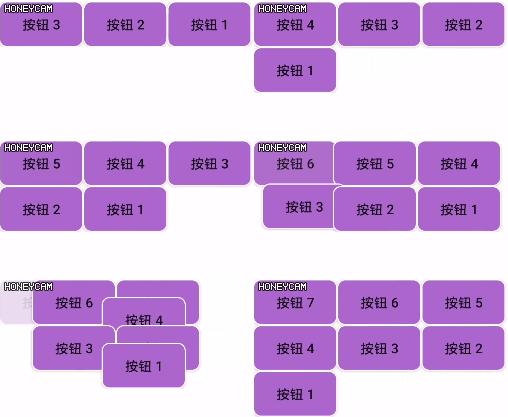
演示代码如下,给ViewGroup添加子View:
mAddBtn.setOnClickListener((v) -> {
        Button button = new Button(this/*, null, R.style.ButtonStyle*/);
        button.setBackgroundResource(R.drawable.button_bg);
        button.setText("按钮 " + (count++));
        mViewGroup.addView(button, 0);
    });
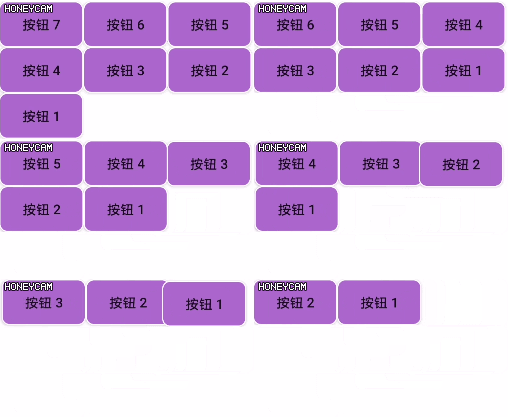
从ViewGroup中删除子View,注意还要将count计数器同时减一
mRemoveBtn.setOnClickListener((v) -> {
        if (mViewGroup.getChildCount() > 0) {
            mViewGroup.removeViewAt(0);
            --count;
        }
    });
4、自定义LayoutTransition动画
上面是默认的动画效果,当然开发者也可以自己实现具体的动效让应用与众不同。主要借助PropertyValuesHolder构造ObjectAnimator。
4.1、自定义动画说明
LayoutTransition坑点很多,和ObjectAnimator直接用又有所不一样,看源码设置动画的setAnimator(int transitionType, Animator animator)方法注释说明:
/**
     * Sets the animation used during one of the transition types that may run. Any
     * Animator object can be used, but to be most useful in the context of layout
     * transitions, the animation should either be a ObjectAnimator or a AnimatorSet
     * of animations including PropertyAnimators. Also, these ObjectAnimator objects
     * should be able to get and set values on their target objects automatically. For
     * example, a ObjectAnimator that animates the property "left" is able to set and get the
     * <code>left</code> property from the View objects being animated by the layout
     * transition. The transition works by setting target objects and properties
     * dynamically, according to the pre- and post-layoout values of those objects, so
     * having animations that can handle those properties appropriately will work best
     * for custom animation. The dynamic setting of values is only the case for the
     * CHANGE animations; the APPEARING and DISAPPEARING animations are simply run with
     * the values they have.
     *
     * <p>It is also worth noting that any and all animations (and their underlying
     * PropertyValuesHolder objects) will have their start and end values set according
     * to the pre- and post-layout values. So, for example, a custom animation on "alpha"
     * as the CHANGE_APPEARING animation will inherit the real value of alpha on the target
     * object (presumably 1) as its starting and ending value when the animation begins.
     * Animations which need to use values at the beginning and end that may not match the
     * values queried when the transition begins may need to use a different mechanism
     * than a standard ObjectAnimator object.</p>
     *
     * @param transitionType One of {@link #CHANGE_APPEARING}, {@link #CHANGE_DISAPPEARING},
     * {@link #CHANGING}, {@link #APPEARING}, or {@link #DISAPPEARING}, which determines the
     * animation whose animator is being set.
     * @param animator The animation being assigned. A value of <code>null</code> means that no
     * animation will be run for the specified transitionType.
     */
    public void setAnimator(int transitionType, Animator animator) {
        switch (transitionType) {
            case CHANGE_APPEARING:
                mChangingAppearingAnim = animator;
                break;
            case CHANGE_DISAPPEARING:
                mChangingDisappearingAnim = animator;
                break;
            case CHANGING:
                mChangingAnim = animator;
                break;
            case APPEARING:
                mAppearingAnim = animator;
                break;
            case DISAPPEARING:
                mDisappearingAnim = animator;
                break;
        }
}总结为一下几点(参考《Android自定义控件开发入门与实战》):
①LayoutTransition.CHANGE_APPEARING和LayoutTransition.CHANGE_DISAPPEARING必须使用PropertyValuesHolder构造动画才会有效果,其他任何方式构造动画都不会有效果。
②在使用PropertyValuesHolder时,”left”、”top”基础属性就算不需要变化也必须要写
PropertyValuesHolder leftValuesHolder = PropertyValuesHolder.ofInt("left", 0, 0);
PropertyValuesHolder topValuesHolder = PropertyValuesHolder.ofInt("top", 0, 0);③ofInt,ofFloat中的参数值,第一个值和最后一个值必须相同,不然此属性所对应的的动画将被放弃,在此属性值上将不会有效果。
//首尾值一样,中间插入变化值
PropertyValuesHolder rotationDisAppearing = PropertyValuesHolder.ofFloat("rotationY", 90f, 0f, 90f);④使用的ofInt,ofFloat中,如果所有参数值都相同,也将不会有动画效果。所以至少需要三个值,相同的首尾两个值,中间一个变化值。
//无效的动画设置,首尾值一样。
    PropertyValuesHolder leftValuesHolder = PropertyValuesHolder.ofInt("left", 0, 0);
4.2、构造ObjectAnimator
演示如何设置一个item移除DISAPPEARING时的动画。其它几种类型都是举一反三的。
①如果动画复杂,需要构造多个动画。先构造若干PropertyValuesHolder对象
PropertyValuesHolder rotationDisAppearing = PropertyValuesHolder.ofFloat("rotationY", 0f, 90f);
    PropertyValuesHolder alphaDisappearing = PropertyValuesHolder.ofFloat("alpha", 1f, 0f);
    PropertyValuesHolder colorDisappearing = PropertyValuesHolder.ofObject("BackgroundColor",
                                                                            new ArgbEvaluator(),
                                                                            Color.parseColor("#84bf96"),
Color.parseColor("#ed1941"));②使用PropertyValuesHolder对象构造ObjectAnimator实例,详见《属性动画:PropertyValuesHolder》
ObjectAnimator disappearingAnimator = ObjectAnimator.ofPropertyValuesHolder(mViewGroup,
                                  leftValuesHolder, topValuesHolder, colorDisappearing, rotationDisAppearing, alphaDisappearing);
③构造LayoutTransition对象
LayoutTransition layoutTransition = new LayoutTransition();④ObjectAnimator动画指定设置给ayoutTransition对象指定的Type变换类型,这里指定DISAPPEARING时进行动画。
layoutTransition.setAnimator(LayoutTransition.DISAPPEARING, disappearingAnimator);⑤还可以对LayoutTransition进行一些设置
layoutTransition.setDuration(1000);
    layoutTransition.setDuration(LayoutTransition.DISAPPEARING,750);
    layoutTransition.setInterpolator(LayoutTransition.DISAPPEARING, new AccelerateInterpolator());
⑥最后将构造好的LayoutTransition设置给ViewGroup
mViewGroup.setLayoutTransition(layoutTransition);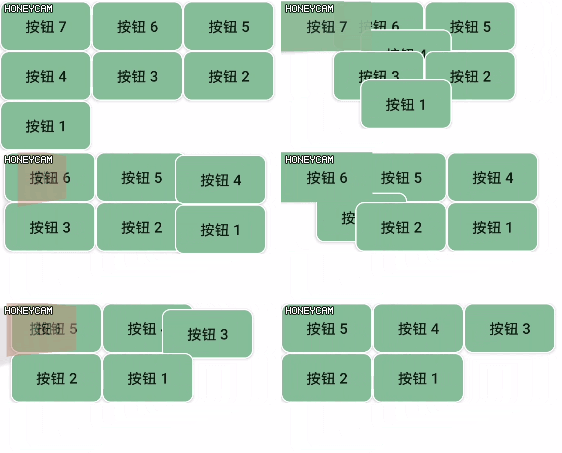
相关资料:
Docs > Reference > LayoutTransition">Android Developers > Docs > Reference > LayoutTransition
Sample project for Android Animations
LayoutAnimation和LayoutTransition


