
Bitmap位图介绍
Android中的Bitmap和Java中的Bitmap可不一样,它专门用来存储图像。给ImageView显示,或者用来存储Canvas画布绘制的图像。
1、了解Bitmap
关于Bitmap有一些知识点需要先了解。
1.1、Bitmap用途
Bitmap最常用的两种用途,前面已经说到:
①设置给ImageView显示
imageView.setImageBitmap(bitmap);②用来保存Canvas画布上绘制的图案
Canvas canvas = new Canvas(bitmap);1.2、Bitmap.Config
不进行合理的压缩存储设置,Bitmap加载到内存很容易引起OOM。就用到Bitmap.Config值设置Bitmap在内存中存储的形式,参考Bitmap加载选项:BitmapFactory.Options一文第2.4节。源码定义的共有如下几种:
public enum Config {
        // these native values must match up with the enum in SkBitmap.h

        /**
         * ALPHA通道占用8位即1个字节
         */
        ALPHA_8     (1),

        /**
         * R通道占用5位,G通道占用6位,B通道占用5位,共16位即2个字节
         */
        RGB_565     (3),

        /**
         * A,R,G,B四个通道各占用4位,共16位即2个字节
         */
        @Deprecated
        ARGB_4444   (4),

        /**
         * A,R,G,B四个通道各占用8位,共32位即4个字节
         */
        ARGB_8888   (5),

        /**
         * 每个像素占用8个字节;这个属性适合用于广色域宽屏和HDR,内存占用最高!
         */
        RGBA_F16    (6),

        /**
         * 特殊配置,当位图仅存储在图形内存中时,此配置中的位图始终是不可变的。
         * 当位图的唯一操作是将其绘制在屏幕上时,这是最佳选择。
         */
        HARDWARE    (7);
}实际中常用的是ARGB_8888,存储带Alpha通道透明度的Bitmap,用来加载.png图片时透明背景不会变黑。ARGB_4444已经被淘汰。
2、创建Bitmap
无法通过Bitmap构造函数直接创建Bitmap,因为Bitmap的构造方法是默认包访问权限,应用层无法调用。创建Bitmap可以使用Bitmap类提供的静态方法创建,也可以使用BitmapFactory中的静态方法创建,关于BitmapFactory参考BitmapFactory详解。
/**
     * Private constructor that must receive an already allocated native bitmap
     * int (pointer).
     */
    // JNI now calls the version below this one. This is preserved due to UnsupportedAppUsage.
    @UnsupportedAppUsage(maxTargetSdk = 28)
    Bitmap(long nativeBitmap, int width, int height, int density,
            boolean requestPremultiplied, byte[] ninePatchChunk,
            NinePatch.InsetStruct ninePatchInsets) {
        this(nativeBitmap, width, height, density, requestPremultiplied, ninePatchChunk,
                ninePatchInsets, true);
    }
    // called from JNI and Bitmap_Delegate.
    Bitmap(long nativeBitmap, int width, int height, int density,
            boolean requestPremultiplied, byte[] ninePatchChunk,
            NinePatch.InsetStruct ninePatchInsets, boolean fromMalloc) {
            ...
    }
2.1、create系列方法
①createBitmap(Bitmap src)
②createBitmap(Bitmap source, int x, int y, int width, int height)
③createBitmap(Bitmap source, int x, int y, int width, int height,Matrix m, boolean filter)
④createBitmap(int width, int height,Config config):像素可更改
⑤createBitmap(DisplayMetrics display, int width,int height,Config config):像素可变
⑥createBitmap(int width, int height,Config config, boolean hasAlpha)
⑦createBitmap(int width, int height,Config config,boolean hasAlpha,ColorSpace colorSpace)
⑧createBitmap(DisplayMetrics display, int width, int height,Config config, boolean hasAlpha)
⑨createBitmap(DisplayMetrics display, int width, int height,Config config, boolean hasAlpha,ColorSpace colorSpace)
⑩createBitmap(int[] colors, int offset, int stride,int width, int height,Config config):通过色彩空间创建,耗时,需要指定每一个像素点的颜色值,colors颜色数组大小长度为像素点个数。
⑪createBitmap(int[] colors,int width, int height, Config config)
⑫createBitmap(DisplayMetrics display,int[] colors, int offset, int stride,int width, int height,Config config)
⑬createBitmap(DisplayMetrics display,int colors[], int width, int height,Config config)
⑭createBitmap(Picture source)
⑮createBitmap(Picture source, int width, int height,Config config)
⑯createScaledBitmap(Bitmap src, int dstWidth, int dstHeight,boolean filter):从原Bitmap创建放缩的Bitmap。像素可变
2.2、copy复制Bitmap
①copy(Config config, boolean isMutable):从已有的Bitmap复制一个,isMutable可以设置是否可修改。
/**
     * @param config    生成的Bitmap所需的配置
     * @param isMutable 如果Bitmap可变(即可以修改其像素),则设置为true
     * @return Bitmap   如果无法复制,则为null
     * @throws IllegalArgumentException 如果Config为HARDWARE并且isMutable为true抛出异常
     */
    public Bitmap copy(Config config, boolean isMutable)
3、Bitmap占用内存多少?
如何计算Bitmap占用了多少内存呢?Bitmap中有两种方法获取占用的内存大小,还可以自行计算。
3.1、getByteCount()
在API 12中加入了getByteCount()方法,表示存储Bitmap所需的最小内存。
/**
     * 返回可用于存储该位图像素的最小字节数。
     *
     * 当API为19及以上时,该方法的结果不能再用于确定位图的内存使用情况。
     * 应使用getAllocationByteCount()
     */
    public final int getByteCount() {
        if (mRecycled) {
            Log.w(TAG, "Called getByteCount() on a recycle()'d bitmap! This is undefined behavior!");
            return 0;
        }
        // int result permits bitmaps up to 46,340 x 46,340
        return getRowBytes() * getHeight();
    }
3.2、getAllocationByteCount()
在API 19时新增getAllocationByteCount()方法,表示在内存中为Bitmap分配的内存大小。
/**
     * Returns the size of the allocated memory used to store this bitmap's pixels.
     *
     * <p>This can be larger than the result of {@link #getByteCount()} if a bitmap is reused to
     * decode other bitmaps of smaller size, or by manual reconfiguration. See {@link
     * #reconfigure(int, int, Config)}, {@link #setWidth(int)}, {@link #setHeight(int)}, {@link
     * #setConfig(Bitmap.Config)}, and {@link BitmapFactory.Options#inBitmap
     * BitmapFactory.Options.inBitmap}. If a bitmap is not modified in this way, this value will be
     * the same as that returned by {@link #getByteCount()}.</p>
     *
     * 这个值在位图的生命周期内不会改变.</p>
     *
     * @see #reconfigure(int, int, Config)
     */
    public final int getAllocationByteCount() {
        if (mRecycled) {
            Log.w(TAG, "Called getAllocationByteCount() on a recycle()'d bitmap! This is undefined behavior!");
            return 0;
        }
        return nativeGetAllocationByteCount(mNativePtr);
    }
3.3、两个方法的区别
getByteCount()和getAllocationByteCount()有什么区别吗?
①不复用Bitmap时,这两个方法获取的大小一样。
②复用Bitmap时,getByteCount()表示解码Bitmap占用的内存大小,而getAllocationByteCount()表示复用后Bitmap的真实内存大小。
3.4、像素点*存储格式
结合1.2节中的Bitmap.Config看看Bitmap的存储格式是什么?不同的存储格式每个像素点占用的内存大小不同:
Bitmap.Config.ALPHA_8 :1B
Bitmap.Config.RGB_565 :2B
Bitmap.Config.ARGB_4444 :2B
Bitmap.Config.ARGB_8888 :4B
Bitmap.Config.RGBA_F16 :8B
像素点个数乘每个像素点大小即可计算出真实的内存大小。
int pixelCount = bitmap.getWidth() * bitmap.getHeight()
    int memory = pixelCount * ?;
3.5、通用方法
结合上面的几种方式:getAllocationByteCount()、getByteCount()或每行字节数*行数计算,可以写一个通用的方法计算Bitmap大小:
public static int getBitmapSize(Bitmap bitmap) {
        int size = 0;
        if (null == bitmap || bitmap.isRecycled()) {
            return size;
        }
        if (Build.VERSION.SDK_INT > Build.VERSION_CODES.KITKAT) {
            return bitmap.getAllocationByteCount();
        }
        if (Build.VERSION.SDK_INT >= Build.VERSION_CODES.HONEYCOMB_MR1) {
            return bitmap.getByteCount();
        }
        return bitmap.getRowBytes() * bitmap.getHeight();
    }
4、Bitmap压缩
压缩Bitmap减少加载Bitmap时的内存占用。使用BitmapFactory.Options对Bitmap进行采样加载减少Bitmap占用的内存空间,详见Bitmap加载选项:BitmapFactory.Options。另外Bitmap还提供了一种压缩方法compress(CompressFormat format, int quality, OutputStream stream),将压缩过的Bitmap写入到输出流中。
/**
     * Write a compressed version of the bitmap to the specified outputstream.
     * If this returns true, the bitmap can be reconstructed by passing a
     * corresponding inputstream to BitmapFactory.decodeStream(). Note: not
     * all Formats support all bitmap configs directly, so it is possible that
     * the returned bitmap from BitmapFactory could be in a different bitdepth,
     * and/or may have lost per-pixel alpha (e.g. JPEG only supports opaque
     * pixels).
     *
     * @param format   压缩图像的格式
     * @param quality  0-100。 0表示小尺寸压缩,100表示最大质量压缩。
     *                 某些格式(如无损PNG)将忽略质量设置
     * @param stream   写入压缩数据的输出流。
     * @return true    如果成功压缩到指定的流,返回true。
     */
    @WorkerThread
    public boolean compress(CompressFormat format, int quality, OutputStream stream)
4.1、Bitmap.CompressFormat
Bitmap压缩格式有三种:JPEG、PNG、WEBP。
/**
     * Specifies the known formats a bitmap can be compressed into
     */
    public enum CompressFormat {
        //有损压缩算法
        JPEG    (0),

        //支持透明度的无损压缩算法,压缩后和原图一样。
        PNG     (1),

        //从API 17开始是无损压缩算法,耗时较长,文件较小
        WEBP    (2);
    }
4.2、ByteArrayOutputStream
创建ByteArrayOutputStream输出流,调用Bitmap的compress()压缩方法,将Bitmap按照指定格式,采用率
ByteArrayOutputStream bos = new ByteArrayOutputStream();
    bitmap.compress(Bitmap.CompressFormat.JPEG, 1, bos);
获取输出流之后,再借助BitmapFactory从中解析出压缩后的Bitmap,关于BitmapFactory详见:
byte[] bytes = bos.toByteArray();
    Bitmap bmp = BitmapFactory.decodeByteArray(bytes, 0, bytes.length);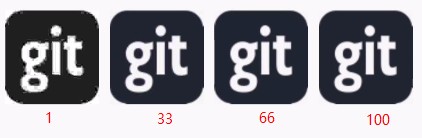
5、保存Bitmap
有时需要对加载的图片进行缓存,或者处理完的Bitmap需要缓存。将Bitmap保存到外存储上该如何操作?
①创建要保存文件的对象,保存的路径,及文件名。关于Android中的目录参考Android中的各种目录。
File file = new File(path);②借助上一节提到的compress压缩方法,将Bitmap传入图像流中。进而通过FileOutputStream接收图像流保存Bitmap文件。
try {
        FileOutputStream fileOutputStream = new FileOutputStream(file);
        bitmap.compress(Bitmap.CompressFormat.PNG, 100, fileOutputStream);
        fileOutputStream.flush();
        fileOutputStream.close();
    } catch (Exception e) {
        Log.d(TAG, e.toString());
    }
6、Bitmap其它常用方法介绍
Bitmap类还有很多其它方法,更详细的参考官方文档( Docs > Bitmap">Android Developers > Docs > Bitmap)或者阅读源码(Bitmap)。
①recycle():回收Bitmap占用的内存。API 11开始数据与Bitmap都在Dalvik虚拟机堆中,无需手动释放。API 10及以下如果不手动释放底层持有的数据会造成内存泄漏。注意可能会引起ImageView异常,详见Canvas: trying to use a recycled bitmap android.graphics
②boolean isRecycled():如果Bitmap已回收,则返回true
③getByteCount():获取Bitmap分配的内存,返回可用于存储此位图像素的最小字节数,API有效范围:12~18。
④getAllocationByteCount():获取Bitmap分配的内存,API有效范围 ≥19。
⑤getRowBytes():返回Bitmap像素中一行的字节数
⑥getHeight():返回Bitmap的高度
⑦getWidth():返回Bitmap的宽度
⑧setPixel(int x, int y, int color):设置指定位置(x,y)的颜色值。
⑨int getPixel(int x, int y):返回指定位置(x,y)位置的像素颜色Int值。
相关资料:
Docs > Bitmap">Android Developers > Docs > Bitmap
Docs > Bitmap.Config">Android Developers > Docs > Bitmap.Config
Docs > BitmapFactory">Android Developers > Docs > BitmapFactory
Android Bitmap详细总结之Bitmap.Config色彩模式


