
ViewModel视图与数据的桥梁
学习Jetpack库第二步,ViewMode是必经之路。它是Google提供的类,专门用来存放数据。Android开发中通常会将业务逻辑和UI界面 拆分,不然的话会导致页面代码臃肿复杂。
1、ViewModel
听到ViewModel就想到MVVM,ViewModel就是介于View和Model之间的对象。将数据从View中脱离出来。
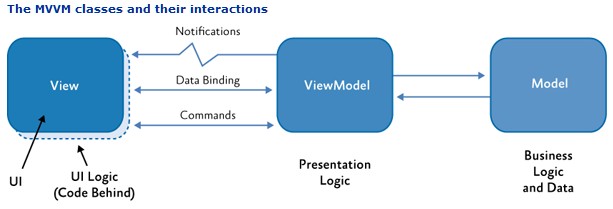
1.1、ViewModel介绍
ViewModel是抽象类,但是并没有抽象方法需要开发者去实现。
public abstract class ViewModel {
        // Can't use ConcurrentHashMap, because it can lose values on old apis (see b/37042460)
        @Nullable
        private final Map<String, Object> mBagOfTags = new HashMap<>();
        private volatile boolean mCleared = false;
        /**
         * This method will be called when this ViewModel is no longer used and will be destroyed.
         * <p>
         * It is useful when ViewModel observes some data and you need to clear this subscription to
         * prevent a leak of this ViewModel.
         */
        protected void onCleared() {
        }
        @MainThread
        final void clear() {
            mCleared = true;
            ...
            onCleared();
        }
        ...
}其中有一个onCleared()空方法,当Activity销毁对应的ViewModel不再使用时,该方法会被回调。开发者在这里释放回收自定义ViewModel中的资源,以免造成内存泄漏,或者对数据进行持久化的保存处理。
1.2、AndroidViewModel
因为ViewModel的生命周期远比Activity的长,如果ViewModel中持有了任何Activity、Context即有可能造成内存泄漏,所以不要将Activity传递给ViewModel持有!
如果要使用Context也最好使用Application全局Context,Google在ViewModel中又提供了另一个类AndroidViewModel,继承自ViewModel,只不过持有了全局Application你作为Context。获取全局Context还有一个大家熟知的方法:如何获取全局Context?
public class AndroidViewModel extends ViewModel {

        private Application mApplication;
        public AndroidViewModel(Application application) {
            mApplication = application;
        }

        public <T extends Application> T getApplication() {
            return (T) mApplication;
        }
    }
1.3、引入ViewModel
使用ViewModel需要在项目的build.gradle文件中添加如下依赖,更多Lifecycle的类库详见 Libraries > Lifecycle">Jetpack > Libraries > Lifecycle
dependencies {
    ...
    def lifecycle_version = "2.2.0"
    // ViewModel
    implementation "androidx.lifecycle:lifecycle-viewmodel:$lifecycle_version"
    ...
}
2、ViewModel简单使用
学会初步的ViewModel使用,更多用法还得在项目上通过实战磨炼。
2.1、自定义ViewModel
前面说到ViewModel是抽象类,开发者不能直接创建ViewModel的实例,需要继承ViewModel实现自定义的ViewModel,并且别忘了重写onCleared()方法释放资源。
例:
public class BitmapViewModel extends ViewModel {
        private Bitmap mBitmap;

        public Bitmap getBitmap() {
            return mBitmap;
        }

        public void loadBitmap() {
            //加载Bitmap
        }

        @Override
        protected void onCleared() {
            super.onCleared();
            if (null != mBitmap) {
                mBitmap.recycle();
                mBitmap = null;
            }
        }
    }
2.2、获取ViewModel
在UI中获取ViewModel对象,借助ViewModelProvider对象获取,源码第三节中分析。
TimerViewModel timerViewModel = new ViewModelProvider(this).get(TimerViewModel.class);通过ViewModel实例就可以拿到其中的数据,将数据和UI层分析。后面还会继续学习LiveData,结合LiveData将完美实现数据的更新同步,当ViewModel中的数据加载完成准备好的时候,通过LiveData通知更新主界面UI。
2.3、获取AndroidViewModel
方法同上,只不过需要注意的是使用的是AndroidViewModel,继承的自定义类必须提供带Application作为参数的构造函数,否则会抛出异常。

这里我多此一举,定义的是无参的构造函数,调用super父类构造方法传入的是全局Application参数
public class StudentViewModel extends AndroidViewModel {
        //
        public StudentViewModel() {
            super(MyApplication.getApplication());
        }

}查看源码才会发现,因为AndroidViewModel设计就是持有一个Application作为Context,避免开发者开发引起内存泄漏。所以内部的AndroidViewModelFactory反射创建AndroidViewModel的时候会默认调用AndroidViewModel的带参数的构造函数。
public <T extends ViewModel> T create(Class<T> modelClass) {
        if (AndroidViewModel.class.isAssignableFrom(modelClass)) {
            //noinspection TryWithIdenticalCatches
            try {
                return modelClass.getConstructor(Application.class).newInstance(mApplication);
            } catch (NoSuchMethodException e) {
                throw new RuntimeException("Cannot create an instance of " + modelClass, e);
            } catch (IllegalAccessException e) {
                throw new RuntimeException("Cannot create an instance of " + modelClass, e);
            } catch (InstantiationException e) {
                throw new RuntimeException("Cannot create an instance of " + modelClass, e);
            } catch (InvocationTargetException e) {
                throw new RuntimeException("Cannot create an instance of " + modelClass, e);
            }
        }
        return super.create(modelClass);
    }
所以使用AndroidViewModel需要提供一个带参数的构造函数:
public class StudentViewModel extends AndroidViewModel {
        //需要带参数,给反射调用
        public StudentViewModel(Application context) {
            super(context);
        }

    }
2.4、更多用法
ViewModel这么好用,可以用来解耦View和数据。更多的坑点和用法还得在项目实战中开发摸索。
①数据持久化
②fragment间通信
③结合LiveData解耦View和Model数据
3、ViewModel原理
AndroidX中的一些新特性很方便,仔细阅读源码,了解其中的设计思想。
3.1、构造ViewModelProvider
从ViewModelProvider类创建开始,它的构造函数如下,需要一个ViewModelStoreOwner类型的构造参数:
public ViewModelProvider(ViewModelStoreOwner owner) {
        this(owner.getViewModelStore(), owner instanceof HasDefaultViewModelProviderFactory
                ? ((HasDefaultViewModelProviderFactory) owner).getDefaultViewModelProviderFactory()
                : NewInstanceFactory.getInstance());
}AndroidX中的ComponentActivity就实现了ViewModelStoreOwner接口。
public interface ViewModelStoreOwner {
        /**
         * Returns owned {@link ViewModelStore}
         *
         */
        ViewModelStore getViewModelStore();
}ComponentActivity中的getViewModelStore()方法具体实现如下,可以看到当Activity还未完全初始化是不能使用ViewModel的。必须在Activity的onCreate后(super.onCreate()后)才能获取ViewModel实例。
public ViewModelStore getViewModelStore() {
        if (getApplication() == null) {
            throw new IllegalStateException("Your activity is not yet attached to the "
                    + "Application instance. You can't request ViewModel before onCreate call.");
        }
        ...
        return mViewModelStore;
}同时,在ComponentActivity的构造函数中可以发现,添加了Lifecycle监控Activity的生命周期,关于Lifecycle详见Lifecycle生命周期感知组件。当Activity销毁(注意如果是横竖屏切换除外)时会回调ViewModelStore中的clear()方法,下一小节会看到这个方法遍历回调ViewModel的clear()方法清空释放资源(内部会调用onClear()方法)。
public ComponentActivity() {
        Lifecycle lifecycle = getLifecycle();
        ...
        getLifecycle().addObserver(new LifecycleEventObserver() {
            @Override
            public void onStateChanged(LifecycleOwner source,
                    @NonNull Lifecycle.Event event) {
                if (event == Lifecycle.Event.ON_DESTROY) {
                    if (!isChangingConfigurations()) {
                        getViewModelStore().clear();
                    }
                }
            }
        });
        ...
    }
3.2、ViewModelStore
ViewModelStoreOwner接口中的getViewModelStore()方法返回ViewModelStore对象,类的源码不过30行,不难看出内部通过HashMap<String,ViewModel>来存储ViewModel实例。
public class ViewModelStore {
        private final HashMap<String, ViewModel> mMap = new HashMap<>();

        final void put(String key, ViewModel viewModel) {
            ViewModel oldViewModel = mMap.put(key, viewModel);
            if (oldViewModel != null) {
                oldViewModel.onCleared();
            }
        }

        final ViewModel get(String key) {
            return mMap.get(key);
        }

        Set<String> keys() {
            return new HashSet<>(mMap.keySet());
        }

        /**
         *  Clears internal storage and notifies ViewModels that they are no longer used.
         */
        public final void clear() {
            for (ViewModel vm : mMap.values()) {
                vm.clear();
            }
            mMap.clear();
        }
    }
3.3、ViewModelProvider#get
ViewModelProvider实例构造好之后,紧接着调用它的get()泛型方法,传入自定义的ViewModel的Class
private static final String DEFAULT_KEY = "androidx.lifecycle.ViewModelProvider.DefaultKey";

    public <T extends ViewModel> T get(@NonNull Class<T> modelClass) {
        String canonicalName = modelClass.getCanonicalName();
        if (canonicalName == null) {
            throw new IllegalArgumentException("Local and anonymous classes can not be ViewModels");
        }
        return get(DEFAULT_KEY + ":" + canonicalName, modelClass);
}原来ViewModelStore中存储ViewModel的HashMap的键是"androidx.lifecycle.ViewModelProvider.DefaultKey" + 自定义ViewModel类名。
public <T extends ViewModel> T get(String key,Class<T> modelClass) {
        ViewModel viewModel = mViewModelStore.get(key);
        if (modelClass.isInstance(viewModel)) {
            if (mFactory instanceof OnRequeryFactory) {
                ((OnRequeryFactory) mFactory).onRequery(viewModel);
            }
            return (T) viewModel;
        } else {
            //noinspection StatementWithEmptyBody
            if (viewModel != null) {
                // TODO: log a warning.
            }
        }
        if (mFactory instanceof KeyedFactory) {
            viewModel = ((KeyedFactory) (mFactory)).create(key, modelClass);
        } else {
            viewModel = (mFactory).create(modelClass);
        }
        mViewModelStore.put(key, viewModel);
        return (T) viewModel;
    }
3.4、ViewModel缓存
从上面的get(String key,Class<T> modelClass)方法最终获取到ViewModel。
先从ViewModelStore中获取,如果有缓存且和modelClass类型一样就直接返回
ViewModel viewModel = mViewModelStore.get(key);
        if (modelClass.isInstance(viewModel)) {
            if (mFactory instanceof OnRequeryFactory) {
                ((OnRequeryFactory) mFactory).onRequery(viewModel);
            }
            return (T) viewModel;
        }
如果有结果但是类型和需要的modelClass不一样,啥也不干顶多输出一条warning日志,说明缓存的ViewModel类型和key不一致。这里没有直接抛出异常,很不Google!
else {
            //noinspection StatementWithEmptyBody
            if (viewModel != null) {
                // TODO: log a warning.
            }
        }
接下来,是ViewModelStore也没有需要的modelClass类型的ViewModel缓存,就需要通过工厂模式创建新的modelClass类型的ViewModel返回,并且将其缓存在ViewModelStore中。
if (mFactory instanceof KeyedFactory) {
            viewModel = ((KeyedFactory) (mFactory)).create(key, modelClass);
        } else {
            viewModel = (mFactory).create(modelClass);
        }
        mViewModelStore.put(key, viewModel);
        return (T) viewModel;
3.5、Factory创建ViewModel
mFactory是Factory接口类型,定义了基础的create()接口方法
public interface Factory {
        <T extends ViewModel> T create(Class<T> modelClass);
}它的实现类之一是SavedStateViewModelFactory类,实现上面的方法,注意这里通过源码才发现自定义的ViewModel不可以是匿名类,必须定义为继承自ViewModel的具体类,否则因为没有类名无法组合有效的key而抛出异常。
public <T extends ViewModel> T create(Class<T> modelClass) {
        String canonicalName = modelClass.getCanonicalName();
        if (canonicalName == null) {
            throw new IllegalArgumentException("Local and anonymous classes can not be ViewModels");
        }
        return create(canonicalName, modelClass);
    }
接下来就是通过反射创建指定modelClass类型的ViewModel实例了:
public <T extends ViewModel> T create(String key,Class<T> modelClass) {
        boolean isAndroidViewModel = AndroidViewModel.class.isAssignableFrom(modelClass);
        Constructor<T> constructor;
        if (isAndroidViewModel) {
            constructor = findMatchingConstructor(modelClass, ANDROID_VIEWMODEL_SIGNATURE);
        } else {
            constructor = findMatchingConstructor(modelClass, VIEWMODEL_SIGNATURE);
        }
        // doesn't need SavedStateHandle
        if (constructor == null) {
            return mFactory.create(modelClass);
        }
4、ViewModel坑点
Google一直都很坑,不断的迭代更新难免有各种问题。接入SDK约等于接入Bug!
4.1、AndroidViewModel创建失败
自定义AndroidViewModel的时候,标准流程操作,获取实例,一气呵成
final UserViewModel userViewModel = new ViewModelProvider(this).get(UserViewModel.class);结果运行时奔溃了
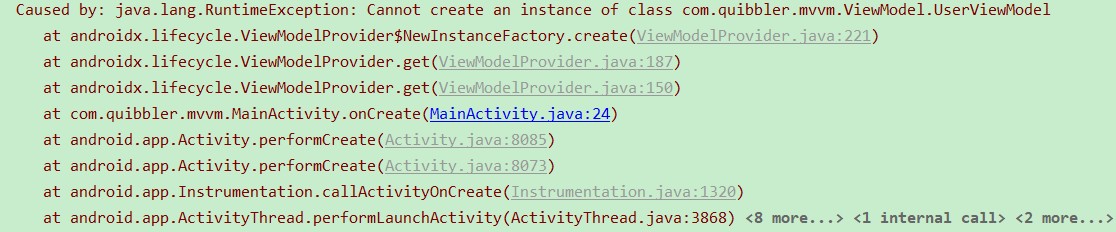
分析追踪了一波代码,发现从创建ViewModelProvider的时候内部就出错了,使用错误的Factory工厂,当然无法创建AndroidViewModel类型的实例。
public ViewModelProvider(@NonNull ViewModelStoreOwner owner) {
        this(owner.getViewModelStore(), owner instanceof HasDefaultViewModelProviderFactory
                ? ((HasDefaultViewModelProviderFactory) owner).getDefaultViewModelProviderFactory()
                : NewInstanceFactory.getInstance());
    }
问题就在第二个参数的位置owner instanceof HasDefaultViewModelProviderFactory,说明当前的Activity并不是HasDefaultViewModelProviderFactory!难道还不一样,以前运行好着呢,查看源码发现果然不一样。一个版本的ComponentActivity实现了HasDefaultViewModelProviderFactory接口

另一个项目使用的ComponentActivity却没有实现这个接口,因为使用的是1.0.0低版本AndroidX库中的activity。

所以导致了后面出现的乌龙问题,Android开发,重要的一点就是做好版本的兼容处理,因为Google真的很坑,说不定哪天把接口又变了!
def activity_version = "1.1.0"
    // Java language implementation
    implementation "androidx.activity:activity:$activity_version"
相关资料:
Libraries > Lifecycle">Jetpack > Libraries > Lifecycle


