Parcelable序列化插件
Android开发中跨进程传输数据,用到Parcelable序列化传输对象。关于Parcelable详见Android中的两种序列化:Parcelable和Serialable。实际开发中需要序列化的属性非常多,手动写又慢有容易出错。现在工具这么多很方便,极大的提高开发效率。推荐使用Android Parcelable code generator插件一键实现Parcelable序列化。
1、安装Parcelable插件
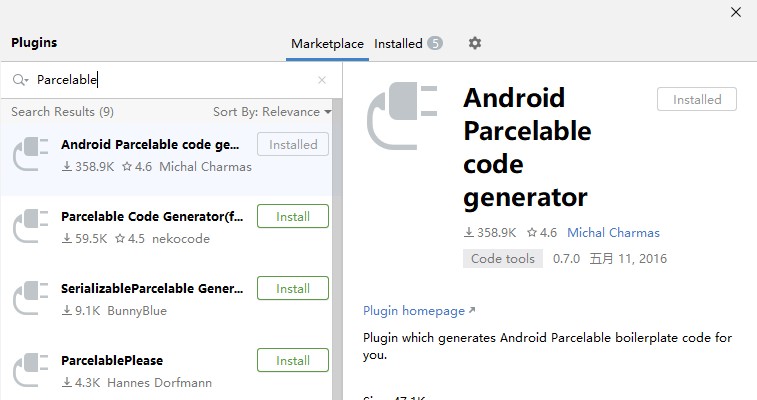
打开Files > Settings > Plugins菜单,搜索Parcelable。安装Android Parcelable code generator插件
2、生成Parcelable
建一个Student类演示快速实现Parcelable接口:
public class Student {
        public int id;
        public String name;
        public int age;
    }
2.1、一键实现Parcelable序列化
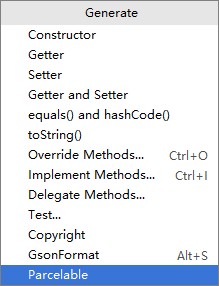
在代码中按快捷键Alt + Ins键,选择Parcelable选项
弹出一个对话框选择需要序列化的属性,实际开发中属性非常多,手动写又慢有容易出错。现在工具这么多很方便,极大的提高开发效率。
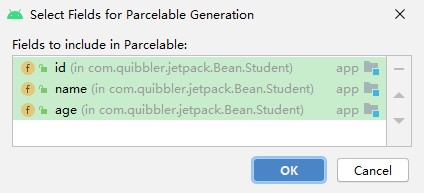
点击OK或回车,立马实现Parcelable接口,并且实现各个接口方法,并创建CREATOR实例。自动产生的完整代码如下:
public class Student implements Parcelable {
        public int id;
        public String name;
        public int age;

        public Student() {}

        @Override
        public int describeContents() {
            return 0;
        }

        @Override
        public void writeToParcel(Parcel dest, int flags) {
            dest.writeInt(this.id);
            dest.writeString(this.name);
            dest.writeInt(this.age);
        }

        protected Student(Parcel in) {
            this.id = in.readInt();
            this.name = in.readString();
            this.age = in.readInt();
        }

        public static final Parcelable.Creator<Student> CREATOR = new Parcelable.Creator<Student>() {
            @Override
            public Student createFromParcel(Parcel source) {
                return new Student(source);
            }
            @Override
            public Student[] newArray(int size) {
                return new Student[size];
            }
        };
    }
2.2、boolean类型的支持
Parcelable不支持boolean类型的序列化,这个插件会不会自动进行转换呢?测试一下
public class Student {
        private boolean is;
}生成的序列化代码会将boolean转换成byte传输,创建的时候再从Pracel流中将其转换成boolean值。
public void writeToParcel(Parcel dest, int flags) {
        dest.writeByte(this.is ? (byte) 1 : (byte) 0);
    }

    protected Student(Parcel in) {
        this.is = in.readByte() != 0;
    }
2.3、其它类型的支持
项目中的Bean类除了基础类型,往往还嵌套其它Bean类型成员属性。
public class Student {
        private Student student;
}插件能否将其序列化呢?也是可以的,使用writeParcelable(Parcelable p, int parcelableFlags)和readParcelable(ClassLoader loader)方法。前提是该对象已经实现Parcelable接口,否则会提示错误,并不能将成员中未实现Parcelable序列化的类也一并实现序列化。
@Override
    public void writeToParcel(Parcel dest, int flags) {
        dest.writeParcelable(this.student, flags);
    }

    protected Student(Parcel in) {
        this.student = in.readParcelable(Student.class.getClassLoader());
}经过上面的简单试用,使用Android Parcelable code generator插件没有问题,可以放心使用。