
线程池 Executors
Executor框架是java中的线程池实现。Executor是最顶层的接口定义,它的子类和实现主要包括ExecutorService,ScheduledExecutorService,ThreadPoolExecutor,ScheduledThreadPoolExecutor,ForkJoinPool等。其结构如下图所示:
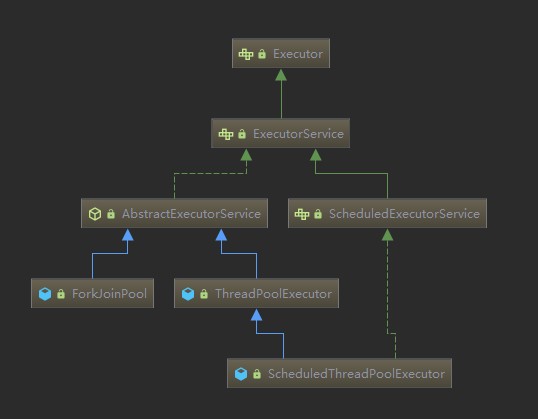
Executor:Executor是一个接口,其只定义了一个execute()方法:void execute(Runnable command);,只能提交Runnable形式的任务,不支持提交Callable带有返回值的任务。
ExecutorService:ExecutorService在Executor的基础上加入了线程池的生命周期管理,我们可以通过ExecutorService#shutdown或者ExecutorService#shutdownNow方法来关闭我们的线程池。ExecutorService支持提交Callable形式的任务,提交完Callable任务后我们拿到一个Future,它代表一个异步任务执行的结果。关于shutdown和shutdownNow方法我们需要注意的是:这两个方法是非阻塞的,调用后立即返回,不会等待线程池关闭完成。如果我们需要等待线程池处理完成再返回可以使用ExecutorService#awaitTermination来完成。
shutdown方法会等待线程池中已经运行的任何和阻塞队列中等待执行的任务执行完成,而shutdownNow则不会,shutdownNow方法会尝试中断线程池中已经运行的任务,阻塞队列中等待的任务不会再被执行,阻塞队列中等待执行的任务会作为返回值返回。
ThreadPoolExecutor:是线程池中最核心的类
public ThreadPoolExecutor(int corePoolSize,
                              int maximumPoolSize,
                              long keepAliveTime,
                              TimeUnit unit,
                              BlockingQueue<Runnable> workQueue,
                              ThreadFactory threadFactory,
                              RejectedExecutionHandler handler) {
        if (corePoolSize < 0 ||
            maximumPoolSize <= 0 ||
            maximumPoolSize < corePoolSize ||
            keepAliveTime < 0)
            throw new IllegalArgumentException();
        if (workQueue == null || threadFactory == null || handler == null)
            throw new NullPointerException();
        this.corePoolSize = corePoolSize;
        this.maximumPoolSize = maximumPoolSize;
        this.workQueue = workQueue;
        this.keepAliveTime = unit.toNanos(keepAliveTime);
        this.threadFactory = threadFactory;
        this.handler = handler;
    }
1.corePoolSize:线程池的核心线程数目,当一个请求进来时如果当前线程池中线程数量小于这个值,则直接通过ThreadFactory新建一个线程来处理这个请求,如果已有线程数量大于等于这个值则将请求放入阻塞队列中。
2.maximumPoolSize:线程池的最大线程数目,当线程池数量已经等于corePoolSize并且阻塞队列也已经满了,则看线程数量是否小于maximumPoolSize:如果小于则创建一个线程来处理请求,否则使用“饱和策略”来拒绝这个请求。对于大于corePoolSize部分的线程,称作这部分线程为“idle threads”,这部分线程会有一个最大空闲时间,如果超过这个空闲时间还没有任务进来则将这些空闲线程回收。
3.keepAliveTime和unit:这两个参数主要用来控制idle threads的最大空闲时间,超过这个空闲时间空闲线程将被回收。这里有一点需要注意,ThreadPoolExecutor中有一个属性:private volatile boolean allowCoreThreadTimeOut;,这个用来指定是否允许核心线程空闲超时回收,默认为false,即不允许核心线程超时回收,核心线程将一直等待新任务。如果设置这个参数为true,核心线程空闲超时后也可以被回收。
4.workQueue:阻塞队列,超过corePoolSize部分的请求放入这个阻塞队列中等待执行。阻塞队列分为有界阻塞队列和无界阻塞队列。在创建阻塞队列时如果我们指定了这个队列的“capacity”则这个队列就是有界的,否则是无界的。这里有一点需要注意:使用线程池之前请明确是否真的需要无界阻塞队列,如果阻塞队列是无界的,会导致大量的请求堆积,进而造成内存溢出系统崩溃。
5.threadFactory:是一个线程池工厂,主要用来为线程池创建线程,我们可以定制一个ThreadFactory来达到统一命名我们线程池中的线程的目的。
6.handler:饱和策略,用来拒绝多余的请求。饱和策略有:CallerRunsPolicy:请求脱离线程池运行(调用者caller线程来运行这个任务);AbortPolicy:抛出RejectedExecutionException异常;DiscardPolicy:丢弃这个任务,即什么也不做;DiscardOldestPolicy:将阻塞队列中等待时间最久的任务删除(即队列头部的任务),将新的任务加入队尾。
Executors:
Executors是一个工厂类,主要用来创建ExecutorService,ScheduledExecutorService等线程池。
public static ExecutorService newFixedThreadPool(int nThreads) {
        return new ThreadPoolExecutor(nThreads, nThreads,
                                      0L, TimeUnit.MILLISECONDS,
                                      new LinkedBlockingQueue<Runnable>());
    }

	    public static ExecutorService newWorkStealingPool(int parallelism) {
        return new ForkJoinPool
            (parallelism,
             ForkJoinPool.defaultForkJoinWorkerThreadFactory,
             null, true);
    }

	    public static ExecutorService newWorkStealingPool() {
        return new ForkJoinPool
            (Runtime.getRuntime().availableProcessors(),
             ForkJoinPool.defaultForkJoinWorkerThreadFactory,
             null, true);
    }

	    public static ExecutorService newFixedThreadPool(int nThreads, ThreadFactory threadFactory) {
        return new ThreadPoolExecutor(nThreads, nThreads,
                                      0L, TimeUnit.MILLISECONDS,
                                      new LinkedBlockingQueue<Runnable>(),
                                      threadFactory);
    }

	    public static ExecutorService newSingleThreadExecutor() {
        return new FinalizableDelegatedExecutorService
            (new ThreadPoolExecutor(1, 1,
                                    0L, TimeUnit.MILLISECONDS,
                                    new LinkedBlockingQueue<Runnable>()));
    }

	    public static ExecutorService newSingleThreadExecutor(ThreadFactory threadFactory) {
        return new FinalizableDelegatedExecutorService
            (new ThreadPoolExecutor(1, 1,
                                    0L, TimeUnit.MILLISECONDS,
                                    new LinkedBlockingQueue<Runnable>(),
                                    threadFactory));
    }

	    public static ExecutorService newCachedThreadPool() {
        return new ThreadPoolExecutor(0, Integer.MAX_VALUE,
                                      60L, TimeUnit.SECONDS,
                                      new SynchronousQueue<Runnable>());
    }

	    public static ScheduledExecutorService newSingleThreadScheduledExecutor() {
        return new DelegatedScheduledExecutorService
            (new ScheduledThreadPoolExecutor(1));
    }
注意到这些静态方法可以方便我们创建线程池,但是你必须清楚每个方法创建的线程池的各个参数设置,就像newFixedThreadPool这个方法创建的线程池的阻塞队列是无界的。所以我更倾向推荐大家自己直接用ThreadPoolExecutor来定制自己的线程池。
在Android中常用,Java通过Executors提供线程池,分别为:
- newCachedThreadPool创建一个可缓存线程池,如果线程池长度超过处理需要,可灵活回收空闲线程,若无可回收,则新建线程。线程数量不固定,只有非核心线程,并且最大线程数量为Integer.MAX_VALUE
- newFixedThreadPool 创建一个定长线程池,可控制线程最大并发数,超出的线程会在队列中等待。
- newScheduledThreadPool 创建一个定长线程池,核心线程数量固定,而非核心线程数没有限制,并且当非核心线程闲置时会被立即回收。支持定时及周期性任务执行。
- newSingleThreadExecutor 创建一个单线程化的线程池,它只会用唯一的工作线程来执行任务,保证所有任务按照指定顺序(FIFO, LIFO, 优先级)执行。


评论 (1)
合理的设置安卓应用运行时的线程池核心线程数的大小:
获取CPU核数的源码实现:
/**
     * Gets the number of cores available in this device, across all processors.
     * Requires: Ability to peruse the filesystem at "/sys/devices/system/cpu"
     * <p>
     * Source: http://stackoverflow.com/questions/7962155/
     *
     * @return The number of cores, or 1 if failed to get result
     */
    public static int getNumCpuCores() {
        try {
            // Get directory containing CPU info
            java.io.File dir = new java.io.File("/sys/devices/system/cpu/");
            // Filter to only list the devices we care about
            java.io.File[] files = dir.listFiles(new FileFilter() {
                @Override
                public boolean accept(File file) {
                    // Check if filename is "cpu", followed by a single digit number
                    if (java.util.regex.Pattern.matches("cpu[0-9]+", file.getName())) {
                        return true;
                    }
                    return false;
                }
            });
            // Return the number of cores (virtual CPU devices)
            return files.length;
        } catch (Exception e) {
            // Default to return 1 core
            Log.e(TAG, "Failed to count number of cores, defaulting to 1", e);
            return 1;
        }
    }