
布局彩蛋:BlinkLayout闪烁布局
解析XML布局的过程中有一个彩蛋,在LayoutInflater类中的tryCreateView()方法里:
public final View tryCreateView(View parent,String name,Context context,AttributeSet attrs) {
        if (name.equals(TAG_1995)) {
            // Let's party like it's 1995!
            return new BlinkLayout(context, attrs);
        }
        View view;
        ...
        return view;
}其中TAG_1995标签的定义如下,在这里还能看到熟悉的两个布局tag:<merge/>和<include/>。
private static final String TAG_MERGE = "merge";
    private static final String TAG_INCLUDE = "include";
    private static final String TAG_1995 = "blink";
    ...
1、使用<blink/>
新建一个普通项目,在XML布局中尝试一下<blink/>这个标签:
<?xml version="1.0" encoding="utf-8"?>
<blink xmlns:android="http://schemas.android.com/apk/res/android"
    android:layout_width="match_parent"
    android:layout_height="match_parent">

    <LinearLayout ...>

</blink>忽略AndroidStudio的Cannot resolve class blink提示,可以通过编译。
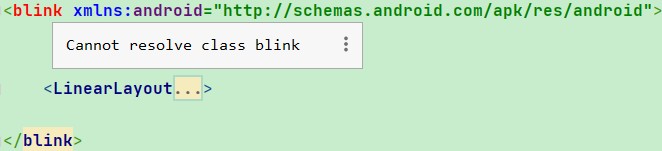
运行起来会发现用<blink/>标签包含的界面会一闪一闪(周期500ms),所以叫做BlinkLayout。
2、极简的BlinkLayout源码
简短的58行代码,涉及到:自定义View、Handler消息、View绘制等要点。
private static class BlinkLayout extends FrameLayout {
        private static final int MESSAGE_BLINK = 0x42;
        private static final int BLINK_DELAY = 500;

        private boolean mBlink;
        private boolean mBlinkState;
        private final Handler mHandler;

        public BlinkLayout(Context context, AttributeSet attrs) {
            super(context, attrs);
            mHandler = new Handler(new Handler.Callback() {
                @Override
                public boolean handleMessage(Message msg) {
                    if (msg.what == MESSAGE_BLINK) {
                        if (mBlink) {
                            mBlinkState = !mBlinkState;
                            makeBlink();
                        }
                        invalidate();
                        return true;
                    }
                    return false;
                }
            });
        }

        private void makeBlink() {
            Message message = mHandler.obtainMessage(MESSAGE_BLINK);
            mHandler.sendMessageDelayed(message, BLINK_DELAY);
        }

        @Override
        protected void onAttachedToWindow() {
            super.onAttachedToWindow();
            mBlink = true;
            mBlinkState = true;
            makeBlink();
        }

        @Override
        protected void onDetachedFromWindow() {
            super.onDetachedFromWindow();
            mBlink = false;
            mBlinkState = true;
            mHandler.removeMessages(MESSAGE_BLINK);
        }

        @Override
        protected void dispatchDraw(Canvas canvas) {
            if (mBlinkState) {
                super.dispatchDraw(canvas);
            }
        }
}快速看一下源码:当View “附加”到 Window 上的时候进行回调onAttachedToWindow(),向Handler发送消息触发闪烁。
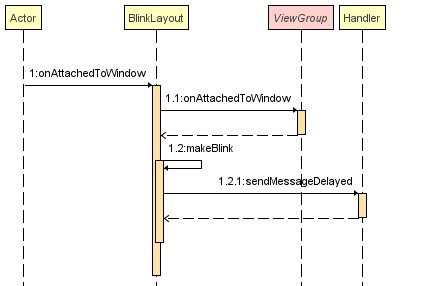
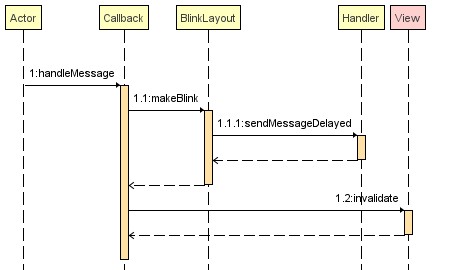
利用Handler不断的“接收-发送”循环消息切换mBlinkState状态影响dispatchDraw(Canvas canvas)绘制,从而实现闪烁效果。注意一定要及时终止消息循环。
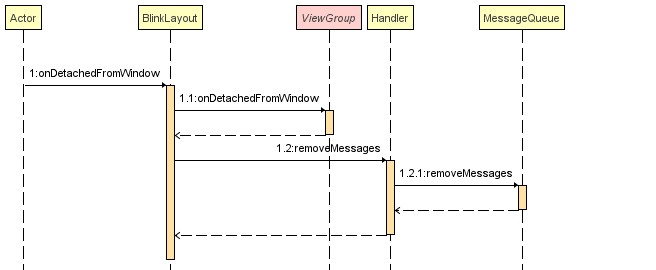
当View从 Window 上“分离”时回调onDetachedFromWindow() 终止消息循环。
3、追溯BlinkLayout历史
Google的开发者为什么要埋这么一个“Let's party like it's 1995!”彩蛋?花了点时间,从AOSP仓库中找到这个彩蛋当年的提交记录,最早可以追溯到2011年,距今已经整整十年!
commit  9c1223a71397b565f38015c07cae57a5015a6500    [log] [tgz]
    author  Romain Guy <romainguy@google.com>   Tue May 17 14:25:49 2011 -0700
    committer   Romain Guy <romainguy@google.com>   Tue May 17 14:25:49 2011 -0700
    tree    43aafa517f82c77b2e4f0a0b5155b19532e6a515
    parent  51d6eb7dcfb776cb70a337ba4fd1eaadc94d8688 [diff] [blame]
Commit Id为 9c1223a 提交的作者是罗曼盖伊(Romain Guy),在这笔提交的注释中提到:“为了提高 LayoutInflater 的合规性。标准是有的,我们应该尽最大努力去正确地执行。”
Improve LayoutInflater's compliance.
    There are standards, we should do our best to implement them properly.
Change-Id: I83a7dc0651795d09b19d536c17b6aefc2eca5c81当年提交记录:googlesource/platform/frameworks/base/core/java/android/view/LayoutInflater,快照:
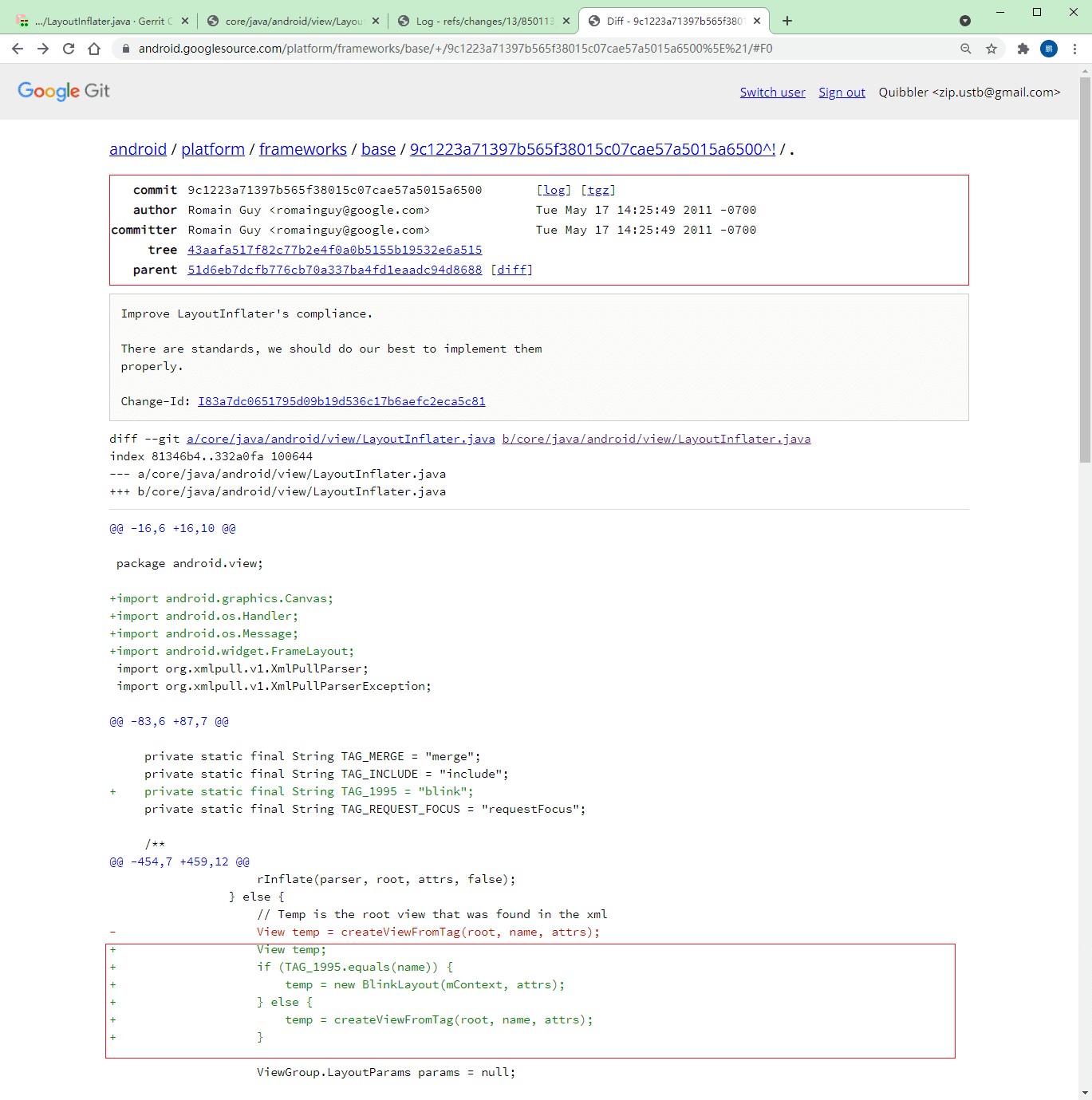
不得不提这笔代码的作者罗曼·盖伊(Romain Guy),现在是Google Android工具团队的总监,在GitHub上拥有高达8K 的 follow:github.com/romainguy。负责的其中一个项目Filament是Google开源的实时PBR渲染引擎,用于Android、iOS、macOS、Windows、Linux和WebGL,是一款很新颖的3D渲染引擎。
深挖的过程中,还发现罗曼盖伊是专业的摄影爱好者,在个人Twitter上和个人博客上放了很多非常漂亮的摄影作品,WLB。
相关链接:
https://developer.android.com/android/hardware/SensorManager
https://android.googlesource.com/frameworks/base/core/java/android/view/LayoutInflater
https://android.googlesource.com/
https://android-review.googlesource.com/frameworks/base/core/java/android/view/LayoutInflater
https://android-review.googlesource.com
https://android-review.googlesource.com/c/platform/frameworks/base/+/850113
https://issuetracker.google.com


