
UncaughtExceptionHandler 原理
使用UncaughtExceptionHandler捕获运行时线程中发生的未捕获异常,可以极大的提高应用稳定性。UncaughtExceptionHandler使用很方便,参考异常捕捉:UncaughtExceptionHandler一文。
1、线程异常传递
当线程运行出现奔溃,JVM虚拟机会调用Thread的dispatchUncaughtException()方法分发奔溃消息。
1.1、JVM中的回调
在hotspot源码中,JVM线程的实现类为thread.cpp,其中定义了线程退出的方法exit(bool destroy_vm, ExitType exit_type):
void JavaThread::exit(bool destroy_vm, ExitType exit_type) {
  assert(this == JavaThread::current(),  "thread consistency check");

  ...
  // 修复一个Bug: is_null 检查只是为了它在 JDK1.2 VM 上工作得更好。 必须通过运行时查询方法修复
  if (!destroy_vm || JDK_Version::is_jdk12x_version()) {

    // JSR-166变更:将异常调用从 ThreadGroup.uncaughtException 更改为 java.lang.Thread.dispatchUncaughtException
    if (uncaught_exception.not_null()) {
      Handle group(this, java_lang_Thread::threadGroup(threadObj()));
      {
        EXCEPTION_MARK;
        // 检查方法 Thread.dispatchUncaughtException() 是否存在,如果存在该方法则调用。
        // 否则,这是一个没有 JSR-166 更改的旧库,需要调用ThreadGroup.uncaughtException()
        KlassHandle recvrKlass(THREAD, threadObj->klass());
        CallInfo callinfo;
        KlassHandle thread_klass(THREAD, SystemDictionary::Thread_klass());
        LinkResolver::resolve_virtual_call(callinfo, threadObj, recvrKlass, thread_klass,
                                           vmSymbols::dispatchUncaughtException_name(),
                                           vmSymbols::throwable_void_signature(),
                                           KlassHandle(), false, false, THREAD);
        CLEAR_PENDING_EXCEPTION;
        methodHandle method = callinfo.selected_method();

        //通过dispatchUncaughtException()方法分发线程异常
        if (method.not_null()) {
          JavaValue result(T_VOID);
          JavaCalls::call_virtual(&result,
                                  threadObj, thread_klass,
                                  vmSymbols::dispatchUncaughtException_name(),
                                  vmSymbols::throwable_void_signature(),
                                  uncaught_exception,
                                  THREAD);
        } else {
          //老版本JVM线程异常调用的是uncaughtException()方法
          KlassHandle thread_group(THREAD, SystemDictionary::ThreadGroup_klass());
          JavaValue result(T_VOID);
          JavaCalls::call_virtual(&result,
                                  group, thread_group,
                                  vmSymbols::uncaughtException_name(),
                                  vmSymbols::thread_throwable_void_signature(),
                                  threadObj,           // Arg 1
                                  uncaught_exception,  // Arg 2
                                  THREAD);
        }
        ...
      }
    }
  ...
  //从JVM中移除当前发送异常的线程。如果是应用主线程,很显然没救了,主线程发生异常即使被UncaughtExceptionHandler捕获,也会最终发生ANR退出。
  // Remove from list of active threads list, and notify VM thread if we are the last non-daemon thread
  Threads::remove(this);
}当线程出现异常时,JVM会通过dispatchUncaughtException()方法将异常传递,传递到哪去?如果开发者设置了自定义的UncaughtExceptionHandler,则由它处理;如果没有,则由当前线程的ThreadGroup处理。。
1.2、线程异常回调的dispatchUncaughtException()方法
标准JDK中dispatchUncaughtException(Throwable e)方法的实现如下:
/**
     * Dispatch an uncaught exception to the handler. This method is
     * intended to be called only by the JVM.
     */
    private void dispatchUncaughtException(Throwable e) {
        getUncaughtExceptionHandler().uncaughtException(this, e);
}Android对此方法做了一些修改,原本private改为public,同时为了避免开发者调用将此方法hide。
/**
     * Dispatch an uncaught exception to the handler. This method is
     * intended to be called only by the runtime and by tests.
     *
     * @hide
     */
    // Android-changed: Make dispatchUncaughtException() public, for use by tests.
    public final void dispatchUncaughtException(Throwable e) {
        // BEGIN Android-added: uncaughtExceptionPreHandler for use by platform.
        Thread.UncaughtExceptionHandler initialUeh =
                Thread.getUncaughtExceptionPreHandler();
        if (initialUeh != null) {
            try {
                initialUeh.uncaughtException(this, e);
            } catch (RuntimeException | Error ignored) {
                // Throwables thrown by the initial handler are ignored
            }
        }
        // END Android-added: uncaughtExceptionPreHandler for use by platform.
        getUncaughtExceptionHandler().uncaughtException(this, e);
}先用getUncaughtExceptionPreHandler()方法获取异常预处理器uncaughtExceptionPreHandler,最后再通过getUncaughtExceptionHandler()获取异常处理器处理异常。
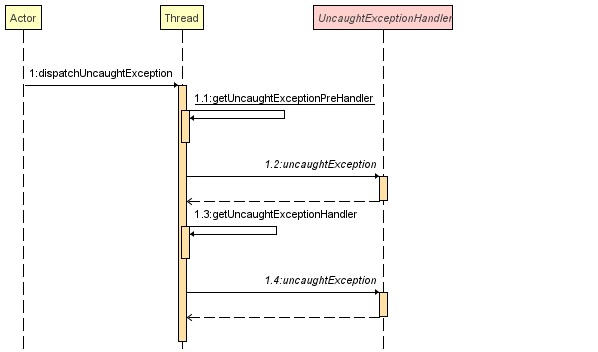
getUncaughtExceptionHandler()方法获取线程异常处理器:
public UncaughtExceptionHandler getUncaughtExceptionHandler() {
        return uncaughtExceptionHandler != null ?
            uncaughtExceptionHandler : group;
}如果应用没有自定义UncaughtExceptionHandler,就使用ThreadGroup处理异常,ThreadGroup也实现了UncaughtExceptionHandler接口:
public void uncaughtException(Thread t, Throwable e) {
        if (parent != null) {
            parent.uncaughtException(t, e);
        } else {
            Thread.UncaughtExceptionHandler ueh =
                Thread.getDefaultUncaughtExceptionHandler();
            if (ueh != null) {
                ueh.uncaughtException(t, e);
            } else if (!(e instanceof ThreadDeath)) {
                System.err.print("Exception in thread \""
                                 + t.getName() + "\" ");
                e.printStackTrace(System.err);
            }
        }
}在AOSP的代码中给uncaughtExceptionPreHandler和defaultUncaughtExceptionHandler这两个异常处理器设置了默认的实现:LoggingHandler和KillApplicationHandler:
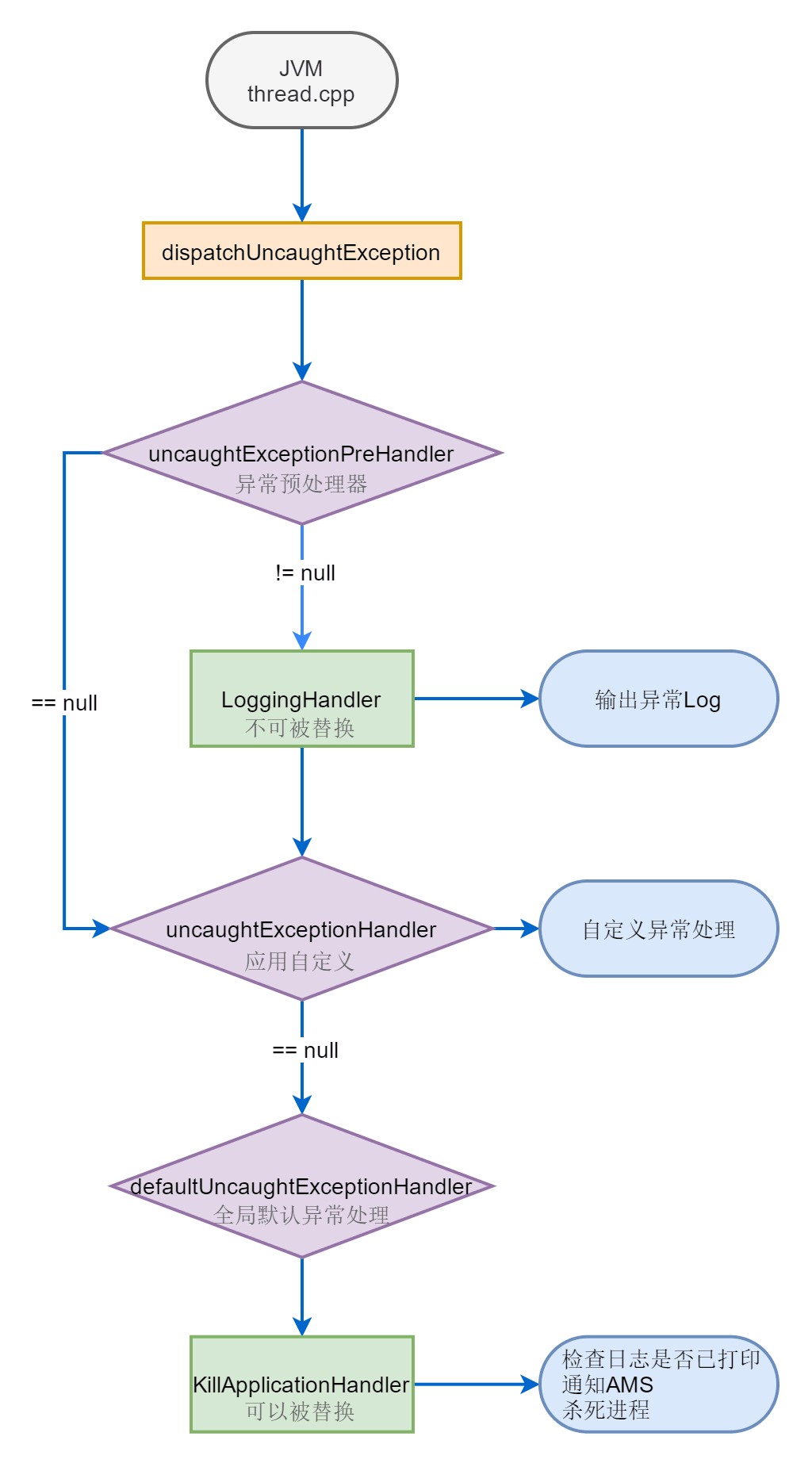
2、默认的UncaughtExceptionHandler
众所周知,Android应用程序进程从Zygote进程fork出来,详见Zygote进程的启动和APP进程启动流程这两篇博客。在进程初始化流程中调用到ZygoteInit里的zygoteInit()方法来初始化应用进程:
public static Runnable zygoteInit(int targetSdkVersion, long[] disabledCompatChanges,
            String[] argv, ClassLoader classLoader) {
        if (RuntimeInit.DEBUG) {
            Slog.d(RuntimeInit.TAG, "RuntimeInit: Starting application from zygote");
        }
        Trace.traceBegin(Trace.TRACE_TAG_ACTIVITY_MANAGER, "ZygoteInit");
        RuntimeInit.redirectLogStreams();
        RuntimeInit.commonInit();
        ZygoteInit.nativeZygoteInit();
        return RuntimeInit.applicationInit(targetSdkVersion, disabledCompatChanges, argv,
                classLoader);
}上面又用到RuntimeInit类里的commonInit()方法。在该方法中创建了两个异常处理器:LoggingHandler和KillApplicationHandler,分别作为异常预处理器和全局默认异常处理器:
protected static final void commonInit() {
        if (DEBUG) Slog.d(TAG, "Entered RuntimeInit!");
        /*
         * 设置处理程序; 这些适用于 VM 中的所有线程。
         * 应用程序可以替换默认处理程序,但不能替换预处理程序。
         */
        LoggingHandler loggingHandler = new LoggingHandler();

        //hook jvm runtimes,设置异常预处理器为LoggingHandler
        RuntimeHooks.setUncaughtExceptionPreHandler(loggingHandler);

        //设置全局线程默认异常处理器为KillApplicationHandler
        Thread.setDefaultUncaughtExceptionHandler(new KillApplicationHandler(loggingHandler));

        ...
        initialized = true;
}其中调用RuntimeHooks的setUncaughtExceptionPreHandler(uncaughtExceptionHandler)方法给线程设置异常预处理器。RuntimeHooks类在AOSP的/platform/libcore/dalvik目录下, 不在/platform/dalvik目录。
/**
     * Sets an {@link Thread.UncaughtExceptionHandler} that will be called before any
     * returned by {@link Thread#getUncaughtExceptionHandler()}. To allow the standard
     * handlers to run, this handler should never terminate this process. Any
     * throwables thrown by the handler will be ignored by
     * {@link Thread#dispatchUncaughtException(Throwable)}.
     *
     * @param uncaughtExceptionHandler handler for uncaught exceptions
     *
     * @hide
     */
    @SystemApi(client = MODULE_LIBRARIES)
    public static void setUncaughtExceptionPreHandler(
            @Nullable Thread.UncaughtExceptionHandler uncaughtExceptionHandler) {
        Thread.setUncaughtExceptionPreHandler(uncaughtExceptionHandler);
    }
2.1、LoggingHandler 默认异常预处理器
该类定义在RuntimeInit中,当异常发生的时候LoggingHandler负责输出打印异常日志。
private static class LoggingHandler implements Thread.UncaughtExceptionHandler {
        //当前LoggingHandler异常预处理器触发标志
        public volatile boolean mTriggered = false;

        @Override
        public void uncaughtException(Thread t, Throwable e) {
            mTriggered = true;

            // 如果 KillApplicationHandler 已经运行,则不要再打印log
            if (mCrashing) return;

            // mApplicationObject is null for non-zygote java programs (e.g. "am")
            // There are also apps running with the system UID. We don't want the
            // first clause in either of these two cases, only for system_server.
            if (mApplicationObject == null && (Process.SYSTEM_UID == Process.myUid())) {
                Clog_e(TAG, "*** FATAL EXCEPTION IN SYSTEM PROCESS: " + t.getName(), e);
            } else {
                logUncaught(t.getName(), ActivityThread.currentProcessName(), Process.myPid(), e);
            }
        }

}这也是为什么每当应用出现崩溃,开发者可以从Log查看到崩溃时的详细堆栈日志。作为Android中默认的异常异常预处理器不可以被替换,在AOSP源码Thread类里,setUncaughtExceptionPreHandler(UncaughtExceptionHandler eh)方法被标记为hide。
// BEGIN Android-added: The concept of an uncaughtExceptionPreHandler for use by platform.
    // See http://b/29624607 for background information.
    // null unless explicitly set
    private static volatile UncaughtExceptionHandler uncaughtExceptionPreHandler;

    /**
     * Sets an {@link UncaughtExceptionHandler} that will be called before any
     * returned by {@link #getUncaughtExceptionHandler()}. To allow the standard
     * handlers to run, this handler should never terminate this process. Any
     * throwables thrown by the handler will be ignored by
     * {@link #dispatchUncaughtException(Throwable)}.
     *
     * @hide used when configuring the runtime for exception logging; see
     *     {@link dalvik.system.RuntimeHooks} b/29624607
     */
    public static void setUncaughtExceptionPreHandler(UncaughtExceptionHandler eh) {
        uncaughtExceptionPreHandler = eh;
    }
2.2、KillApplicationHandler 默认全局异常处理器
KillApplicationHandler类也定义在RuntimeInit中。KillApplicationHandler是Android中默认的全局异常处理,当应用线程出现异常时,负责确保日志打印、通知AMS、杀死退出应用。
private static class KillApplicationHandler implements Thread.UncaughtExceptionHandler {
        //持有一个LoggingHandler对象,确保异常Log打印
        private final LoggingHandler mLoggingHandler;

        //用LoggingHandler构造此KillApplicationHandler实例
        public KillApplicationHandler(LoggingHandler loggingHandler) {
            this.mLoggingHandler = Objects.requireNonNull(loggingHandler);
        }

        @Override
        public void uncaughtException(Thread t, Throwable e) {
            try {
                //确保异常Log已经被异常预处理器打印
                ensureLogging(t, e);

                // Don't re-enter -- avoid infinite loops if crash-reporting crashes.
                if (mCrashing) return;
                mCrashing = true;
                // Try to end profiling. If a profiler is running at this point, and we kill the
                // process (below), the in-memory buffer will be lost. So try to stop, which will
                // flush the buffer. (This makes method trace profiling useful to debug crashes.)
                if (ActivityThread.currentActivityThread() != null) {
                    ActivityThread.currentActivityThread().stopProfiling();
                }
                // Bring up crash dialog, wait for it to be dismissed
                ActivityManager.getService().handleApplicationCrash(
                        mApplicationObject, new ApplicationErrorReport.ParcelableCrashInfo(e));
            } catch (Throwable t2) {
                if (t2 instanceof DeadObjectException) {
                    // System process is dead; ignore
                } else {
                    try {
                        Clog_e(TAG, "Error reporting crash", t2);
                    } catch (Throwable t3) {
                        // Even Clog_e() fails!  Oh well.
                    }
                }
            } finally {
                //连杀两次,确保此进程消失
                Process.killProcess(Process.myPid());    //发送SIGNAL 9,从底层杀死进程
                System.exit(10);    //直接关闭JVM的方法
            }
        }

        /**
         * 确保已触发日志记录处理程序。
         */
        private void ensureLogging(Thread t, Throwable e) {
            //如果执行到当前的KillApplicationHandler,LoggingHandler异常预处理器还没有打印过log
            if (!mLoggingHandler.mTriggered) {
                try {
                    //尝试再次打印异常log
                    mLoggingHandler.uncaughtException(t, e);
                } catch (Throwable loggingThrowable) {
                    // Ignored.
                }
            }
        }

}开发者可以参考异常捕捉:UncaughtExceptionHandler一文,自定义UncaughtExceptionHandler捕获替换全局默认异常处理器。
//全局默认异常处理器
    private static volatile UncaughtExceptionHandler defaultUncaughtExceptionHandler;

    //静态方法给Thread类设置全局默认异常处理器
    public static void setDefaultUncaughtExceptionHandler(UncaughtExceptionHandler eh) {
        // Android-removed: SecurityManager stubbed out on Android.
        /*
        SecurityManager sm = System.getSecurityManager();
        if (sm != null) {
            sm.checkPermission(
                new RuntimePermission("setDefaultUncaughtExceptionHandler")
                    );
        }
        */
         defaultUncaughtExceptionHandler = eh;
     }

    //线程发生异常的时候会用此方法拿到全局默认异常处理器
    //如果开发者没有设置,默认的就是AOSP给我们设置的KillApplicationHandler
    public static UncaughtExceptionHandler getDefaultUncaughtExceptionHandler(){
        return defaultUncaughtExceptionHandler;
}子线程中的异常都能捕获,避免应用因为子线程异常而奔溃,稳定性极大提高。但是如果是主线程发生异常,那就没救了,主线程发生异常即使被UncaughtExceptionHandler捕获,线程也会被杀死,最终发生ANR应用退出。


