
存储管理:StorageManager 和 StorageStatsManager
在Android应用开发中,数据存储是一个重要的话题。存储设备分内部存储和外部存储,外部存储可以有SD卡、U盘等其它挂载的外设。
1、StorageManager
储存器管理器StorageManager是Android中管理存储设备的一个类,提供了访问设备上各种储存位置的功能。
1.1、获取StorageManager实例
通过getSystemService()方法获取StorageManager实例:
StorageManager storageManager = (StorageManager) getSystemService(Context.STORAGE_SERVICE);1.2、所有存储位置
Android设备上有多个储存位置可供使用,例如内部存储器和外部SD卡。使用StorageManager的getStorageVolumes()方法来获取所有的储存位置:
List<StorageVolume> storageVolumes = storageManager.getStorageVolumes();
    for (StorageVolume volume : storageVolumes) {
        //处理每个储存位置
}StorageVolume代表的是一个设备信息的数据结构,里面包含了设备名称、唯一标识UUID、路径、挂载状态等等信息。
public final class StorageVolume implements Parcelable {

        @UnsupportedAppUsage
        private final String mId;

        @UnsupportedAppUsage
        private final File mPath;
        private final File mInternalPath;

        @UnsupportedAppUsage
        private final String mDescription;

        @UnsupportedAppUsage
        private final boolean mPrimary;

        @UnsupportedAppUsage
        private final boolean mRemovable;
        private final boolean mEmulated;
        private final boolean mExternallyManaged;
        private final boolean mAllowMassStorage;
        private final long mMaxFileSize;
        private final UserHandle mOwner;

        private final UUID mUuid;
        private final String mFsUuid;
        private final String mState;

	...
}每个设备都有唯一的UUID设备号,在StorageManager中也定义了默认的存储器UUID编号,实际设备中的默认存储器往往使用该默认编号:
public static final UUID UUID_DEFAULT = UUID.fromString("41217664-9172-527a-b3d5-edabb50a7d69");

    /** {@hide} */
    public static final UUID UUID_PRIMARY_PHYSICAL_ = UUID.fromString("0f95a519-dae7-5abf-9519-fbd6209e05fd");

    /** {@hide} */
    public static final UUID UUID_SYSTEM_ = UUID.fromString("5d258386-e60d-59e3-826d-0089cdd42cc0");
1.3、检查可用空间
传入指定设备的UUID,可以通过StorageManager的getAllocatableBytes(UUID storageUuid)方法检查该存储设备的剩余可用空间:
/**
     * Return the maximum number of new bytes that your app can allocate for
     * itself on the given storage volume. This value is typically larger than
     * {@link File#getUsableSpace()}, since the system may be willing to delete
     * cached files to satisfy an allocation request. You can then allocate
     * space for yourself using {@link #allocateBytes(UUID, long)} or
     * {@link #allocateBytes(FileDescriptor, long)}.
     */
    @WorkerThread
    public @BytesLong long getAllocatableBytes(@NonNull UUID storageUuid)
            throws IOException {
        return getAllocatableBytes(storageUuid, 0);
}调用另外一个重载方法,多一个@AllocateFlags参数。
/** @hide */
    @SystemApi
    @WorkerThread
    @SuppressLint("RequiresPermission")
    public long getAllocatableBytes(@NonNull UUID storageUuid,
            @RequiresPermission @AllocateFlags int flags) throws IOException {
        try {
            return mStorageManager.getAllocatableBytes(convert(storageUuid), flags,
                    mContext.getOpPackageName());
        } catch (ParcelableException e) {
            e.maybeRethrow(IOException.class);
            throw new RuntimeException(e);
        } catch (RemoteException e) {
            throw e.rethrowFromSystemServer();
        }
    }
1.4、分配空间
通过allocateBytes(FileDescriptor fd,long bytes)方法分配指定字节大小存储空间:
@WorkerThread
    public void allocateBytes(FileDescriptor fd, @BytesLong long bytes) throws IOException {
        allocateBytes(fd, bytes, 0);
}或者allocateBytes(UUID storageUuid,long bytes)方法:
@WorkerThread
    public void allocateBytes(@NonNull UUID storageUuid, @BytesLong long bytes) throws IOException {
        allocateBytes(storageUuid, bytes, 0);
}以上第一节介绍了StorageManager的基本用法,包括获取StorageManager实例、获取所有的储存位置、检查可用空间和创建文件等操作。
2、StorageStatsManager
作为存储管理的配套管理类,StorageStatsManager往往要和StorageManager一起使用。获取StorageStatsManager实例:
//Class requires API level 26 (current min is 24)
val storageStatsManager: StorageStatsManager = getSystemService(Context.STORAGE_STATS_SERVICE) as StorageStatsManager前面已经了解到通过StorageManager.getStorageVolumes()获取的StorageVolume存储器列表,通过StorageVolume可以获取到每个存储器的UUID。而StorageStatsManager中的方法正好也都需要一个UUID,以标识查询哪个存储器的状态:
public @BytesLong long getTotalBytes(UUID storageUuid) throws IOException

    public @BytesLong long getFreeBytes(UUID storageUuid) throws IOException

    public StorageStats queryStatsForPackage(UUID storageUuid,String packageName,UserHandle user)

    public StorageStats queryStatsForUid(UUID storageUuid, int uid)

    public StorageStats queryStatsForUser(UUID storageUuid,UserHandle user)

    public ExternalStorageStats queryExternalStatsForUser(UUID storageUuid,UserHandle user)
2.1、查询应用存储空间明细
应用查询自己的存储空间无需权限,但是如果需要查询外部应用的存储,则需要申请使用情况访问权限。
<uses-permission android:name="android.permission.PACKAGE_USAGE_STATS" />将对应存储器的UUID传入,一般默认的即可。同时还有需要查询的应用包名:
val storageStats :StorageStats = storageStatsManager.queryStatsForPackage(uuid, "com.larus.nova", userHandler)返回一个StorageStats类型的对象,该类定义如下,包含应用各种类别的存储空间占用信息:
public final class StorageStats implements Parcelable {

        /**
         * Return the size of app.
        * Code is shared between all users on a multiuser device.
         */
        public @BytesLong long getAppBytes() {
            return codeBytes;
        }

        /**
         * Return the size of all data.
          * Data is isolated for each user on a multiuser device.
         */
        public @BytesLong long getDataBytes() {
            return dataBytes;
        }

        /**
         * Return the size of all cached data.
         * Cached data is isolated for each user on a multiuser device.
         */
       public @BytesLong long getCacheBytes() {
            return cacheBytes;
        }

        /**
         * Return the size of all cached data in the primary external/shared storage.
         * Cached data is isolated for each user on a multiuser device.
         */
        public @BytesLong long getExternalCacheBytes() {
            return externalCacheBytes;
        }

        ....
}①getAppBytes:应用的大小。包括 APK 文件、优化的编译器输出和解压的原生库。
②getCacheBytes:应用缓存数据的大小。包括存储在Context.getCacheDir()和Context.getCodeCacheDir()下的文件。
③getDataBytes:应用所有数据的大小。包括存储在Context.getDataDir()、Context.getCacheDir()、Context.getCodeCacheDir()下的文件。
④getExternalCacheBytes:应用主外部共享存储中所有缓存数据的大小。包括存储在Context.getExternalCacheDir()下的文件。
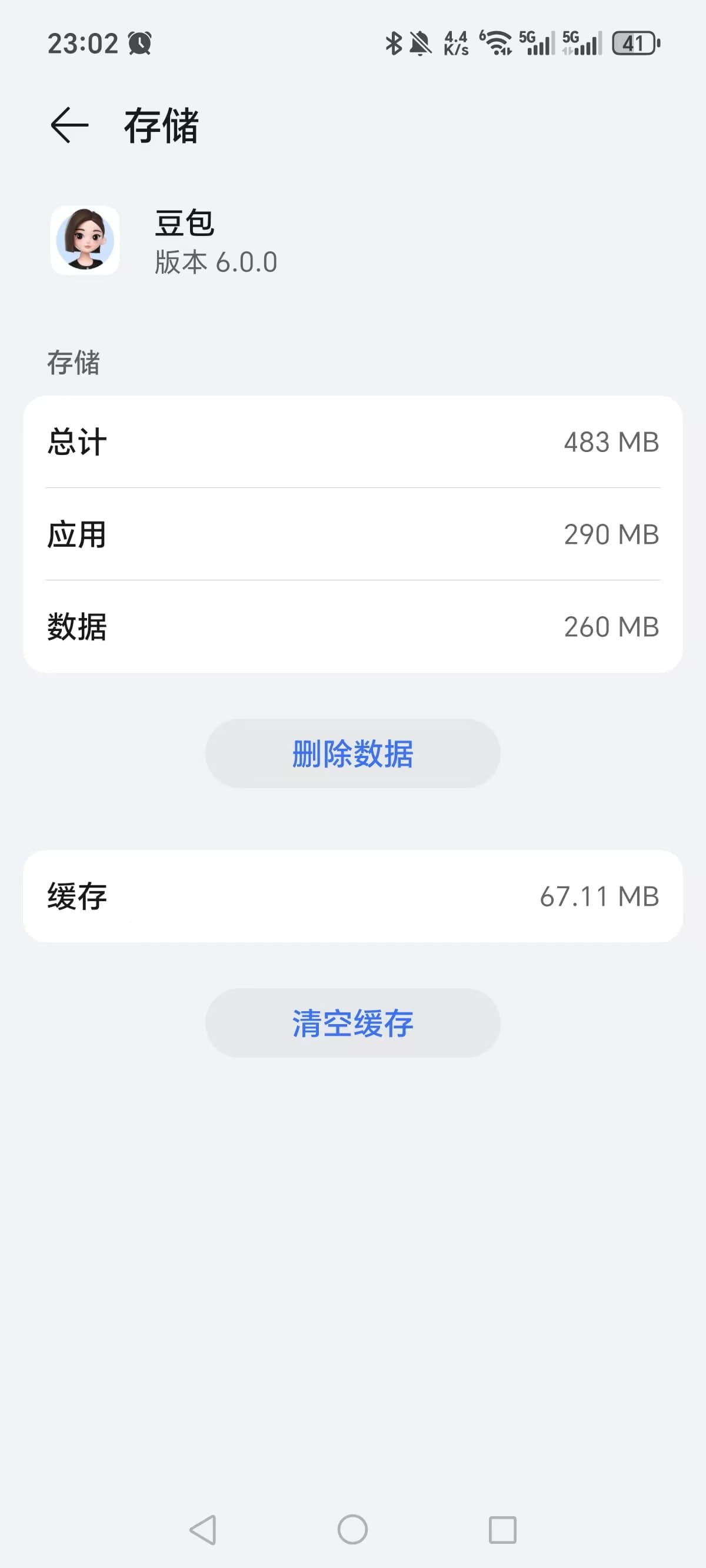
举个例子,查询一下手机里豆包应用的存储空间占用情况:
//返回的存储空间单位是字节
    D  appBytes:289998848 dataBytes:259715072 cacheBytes:167608320 externalCacheBytes:0

    //转换成Mb就是
    D  appBytes:290.00Mb dataBytes:260Mb cacheBytes:167.61Mb externalCacheBytes:0B
和系统设置里应用存储空间查看到的情况一致:
通过本文能更好地理解StorageManager和StorageStatsManager,管理Android中的数据存储。


