
Android百分比布局PercentLayout
百分比布局已经不怎么常用了,现在官方力推用ConstraintLayout构建自适应界面 ,解决屏幕适配的问题。但是PercentLayout有时候还是有用武之地的,尤其是在适配屏幕大小不一,使用比例放缩分配布局。比起LinearLayout使用权重适应屏幕来说,PercentLayout是个不错的选择。
1、引入PercentLayout
使用百分比布局需要引入依赖库,Android提供了Android-percent-support这个库。要添加 PercentLayout 的依赖项,您必须将 Google Maven 代码库添加到项目中。有关详情,请阅读 Google 的 Maven 代码库。
在应用或模块的 build.gradle 文件中添加所需工件的依赖项:
//noinspection GradleCompatible
implementation 'com.android.support:percent:25.2.0'推荐使用AndroidX中的库
implementation 'androidx.percentlayout:percentlayout:1.0.0'2、PercentLayout
百分比布局中新增定义的属性如下:
<declare-styleable name="PercentLayout_Layout">

        <!--控件宽和高占屏幕的比例-->
        <attr format="fraction" name="layout_widthPercent"/>
        <attr format="fraction" name="layout_heightPercent"/>

        <!--控件边距比例-->
        <attr format="fraction" name="layout_marginPercent"/>
        <attr format="fraction" name="layout_marginLeftPercent"/>
        <attr format="fraction" name="layout_marginTopPercent"/>
        <attr format="fraction" name="layout_marginRightPercent"/>
        <attr format="fraction" name="layout_marginBottomPercent"/>
        <attr format="fraction" name="layout_marginStartPercent"/>
        <attr format="fraction" name="layout_marginEndPercent"/>

        <!--屏幕宽高比-->
        <attr format="fraction" name="layout_aspectRatio"/>
    </declare-styleable>
2.1、PercentRelativeLayout
Google官方出品。
2.2、PercentFrameLayout
Google官方出品。
2.3、PercentLinearLayout
非Google官方,大牛开发者扩展的百分比布局。
GitHub地址:https://github.com/JulienGenoud/android-percent-support-lib-sample
3、试用PercentLayout
和使用普通布局一样,可以使用所继承父ViewGroup的属性。
<?xml version="1.0" encoding="utf-8"?>
    <androidx.percentlayout.widget.PercentRelativeLayout
        xmlns:android="http://schemas.android.com/apk/res/android"
        xmlns:app="http://schemas.android.com/apk/res-auto"
        android:layout_width="match_parent"
        android:layout_height="match_parent">
        <ImageView
            android:layout_width="0dp"
            android:layout_height="0dp"
            app:layout_heightPercent="50%"
            app:layout_marginStartPercent="10%"
            app:layout_marginTopPercent="10%"
            app:layout_widthPercent="50%" />
    </androidx.percentlayout.widget.PercentRelativeLayout>
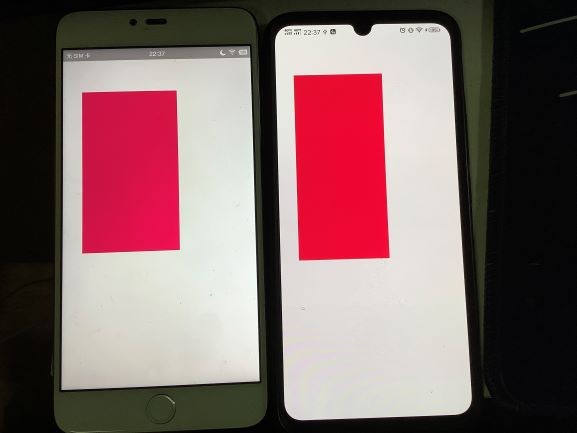
如下所示,在不同屏幕大小的手机上按比例显示。可以很好的根据GUI的切图去开发适配不同手机。
参考资料:


