
Android TabLayout标题
Tab标题也是Android应用中常见的UI,比如今日头条新闻页面上的切换Tab。Tab切换控制通常是个ViewPager一起使用,通过点击Tab页面不同的标签,控制ViewPager显示不同的页面。

1、PagerTabStrip(不推荐)
结合PagerTabStrip,可以添加标题,只需要在ViewPager布局内嵌套PagerTabStrip即可,不需要设置任何方法,标题会从ViewPager中获取并设置。
<androidx.viewpager.widget.ViewPager
        android:id="@+id/viewpager"
        android:layout_width="match_parent"
        android:layout_height="match_parent">

        <androidx.viewpager.widget.PagerTabStrip
            android:id="@+id/tab"
            android:layout_width="match_parent"
            android:layout_height="wrap_content" />

    </androidx.viewpager.widget.ViewPager>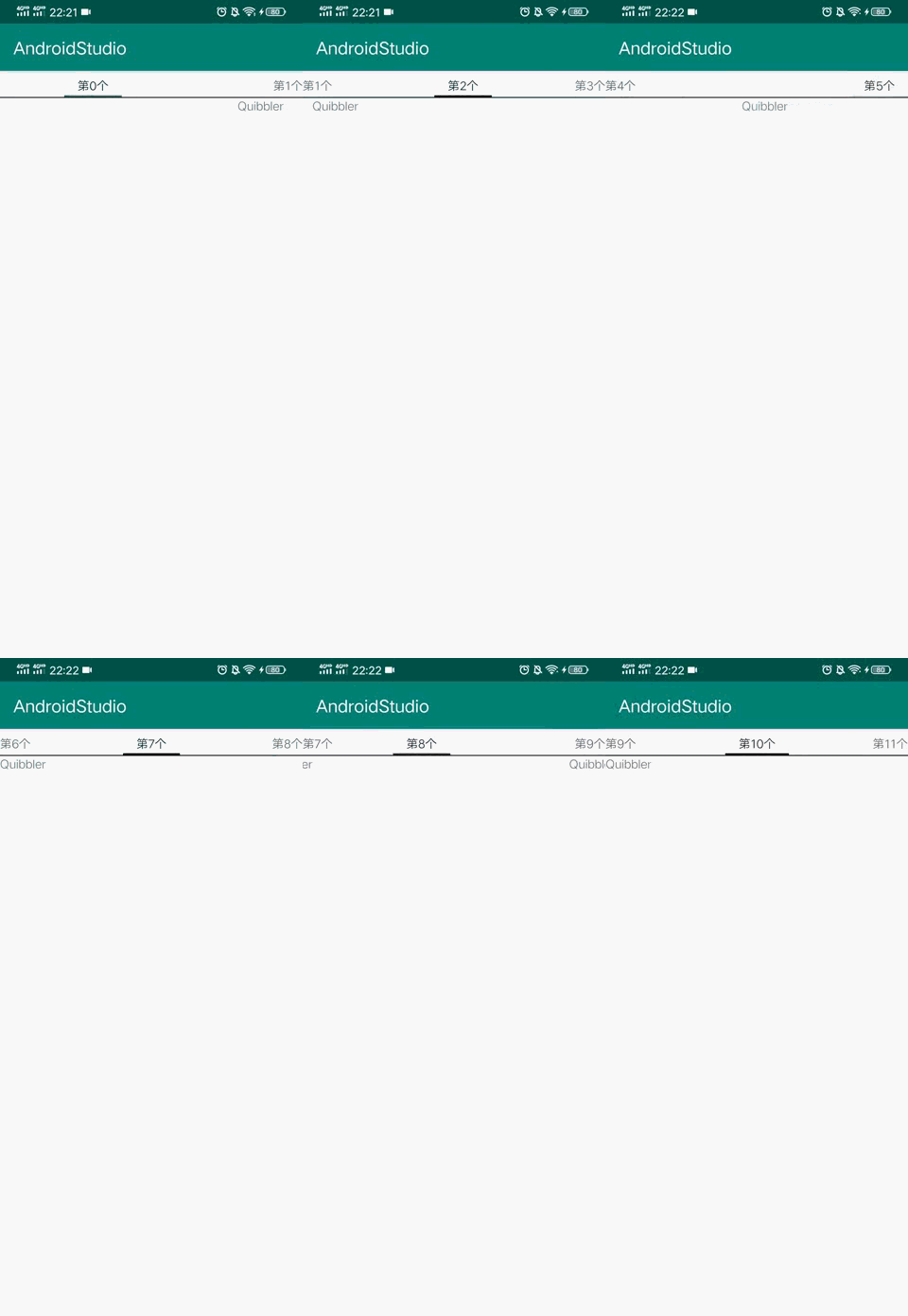
PagerTabStrip还有一个姊妹控件PagerTitleStrip。这两者年代较久,现在用的少,不建议使用。
2、TabLayout
TabLayout继承自HorizontalScrollView,难怪可以水平滚动。比前面的PagerTabStrip更强大,是现在主流Tab标签实现方式。
public class TabLayout extends HorizontalScrollView {
        ...
    }
2.1、引入TabLayout
有些可能没有TabLayout,需要在build.gradle加入依赖:
//废弃
    implementation 'com.android.support:design:28.0.0'
推荐用新库:
//推荐
    implementation 'com.google.android.material:material:1.2.1'
2.2、TabLayout属性
一些属性,可以方便的在布局中设置(也可以在代码中设置):
tabTextColor:Tab未被选中时的文字颜色
tabSelectedTextColor:选中项中的字体颜色
tabBackground:设置Tab背景
tabIndicatorColor:设置指示器的颜色
tabIndicatorHeight:设置指示器的高度
tabTextAppearance:设置style改变字体属性
tabMode:设置Tablayout的布局模式
fixed:固定的,不能滑动,很多标签的时候会被挤压(默认是fixed)

scrollable:可以滑动的

auto:TabLayout自动选择
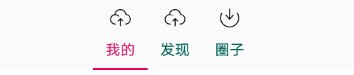
tabGravity:设置TabLayout的布局方式,有两个值。只有当tabMode为fixed时才有效
fill:充满(默认)
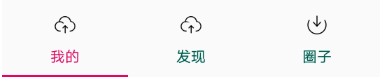
center:居中
tabMaxWidth:设置tab项最大的宽度
tabMinWidth:设置tab项最小的宽度
tabContentStart:设置TabLayout开始位置的偏移量
paddingStart,paddingEnd:设置整个TabLayout的内边距
tabPadding,tabPaddingStart,tabPaddingEnd,tabPaddingTop,tabPaddingBottom:设置tab项的内边距
style:设置样式
tabIconTint:设置文字上面图标的颜色
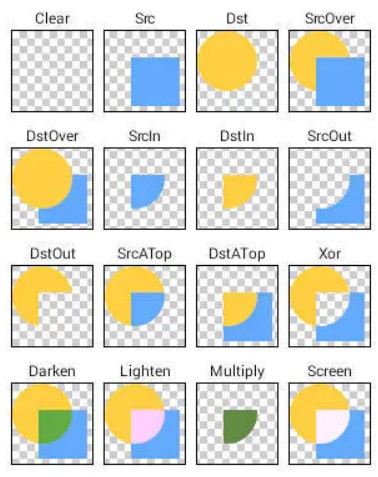
tabIconTintMode:文字上的图标和文字上图标区域的颜色之间的图像混合模式
取值:src_atop、src_over、add、screen、src_in、multiply
含义:如图
tabIndicatorFullWidth:指示器是否沾满整个宽度(默认为true)
tabIndicatorGravity:设置指示器的方位(默认指示器在下方)
取值:top指示器在上方、bottom指示器在下方、center指示器在中间、stretch指示器整个布局
tabIndicatorAnimationDuration:设置指示器动画时间
tabInlineLabel:设置图标和文件的方向(默认为false)
tabRippleColor:设置水波纹的颜色
tabUnboundedRipple:设置水波纹是否有边界(默认有边界)
2.3、使用TabLayout
先在布局中添加TabLayout:
<com.google.android.material.tabs.TabLayout
        android:id="@+id/tab_layout"
        android:layout_width="match_parent"
        android:layout_height="wrap_content"
        app:tabSelectedTextColor="@color/colorAccent"
app:tabTextColor="@color/colorPrimaryDark" />addTab():在代码中添加Tab按钮,设置文字,图标等属性。
mTabLayout.addTab(mTabLayout.newTab().setText("我的").setIcon(R.drawable.icon));
    ...
2.4、TabLayout设置监听
TabLayout设置Tab页选中监听器
mTabLayout.addOnTabSelectedListener(new TabLayout.OnTabSelectedListener() {
            @Override
            public void onTabSelected(TabLayout.Tab tab) {

            }

            @Override
            public void onTabUnselected(TabLayout.Tab tab) {

            }

            @Override
            public void onTabReselected(TabLayout.Tab tab) {
                //再次点击之前一个标签,这是onTabReselected回调被触发。
            }
        });
2.5、ViewPager+TabLayout
在布局中添加,需在代码中给TabLayout关联ViewPager。
mTabLayout.setupWithViewPager(viewPager);注意setUpWithViewPager()方法会创建ViewPager页面数量一致的Tab按钮,并设置一些属性。不必再单独给TabLayout添加addTab():
mTabLayout.setupWithViewPager(mViewPager);
    mTabLayout.getTabAt(0).setText("我的").setIcon(R.drawable.layout_1);
    mTabLayout.getTabAt(1).setText("发现").setIcon(R.drawable.layout_2);
    ...
参考:


