
RTL语言
1、RTL适配
应用国际化最让人头疼的适配就是RTL语言,诸如阿拉伯语等等文字布局都是从右到左。Android已经极力提供最简单的方法适配RTL,在AndroidManifest中的application节点中声明支持RTL:
<application
        android:supportsRtl="true"
...>切换到RTL语言的时候会自动对布局进行RTL镜像切换,注意有时候可能和LTR不一样因为一些属性适配的不太好,比如使用alignStrart替代alignLeft。
2、Unicode双向算法
对于语言来说RTL可能情况会复杂一些,尤其是混合的语言,即便设置了RTL效果也并不如意。关于URL的计算涉及到复杂的Unicode双向算法。Unicode中的每个字符都有一个关联的方向属性。大多数字母都以LTR(从左到右)强类型输入。从右到左脚本的字母被强类型输入为RTL(从右到左)。从右到左将显示一系列强类型的RTL字符。这与周围的基本方向无关。
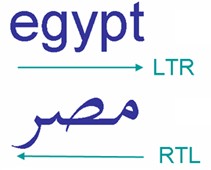
当将具有不同方向性的文本内联混合时,bidi算法会针对具有相同方向性的连续字符的每个序列生成单独的方向性偏斜。因此,在以下示例中,存在三个定向运行:
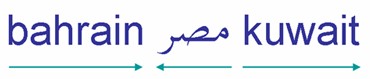
空格和标点符号在Unicode中不是强类型为LTR或RTL,因为它们可以在两种类型的脚本中使用。因此,它们被归类为中立或薄弱的角色。具有相同方向类型的两个强类型字符之间的中性字符也将假定该方向性。因此,两个RTL字符之间的中性字符将被视为RTL字符本身,并将具有扩展定向运行的效果。这就是为什么以下示例中的三个阿拉伯语单词作为一个方向游标从右向左读取的原因- 包括两个中间空格,这些空格作为中性符接周围字符的方向。

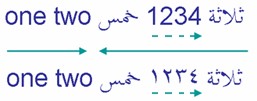
RTL脚本中的数字在从右到左的流程中从左到右运行,但是bidi算法对它们的处理方式与单词稍有不同。据说它们的方向性较弱。图片中的两个示例说明了这种差异。
3、TextView:textDirection
上面只需要了解,实际开发过程中并不需要知道具体实现细节,有优秀的语言学家和算法工程师完成底层实现。在Android中可以给TextView设置不同的属性来控制RTL方向性,这个属性就是textDirection。关于TextView详见《TextView》
<!-- Defines the direction of the text. -->
     <attr name="textDirection" format="integer">

        <!-- Default. -->
        <enum name="inherit" value="0" />

        <!-- Default for the root view. The first strong directional character determines the
             paragraph direction.  If there is no strong directional character, the paragraph
             direction is the view’s resolved layout direction. -->
        <enum name="firstStrong" value="1" />

        <!-- The paragraph direction is RTL if it contains any strong RTL character, otherwise
             it is LTR if it contains any strong LTR characters.  If there are neither, the
             paragraph direction is the view’s resolved layout direction. -->
        <enum name="anyRtl" value="2" />

        <!-- The paragraph direction is left to right. -->
        <enum name="ltr" value="3" />

        <!-- The paragraph direction is right to left. -->
        <enum name="rtl" value="4" />

        <!-- The paragraph direction is coming from the system Locale. -->
        <enum name="locale" value="5" />

        <!-- The first strong directional character determines the paragraph direction. If
             there is no strong directional character, the paragraph direction is LTR. -->
        <enum name="firstStrongLtr" value="6" />

        <!-- The first strong directional character determines the paragraph direction. If
             there is no strong directional character, the paragraph direction is RTL. -->
        <enum name="firstStrongRtl" value="7" />
    </attr>
参考资料
UNICODE BIDIRECTIONAL ALGORITHM


