理解Window
什么是Window?从Activity的组成结构一文中我们了解到:每个Activity都包含一个Window。
1、Window
什么是Window?简单来说就是窗口,对其中的View进行管理。那么Window和Activity又有什么关系?现在来梳理并了解一下它们之间的关系。
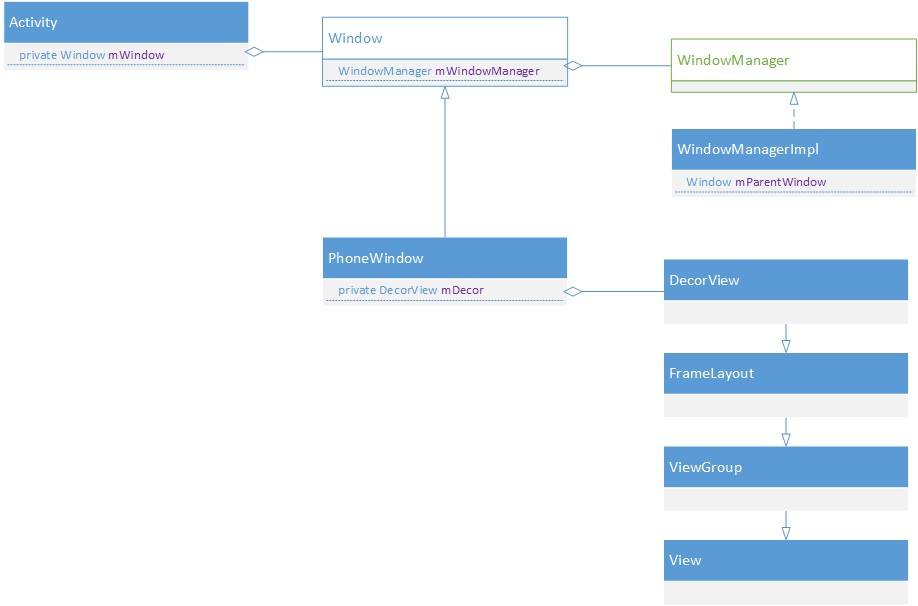
1.1、Window是抽象类
Android中能看见的(比如:Activity、Dialog、Toast等)都是Window。Window是抽象类,View不能脱离Window单独存在,否则会出异常,比如:View not attached to window manager异常,就是因为Window已经退出,却仍然要弹出Dialog,导致View没有可依附的Window引发异常。
1.2、唯一实现PhoneWindow
PhoneWindow继承实现Window。Window类在android.view包中,而它的实现类PhoneWindow却在com.android.internal.policy包中。
1.3、Activity & Window & View
Activity和Window、View的关系如下图,很形象。详见Activity的组成结构。
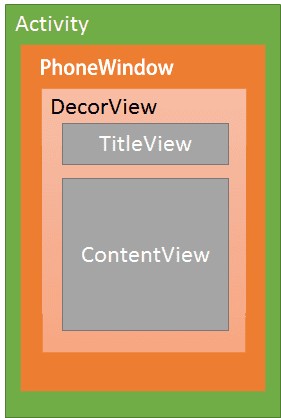
我们所看到的每一个Activity界面都持有一个Window实例mWindow。mWindow实际上初始化是PhoneWindow类型,后面会了解它的初始化过程。
@UnsupportedAppUsage
private Window mWindow;而PhoneWindow不是View,内部持有一个DecorView类型的mDecor实例,DecorView定义在com.android.internal.policy包里,继承自FrameLayout。
// This is the top-level view of the window, containing the window decor.
    private DecorView mDecor;
2、三种类型的Window
WindowManager的源码中有这么一段注释:
/**
   * The general type of window.  There are three main classes of window types:
   *
   * Application windows
   * 1 ~ 99 are normal top-level application
   * windows.  For these types of windows, the token must be
   * set to the token of the activity they are a part of (this will
   * normally be done for you if token is null).
   *
   * Sub-windows
   * 1000 ~ 1999 are associated with another top-level
   * window.  For these types of windows, the token must be
   * the token of the window it is attached to.
   *
   * System windows
   * 2000 ~ 2999 are special types of windows for
   * use by the system for specific purposes.  They should not normally
   * be used by applications, and a special permission is required
   * to use them.
*/看出Android中Window分为三类,flag对应各自的范围(关于Window的flag见《理解WindowManager》):
①Application Window:应用窗口,type范围(0~99),也就是常见的Activity。
②Sub Window:子窗口,type范围(1000~1999),必须依附与附窗口。比如Dialog。
③System Window:系统窗口,type范围(2000~2999),比如状态栏,导航栏。应用不能创建这种类型的窗口,一般由专门的系统框架开发。
3、Window何时创建
详见DecorView添加到Window中的流程第1节。
4、Window属性
Window有非常多的属性Flags!
4.1、设置flag方法
①addFlags(int flags)
public void addFlags(int flags) {
        setFlags(flags, flags);
}②setFlags(int flags, int mask)
public void setFlags(int flags, int mask) {
        final WindowManager.LayoutParams attrs = getAttributes();
        attrs.flags = (attrs.flags&~mask) | (flags&mask);
        mForcedWindowFlags |= mask;
        dispatchWindowAttributesChanged(attrs);
    }
4.2、众多Flags
和Window相关的Flag都定义在WindowManager.LayoutParams类中,详见《理解WindowManager》。
相关博客: