
动画插值器Interpolator
Animation中一个重要的概念是Interpolator插值器,动画执行的速率加上效果(加速或者减速等等),让动画执行起来不那么“死板”,动画看起来能够更自然“活泼”。想要实现炫酷好看的动画离不开插值器。后面讲到属性动画还会学习估值器TypeEvaluator,详见《属性动画:TypeEvaluator》。
1、Interpolator
了解Interpolator用途及其接口定义。对源码熟悉的会发现,在 android.graphics 包中也有一个同名的Interpolator类而非接口。
1.1、介绍
插值器指定了如何根据时间计算动画中的特定值。例如,您可以指定动画在整个动画中以线性方式播放,即动画在整个播放期间匀速移动;也可以指定动画使用非线性时间,例如动画在开始后加速并在结束前减速。
动画系统中的插值器会接收来自 Animator的分数,该分数表示动画的已播放时间。插值器会修改此分数,使其与要提供的动画类型保持一致。
1.2、接口
Interpolator接口在 android.view.animation 包中,继承自TimeInterpolator接口
package android.view.animation;
    import android.animation.TimeInterpolator;
    /**
     * An interpolator defines the rate of change of an animation. This allows
     * the basic animation effects (alpha, scale, translate, rotate) to be
     * accelerated, decelerated, repeated, etc.
     */
    public interface Interpolator extends TimeInterpolator {
        // 为新的android.animation包引入了新接口TimeInterpolator。
        //这个较旧的Interpolator接口扩展了TimeInterpolator,
        //因此基于Animator的新动画的用户可以使用旧的Interpolator实现或直接实现TimeInterpolator的新类。
}TimeInterpolator接口在 android.animation 包中,定义了float getInterpolation(float input)接口方法,后面自定义插值器需要实现该方法。输入参数的值input范围在0~1,0动画开始,0.5动画执行一半,1动画执行完毕。
package android.animation;
    /**
     * 时间插值器定义动画的变化率。 这允许动画进行非线性运动,例如加速和减速。
     */
    public interface TimeInterpolator {
        /**
         * Maps a value representing the elapsed fraction of an animation to a value that represents
         * the interpolated fraction. This interpolated value is then multiplied by the change in
         * value of an animation to derive the animated value at the current elapsed animation time.
         *
         * @param input A value between 0 and 1.0 indicating our current point
         *        in the animation where 0 represents the start and 1.0 represents
         *        the end
         * @return The interpolation value. This value can be more than 1.0 for
         *         interpolators which overshoot their targets, or less than 0 for
         *         interpolators that undershoot their targets.
         */
        float getInterpolation(float input);
    }
2、内置Interpolator
Android系统在 android.view.animation 包中提供了一组常用的插值器。了解一下它们是如何实现的,借助函数图像绘制工具或数学网在线函数图像生成或Desmos图形计算器看看getInterpolation(float input)方法中的数学函数。
2.1、BaseInterpolator*
系统内置插值器扩展自该抽象类BaseInterpolator
package android.view.animation;
    import android.content.pm.ActivityInfo.Config;
    /**
     * 系统内置插值器扩展自该抽象类BaseInterpolator。
     */
    abstract public class BaseInterpolator implements Interpolator {
        private @Config int mChangingConfiguration;
        /**
         * @hide
         */
        public @Config int getChangingConfiguration() {
            return mChangingConfiguration;
        }
        /**
         * @hide
         */
        void setChangingConfiguration(@Config int changingConfiguration) {
            mChangingConfiguration = changingConfiguration;
        }
    }
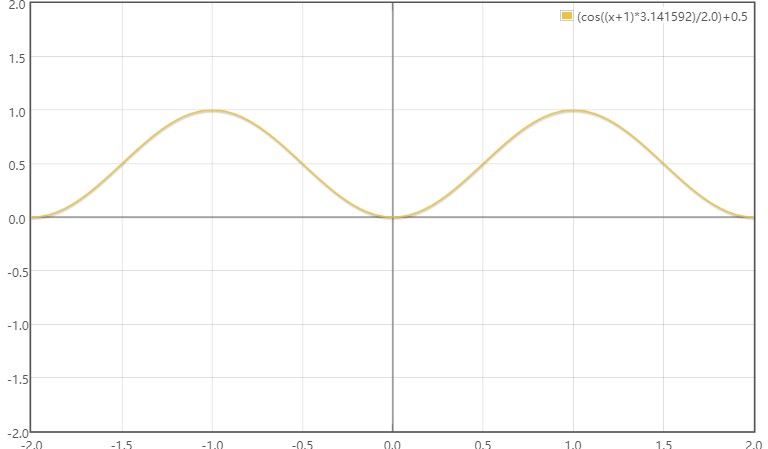
2.2、AccelerateDecelerateInterpolator
AccelerateDecelerateInterpolator:先加速,后加速
public float getInterpolation(float input) {
        return (float)(Math.cos((input + 1) * Math.PI) / 2.0f) + 0.5f;
    }
函数:(cos((x + 1) * π) / 2.0) + 0.5
2.3、AccelerateInterpolator
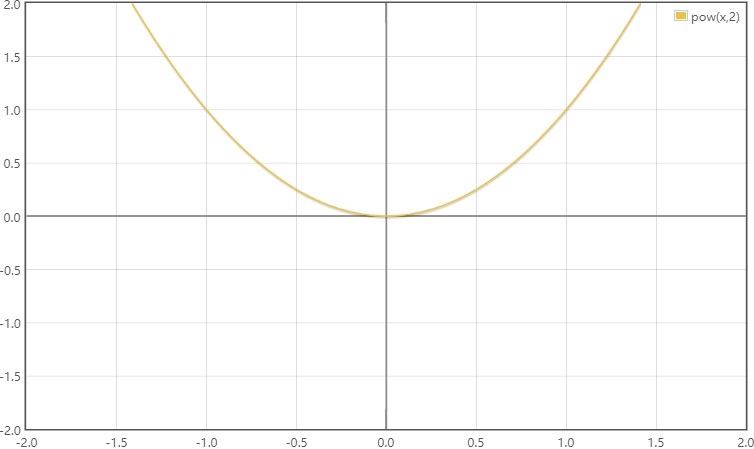
AccelerateInterpolator:加速插值器
public float getInterpolation(float input) {
        if (mFactor == 1.0f) {
            return input * input;
        } else {
            return (float)Math.pow(input, mDoubleFactor);
        }
    }
函数:pow(x,2)
2.4、AnticipateOvershootInterpolator
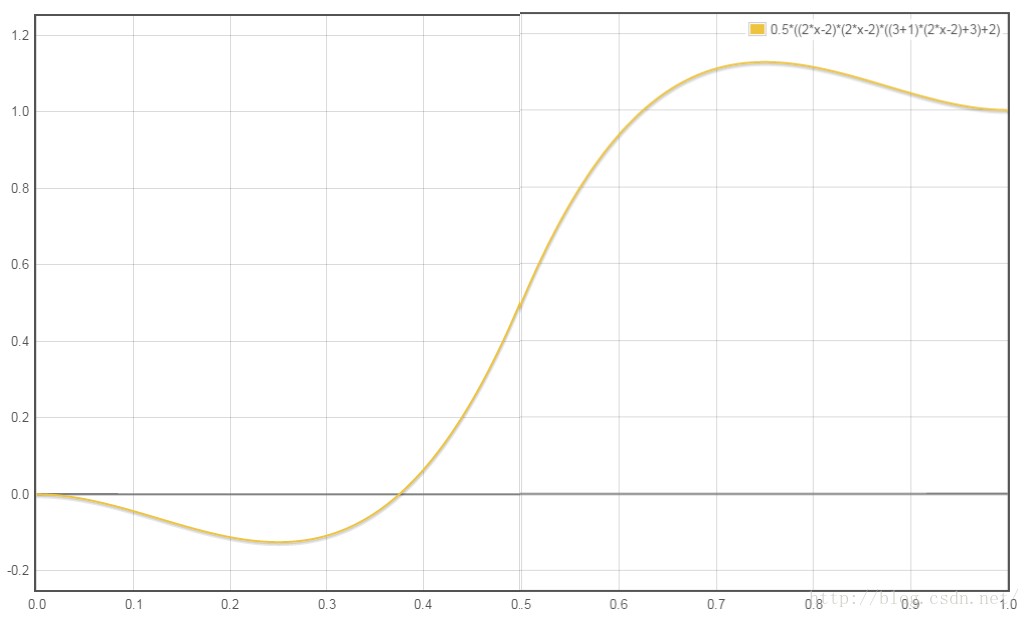
AnticipateOvershootInterpolator:在动画开始时向前偏移一段距离,在动画结束后向后偏移一段距离。
public float getInterpolation(float t) {
        // a(t, s) = t * t * ((s + 1) * t - s)
        // o(t, s) = t * t * ((s + 1) * t + s)
        // f(t) = 0.5 * a(t * 2, tension * extraTension), when t < 0.5
        // f(t) = 0.5 * (o(t * 2 - 2, tension * extraTension) + 2), when t <= 1.0
        if (t < 0.5f) return 0.5f * a(t * 2.0f, mTension);
        else return 0.5f * (o(t * 2.0f - 2.0f, mTension) + 2.0f);
    }

    private static float a(float t, float s) {
        return t * t * ((s + 1) * t - s);
    }

    private static float o(float t, float s) {
        return t * t * ((s + 1) * t + s);
    }
函数:0.5*2*x * 2*x * ((3 + 1) * 2*x - 3) (0 < x < 0.5)
0.5*((2*x-2) * (2*x-2) * ((3 + 1) * (2*x-2) + 3)+2) (0.5 <= x < 1.0)
2.5、LinearInterpolator
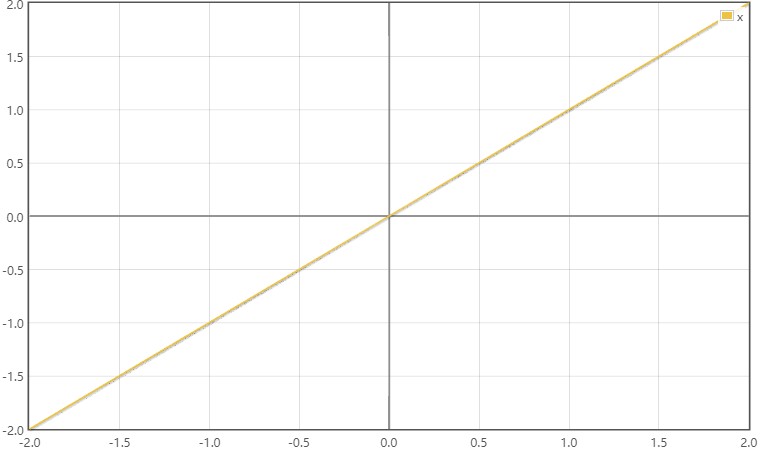
LinearInterpolator:线性插值器,运距加速器。默认的动画效果。
public float getInterpolation(float input) {
        return input;
    }
函数:x
2.6、PathInterpolator
PathInterpolator:新增的Path路径插值器,使用它可以非常方便的创建二阶、三阶的贝塞尔曲线动画。
2.7、BounceInterpolator
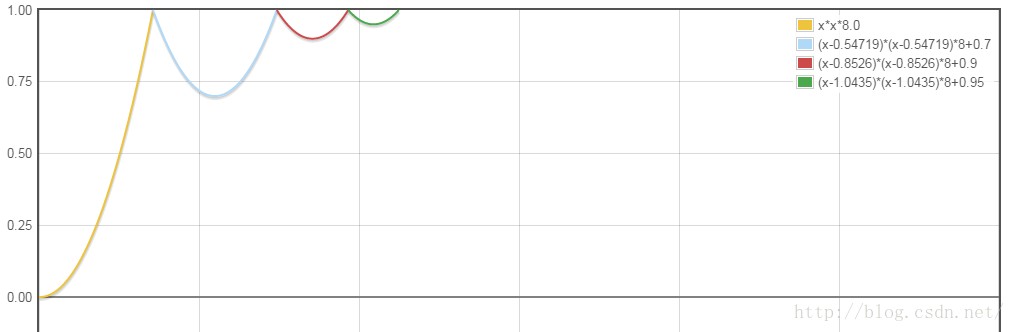
BounceInterpolator:模拟自由落体反复回弹最终落地的动画效果。
public float getInterpolation(float t) {
        // _b(t) = t * t * 8
        // bs(t) = _b(t) for t < 0.3535
        // bs(t) = _b(t - 0.54719) + 0.7 for t < 0.7408
        // bs(t) = _b(t - 0.8526) + 0.9 for t < 0.9644
        // bs(t) = _b(t - 1.0435) + 0.95 for t <= 1.0
        // b(t) = bs(t * 1.1226)
        t *= 1.1226f;
        if (t < 0.3535f) return bounce(t);
        else if (t < 0.7408f) return bounce(t - 0.54719f) + 0.7f;
        else if (t < 0.9644f) return bounce(t - 0.8526f) + 0.9f;
        else return bounce(t - 1.0435f) + 0.95f;
    }
函数:x * x * 8.0, (x < 0.3535)
(x-0.54719)* (x-0.54719)* 8+0.7, (x < 0.7408)
(x-0.8526)* (x-0.8526)* 8+0.9, (x < 0.9644)
(x-1.0435)* (x-1.0435)* 8+0.95 (x = 其他)
2.8、OvershootInterpolator
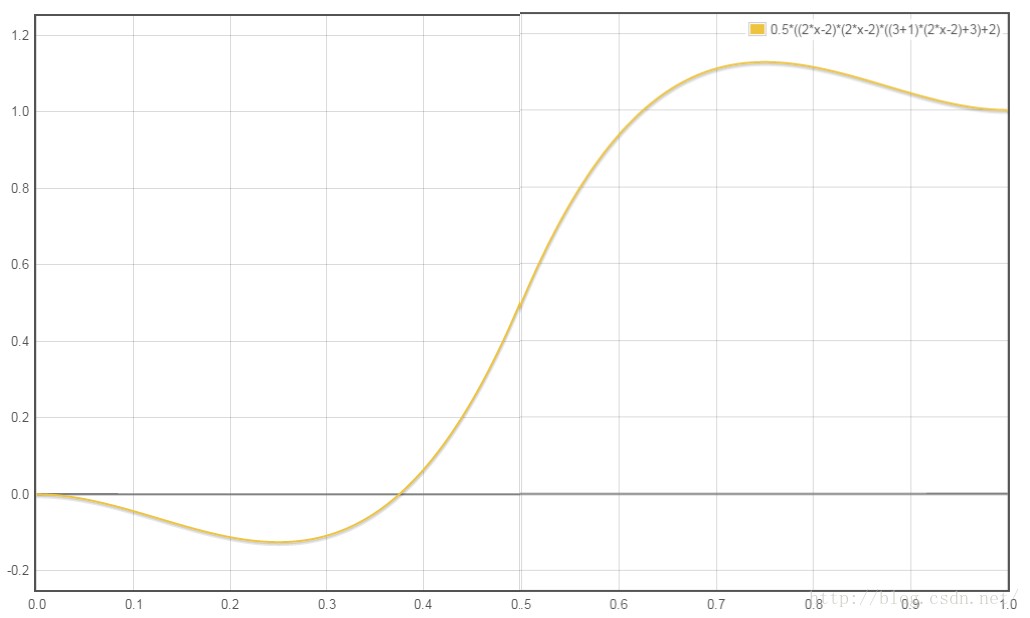
OvershootInterpolator:在动画结束时,继续沿着既定动画路径执行一段距离在结束动画,回到最终位置。
public float getInterpolation(float t) {
        // _o(t) = t * t * ((tension + 1) * t + tension)
        // o(t) = _o(t - 1) + 1
        t -= 1.0f;
        return t * t * ((mTension + 1) * t + mTension) + 1.0f;
    }
函数:0.5*2*x * 2*x * ((3 + 1) * 2*x - 3) (0 < x < 0.5)
0.5*((2*x-2) * (2*x-2) * ((3 + 1) * (2*x-2) + 3)+2) (0.5 <= x < 1.0)
2.9、CycleInterpolator
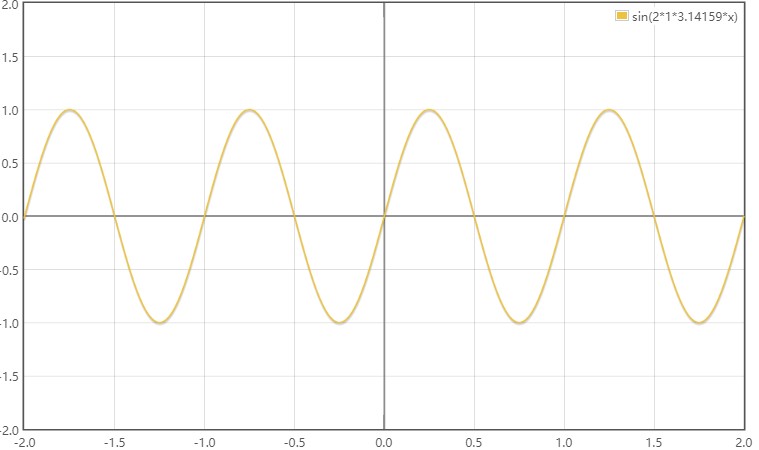
CycleInterpolator:循环插值器。动画循环播放特定的次数。
public float getInterpolation(float input) {
        return (float)(Math.sin(2 * mCycles * Math.PI * input));
    }
函数:sin(2 * 1* π * x)
2.10、AnticipateInterpolator
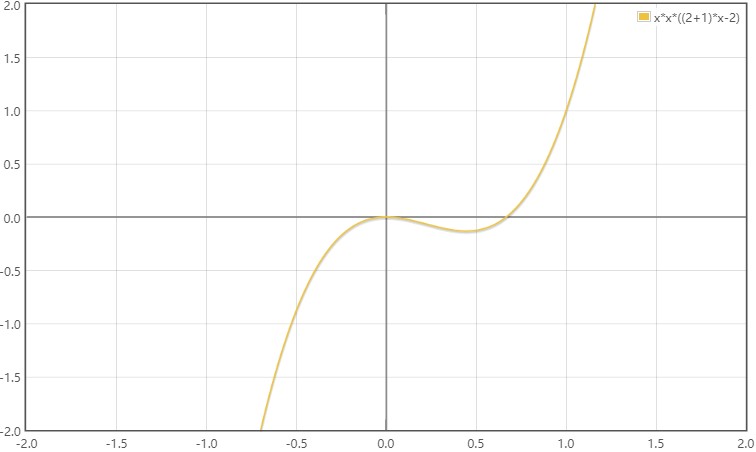
AnticipateInterpolator:动画开始时一开始先向后一段距离,然后开始加速。
public float getInterpolation(float t) {
        // a(t) = t * t * ((tension + 1) * t - tension)
        return t * t * ((mTension + 1) * t - mTension);
    }
函数:x * x * ((2+ 1) * x - 2)
2.11、DecelerateInterpolator
DecelerateInterpolator:加速插值器。一开始动画速度最大,然后逐渐变慢。
public float getInterpolation(float input) {
        float result;
        if (mFactor == 1.0f) {
            result = (float)(1.0f - (1.0f - input) * (1.0f - input));
        } else {
            result = (float)(1.0f - Math.pow((1.0f - input), 2 * mFactor));
        }
        return result;
    }
函数:1.0 - pow((1.0 - x), 2 * 1)
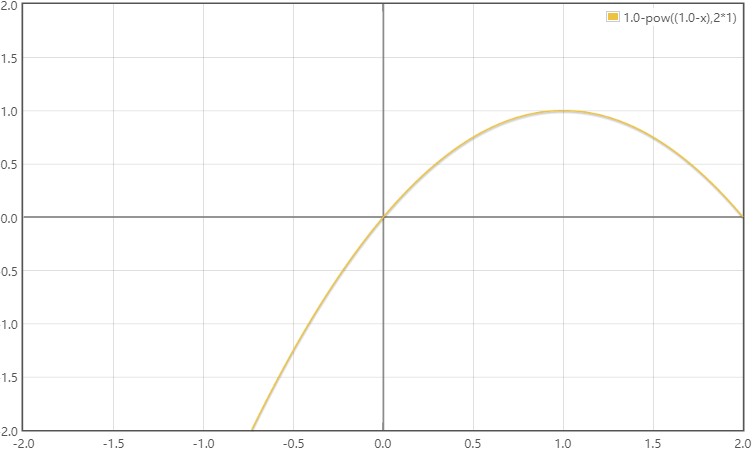
4、使用Interpolator
使用Interpolator很简单,创建需要的插值器类型,然后调用setInterpolator(Interpolator i)方法设置给Animation对象即可。
mAnimation.setInterpolator(interpolator)另外还可以直接在xml动画文件中设置动画的插值器
android:interpolator="@android:anim/accelerate_decelerate_interpolator"
    android:interpolator="@android:anim/accelerate_interpolator"
    android:interpolator="@android:anim/anticipate_interpolator
    android:interpolator="@android:anim/anticipate_overshoot_interpolator
    android:interpolator="@android:anim/bounce_interpolator
    android:interpolator="@android:anim/cycle_interpolator
    android:interpolator="@android:anim/decelerate_interpolator
    android:interpolator="@android:anim/linear_interpolator
    android:interpolator="@android:anim/overshoot_interpolator
4.1、AccelerateDecelerateInterpolator
构造
new AccelerateDecelerateInterpolator();
4.2、AccelerateInterpolator
构造
AccelerateInterpolator()
    /**
     * 动画应缓和的程度。
     * 将系数设置为1.0f会产生y = x ^ 2抛物线。
     * 大于1.0f的因数会放大缓入效果(即开始时更慢,结束时甚至更快)
     */
    AccelerateInterpolator(float factor)
4.3、AnticipateOvershootInterpolator
构造
//mTension默认为2.0f * 1.5f
    public AnticipateOvershootInterpolator() {
        mTension = 2.0f * 1.5f;
    }

    /**
     * @param tension 预期/超量。 当张力等于0.0f时,就不会有预期/超调,并且插补器将成为简单的加减速插补器。
     */
    public AnticipateOvershootInterpolator(float tension) {
        mTension = tension * 1.5f;
    }

    /**
     * @param tension 预期/超量。当张力等于0.0f时,就不会有预期/超调,并且插补器将成为简单的加减速插补器。
     * @param extraTension 乘以张力的量。例如,要以2.0f的张力获得与OvershootInterpolator相同的超调,可以使用1.5f的extraTension。
     */
    public AnticipateOvershootInterpolator(float tension, float extraTension) {
        mTension = tension * extraTension;
    }
4.4、LinearInterpolator
构造
public LinearInterpolator() {
    }
4.5、PathInterpolator
构造,
//注意The Path must start at (0,0) and end at (1,1)
    PathInterpolator(Path path)

    //为二次贝塞尔曲线创建一个插值器,假定为端点(0,0)和(1,1)
    PathInterpolator(float controlX, float controlY)

    //为三次贝塞尔曲线创建一个插值器,假定为端点(0,0)和(1,1)
    PathInterpolator(float controlX1, float controlY1, float controlX2, float controlY2)
例:new PathInterpolator(0.5f, 0.6f, .8f, .3f)

4.6、BounceInterpolator
构造
public BounceInterpolator() {
    }
4.7、OvershootInterpolator
构造
public OvershootInterpolator() {
        mTension = 2.0f;
    }

    /**
     * @param 张力过冲量。当张力等于0.0f时,不会出现过冲,并且插补器将成为简单的减速插补器。
     */
    public OvershootInterpolator(float tension) {
        mTension = tension;
    }
4.8、CycleInterpolator
构造
public CycleInterpolator(float cycles) {
        mCycles = cycles;
    }
4.9、AnticipateInterpolator
构造
public AnticipateInterpolator() {
        mTension = 2.0f;
    }
    /**
     * @param tension 预期量。 当张力等于0.0f时,没有预期值,并且插值器变为简单的加速度插值器。
     */
    public AnticipateInterpolator(float tension) {
        mTension = tension;
    }
4.10、DecelerateInterpolator
构造
public DecelerateInterpolator() {
    }

     /**
     * @param factor 动画应缓和的程度。 将系数设置为1.0f会产生上下颠倒的y = x ^ 2抛物线。
     * 大于1.0f的因数会放大缓和效果(即开始时更快,结束时甚至更慢).
     */
    public DecelerateInterpolator(float factor) {
        mFactor = factor;
    }
5、自定义Interpolator
如果上面系统自带的插值器都不能满足开发需求,那么可以实现Interpolator接口自定义插值器,实现getInterpolation(float input)方法
public class QuibblerInterpolator implements Interpolator {
        private float factor = 2.0f;

        public QuibblerInterpolator() {
        }

        public QuibblerInterpolator(float factor) {
            this.factor = factor;
        }

        @Override
        public float getInterpolation(float input) {
            return (float) (Math.pow(2.0, -10.0 * input) * Math.sin((input - factor / 4) * (2 * Math.PI) / factor) + 1);
        }
}但是不要实现TimeInterpolator接口,因为会发现Animation设置Interpolator方法的参数是Interpolator而不是父接口TimeInterpolator。
/**
     * Sets the acceleration curve for this animation. Defaults to a linear
     * interpolation.
     *
     * @param i The interpolator which defines the acceleration curve
     * @attr ref android.R.styleable#Animation_interpolator
     */
    public void setInterpolator(Interpolator i) {
        mInterpolator = i;
    }
参考博客:
Docs > Reference > Interpolator">Android Developers > Docs > Reference > Interpolator
Use Interpolators">Property Animation Overview > Use Interpolators
让View具有弹性效果的动画——SpringAnimation
Android动画插值器之PathInterpolator浅析


