
视图动画:Animation
动画相关的代码在frameworks层../frameworks/base/core/java/android/view/animation中。Android中的动画有如下分类:
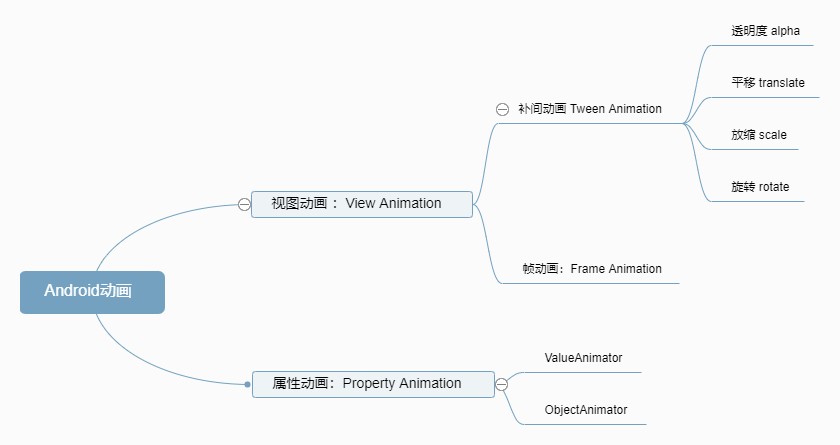
在深入了解动画之前,还是先来看看所有动效的父类Animation类。帧动画详见《逐帧动画:Frame Animation》,补间动画详见《补间动画:Tween Animation》。
1、Animation
可以应用于视图,曲面或其他对象的动画的抽象。 详细官方解释参阅动画包android.view.animation描述。Android提供了两种可用于创建简单动画的机制:补间动画和逐帧动画。两种动画类型都可以在任何View对象中使用,以提供简单的旋转计时器,活动图标和其他有用的UI元素。
1.1、补间动画
补间动画:对View的内容执行一系列简单的转换(位置,大小,旋转等);补间动画由android.view.animation中的类处理。
1.2、逐帧动画
逐帧动画:一个接一个地加载一系列Drawable资源。逐帧动画由android.graphics.drawable中的AnimationDrawable类处理。
2、Animation方法
结束一些Animation抽象类中的通用方法,可以在各种子类动画中调用。
2.1、开始/结束
①start():首次启动动画的便捷方法
②cancel():取消动画。取消动画会调用AnimationListener(如果已设置)以通知动画结束。
③startNow():在当前时间以毫秒为单位启动动画的便捷方法。
④hasEnded():指示此动画是否结束
⑤hasStarted():指示此动画是否已经开始
2.2、初始化/重置
①initialize(int width, int height, int parentWidth, int parentHeight)
/**
     * 使用要设置动画的对象及其父对象的尺寸初始化此动画。
     * (这是为了支持相对于这些尺寸指定动画大小。)
     *
     * @param width 动画对象的宽度
     * @param height 动画对象的高度
     * @param parentWidth 动画对象的父对象的宽度
     * @param parentHeight 动画对象的父对象的高度
     */
    public void initialize(int width, int height, int parentWidth, int parentHeight) {
        reset();
        mInitialized = true;
}②reset():重置此动画的初始化状态
2.3、动画时长
①setDuration(long durationMillis):此动画应持续多长时间。持续时间不能为负。
②restrictDuration(long durationMillis):确保此动画将运行的持续时间不超过durationMillis。 除了调整持续时间本身之外,这还可以确保重复计数也不会使其运行时间超过给定时间。
③scaleCurrentDuration(float scale):缩放持续时间的多少
④setStartTime(long startTimeMillis):该动画何时开始
⑤setStartOffset(long startOffset):此动画应偏移startOffset时间开始。
2.4、重复动画
①setRepeatMode(int repeatMode):动画的重复方式
/**
     * When the animation reaches the end and the repeat count is INFINTE_REPEAT
     * or a positive value, the animation restarts from the beginning.
     */
    public static final int RESTART = 1;

    /**
     * When the animation reaches the end and the repeat count is INFINTE_REPEAT
     * or a positive value, the animation plays backward (and then forward again).
     */
public static final int REVERSE = 2;②setRepeatCount(int repeatCount):动画的重复次数
③getRepeatMode()
④getRepeatCount()
2.5、插值器
这里先简单提一下Interpolator插值器,后面单独开一篇学习插值器。
①setInterpolator(Context context,int resID):设置此动画的加速度曲线。 插值器从指定的上下文作为资源加载。
②setInterpolator(Interpolator i):设置此动画的加速度曲线。 默认为线性插值。
③getInterpolator():获取当前Animation的Interpolator
2.6、动画停留*
①setFillEnabled(boolean fillEnabled):如果fillEnabled为true,则动画将应用fillBefore的值;否则,fillBefore将被忽略,并且动画变换将一直应用到动画结束为止。
②setFillBefore(boolean fillBefore):如果fillBefore为true,则动画结束时画面停留在第一帧。 如果setFillEnabled未设置为true,则默认为true。
③setFillAfter(boolean fillAfter):如果fillAfter为true,则动画结束时画面停留在最后一帧。 如果未设置默认为false。
在Animation类中的这三个值之前约束关系比较奇葩
mFillEnabled mFillBefore mFillAfter 最终停留
true true false 第一帧
true false true 最后一帧
false - - 忽略
true false false 忽略
2.7、其它
①setZAdjustment(int zAdjustment):允许在动画播放期间,调整播放内容在Z轴方向的顺序。定义有三个值如下:
/**
     * Requests that the content being animated be kept in its current Z
     * order.
     */
    public static final int ZORDER_NORMAL = 0;

    /**
     * Requests that the content being animated be forced on top of all other
     * content for the duration of the animation.
     */
    public static final int ZORDER_TOP = 1;

    /**
     * Requests that the content being animated be forced under all other
     * content for the duration of the animation.
     */
    public static final int ZORDER_BOTTOM = -1;
③setBackgroundColor(@ColorInt int bg):设置动画背景
3、AnimationListener
AnimationListener动画监听器,定义在Animation类中的接口。属性动画也有类似的监听器AnimatorListener,详见《属性动画:ValueAnimator》。
3.1、AnimationListener接口
定义了三种动画执行状态相关的方法:onAnimationStart(Animation )、onAnimationEnd(Animation )、onAnimationRepeat(Animation )。
/**
     * <p>An animation listener receives notifications from an animation.
     * Notifications indicate animation related events, such as the end or the
     * repetition of the animation.</p>
     */
    public static interface AnimationListener {
        /**
         * <p>Notifies the start of the animation.</p>
         *
         * @param animation The started animation.
         */
        void onAnimationStart(Animation animation);
        /**
         * <p>Notifies the end of the animation. This callback is not invoked
         * for animations with repeat count set to INFINITE.</p>
         *
         * @param animation The animation which reached its end.
         */
        void onAnimationEnd(Animation animation);
        /**
         * <p>Notifies the repetition of the animation.</p>
         *
         * @param animation The animation which was repeated.
         */
        void onAnimationRepeat(Animation animation);
}向Animation对象添加AnimationListener,在Animation动画执行的不同阶段:开始、重复、结束,分别会调用这几个回到监听方法。
3.2、设置AnimationListener
实现上面的AnimationListener接口
Animation.AnimationListener animationListener = new Animation.AnimationListener() {
        @Override
        public void onAnimationStart(Animation animation) {
            //动画 start
        }

        @Override
        public void onAnimationEnd(Animation animation) {
            //动画 end
        }

        @Override
        public void onAnimationRepeat(Animation animation) {
            //动画 repeat
        }
};①setAnimationListener(AnimationListener listener)方法将动画监听器设置给Animation对象即可。
mAnimation.setAnimationListener(animationListener);②setListenerHandler(Handler handler):设置调用AnimationListener回调方法的Handler
3.3、Animation内部执行
为什么会在Animation执行动画的时候调用AnimationListener相应的回调方法呢?得益于View和Animation内部的设计,其中hasAnimationListener()方法判断当前Animation动画有没有设置了动画监听器:
private boolean hasAnimationListener() {
        return mListener != null;
    }
在动画执行的不同阶段,会调用下面Animation内部定义的动画事件分发方法,如果当前Animation动画对象设置了监听器则会回调AnimationListener相应的方法。
//动画开始,分发回调
    void dispatchAnimationStart() {
        if (mListener != null) {
            mListener.onAnimationStart(this);
        }
    }

    //动画重复,分发出去并回调AnimationListener
    void dispatchAnimationRepeat() {
        if (mListener != null) {
            mListener.onAnimationRepeat(this);
        }
    }

    //分发动画结束,回调
    void dispatchAnimationEnd() {
        if (mListener != null) {
            mListener.onAnimationEnd(this);
        }
    }
更多资料:
Docs > Reference > Animation">Android Developers > Docs > Reference > Animation
Android动画FillEnabled、FillBefore、FillAfter理解


