Volley之网络请求NetworkDispatcher
在源码解析Volley请求队列RequestQueue一文最后,我们捋了向请求队列添加Request网络请求的逻辑:
<T> void beginRequest(Request<T> request) {
        // If the request is uncacheable, skip the cache queue and go straight to the network.
        if (!request.shouldCache()) {
            sendRequestOverNetwork(request);
        } else {
            mCacheQueue.add(request);
        }
}对于没有缓存需求的网络请求,sendRequestOverNetwork(Request<T> request)放入网络请求队列mNetworkQueue中等待处理:
<T> void sendRequestOverNetwork(Request<T> request) {
        mNetworkQueue.add(request);
    }
1、NetworkDispatcher
NetworkDispatcher继承自Thread。
/**
     * Provides a thread for performing network dispatch from a queue of requests.
     */
    public class NetworkDispatcher extends Thread {
        ...
    }
1.1、NetworkDispatcher初始化
在源码解析Volley请求队列RequestQueue一文开启请求队列start()方法中构造特定数量的网络调度程序线程,也就是NetworkDispatcher线程实例,并启动。
/** Starts the dispatchers in this queue. */
    public void start() {
        stop(); // Make sure any currently running dispatchers are stopped.
        // Create the cache dispatcher and start it.
        mCacheDispatcher = new CacheDispatcher(mCacheQueue, mNetworkQueue, mCache, mDelivery);
        mCacheDispatcher.start();
        // Create network dispatchers (and corresponding threads) up to the pool size.
        for (int i = 0; i < mDispatchers.length; i++) {
            NetworkDispatcher networkDispatcher =
                    new NetworkDispatcher(mNetworkQueue, mNetwork, mCache, mDelivery);
            mDispatchers[i] = networkDispatcher;
            networkDispatcher.start();
        }
}NetworkDispatcher的构造方法如下,使用RequestQueue队列中的成员变量作为参数初始化NetworkDispatcher。
/ **
      *创建一个新的网络调度程序线程,必须先调用start()才能开启处理。
      *
      * @param queue传入分类请求队列
      * @param network用于执行请求的网络接口
      * @param cache缓存接口,用于将响应写入缓存
      * @param delivery交付界面,用于发布Response
      * /
    public NetworkDispatcher(BlockingQueue<Request<?>> queue, Network network,
            Cache cache, ResponseDelivery delivery) {
        mQueue = queue;
        mNetwork = network;
        mCache = cache;
        mDelivery = delivery;
    }
1.2、NetworkDispatcher成员
NetworkDispatcher中的成员变量有如下5个,前四个都是持有RequestQueue请求队列中的变量引用。
/** The queue of requests to service. */
    private final BlockingQueue<Request<?>> mQueue;

    /** The network interface for processing requests. */
    private final Network mNetwork;

    /** The cache to write to. */
    private final Cache mCache;

    /** For posting responses and errors. */
    private final ResponseDelivery mDelivery;

    /** Used for telling us to die. */
    private volatile boolean mQuit = false;
1.3、启动NetworkDispatcher
在RequestQueue的start()方法中,每创建一个NetworkDispatcher实例,就调用该实例的start()方法开启网络调度程序线程。Thread的start()方法我们无需关注,看NetworkDispatcher重写的的线程run()方法
@Override
    public void run() {
        Process.setThreadPriority(Process.THREAD_PRIORITY_BACKGROUND);
        while (true) {
            try {
                processRequest();
            } catch (InterruptedException e) {
                // We may have been interrupted because it was time to quit.
                if (mQuit) {
                    Thread.currentThread().interrupt();
                    return;
                }
                VolleyLog.e(
                        "Ignoring spurious interrupt of NetworkDispatcher thread; "
                                + "use quit() to terminate it");
            }
        }
}可以看到每一个RequestQueue网络调度程序线程启动之后都会无线循环,不断的从RequestQueue中的拿取网络请求并处理。
1.4、关闭NetworkDispatcher
RequestQueue提供了一个stop()方法,停止请求队列。挨个调用每个调度程序的quit()方法
/** Stops the cache and network dispatchers. */
    public void stop() {
        if (mCacheDispatcher != null) {
            mCacheDispatcher.quit();
        }
        for (final NetworkDispatcher mDispatcher : mDispatchers) {
            if (mDispatcher != null) {
                mDispatcher.quit();
            }
        }
}RequestQueue网络调度程序线程的quit()方法实现如下,将标志位mQuit置为true,再调用Thread的interrupt()终止当前线程。会在前面的run()方法中被捕获到终止while(true){}循环。
/**
     * Forces this dispatcher to quit immediately. If any requests are still in the queue, they are
     * not guaranteed to be processed.
     */
    public void quit() {
        mQuit = true;
        interrupt();
    }
2、处理网络请求
开启RequestQueue网络调度程序线程后,开始循环处理网络请求队列中的请求。
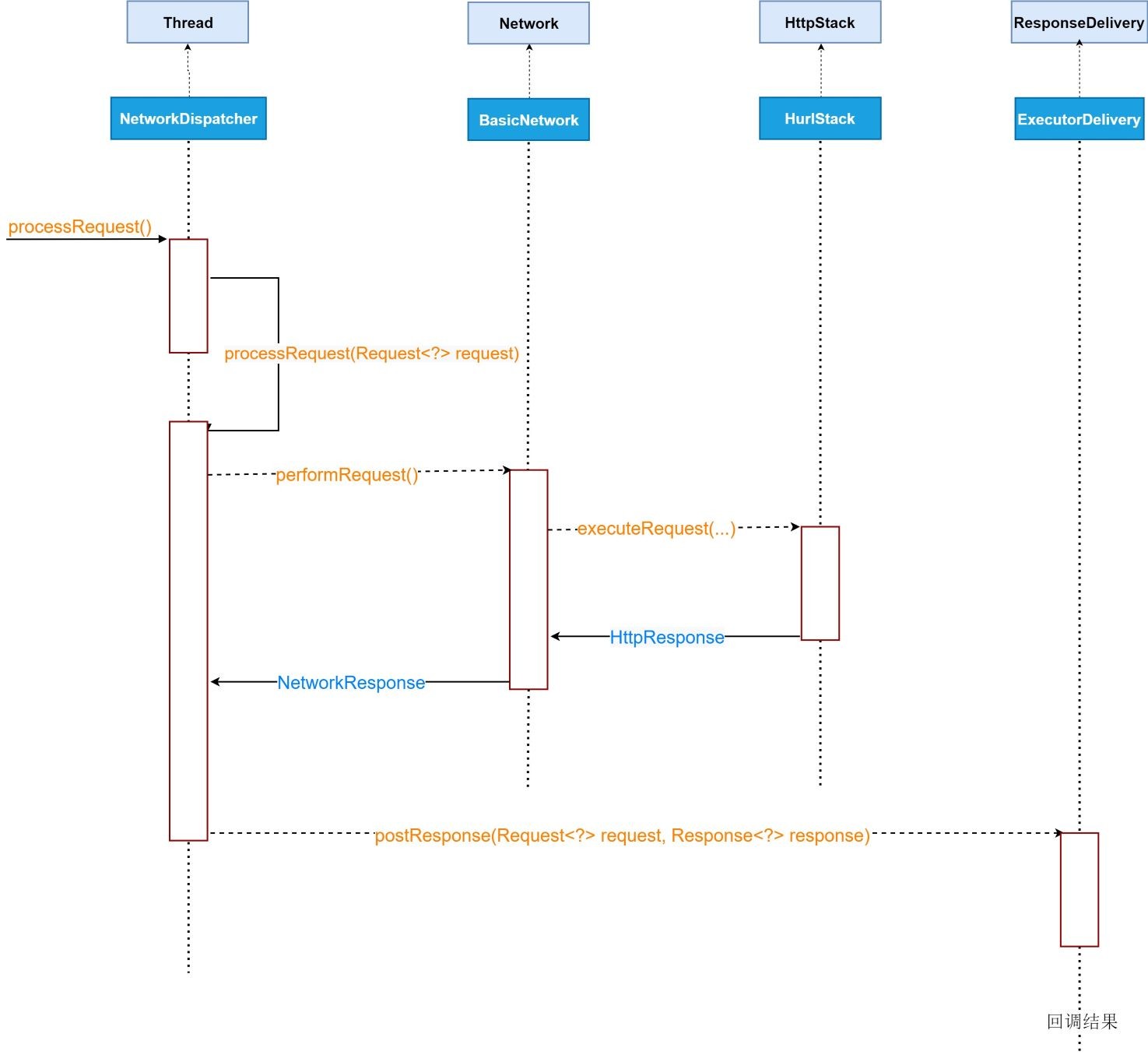
2.1、processRequest二级调用
在主循环中不断的调用processRequest()方法,而在该方法中从RequestQueue的网络请求阻塞队列BlockingQueue<Request<?>>中take()网络请求处理。
之所以单独再抽取一个方法,注释写的很清楚明白:提取到单独的方法中,避免在不确定的时间内保持先前的请求引用有效的必要条件。
// Extracted to its own method to ensure locals have a constrained liveness scope by the GC.
    // This is needed to avoid keeping previous request references alive for an indeterminate amount
    // of time. Update consumer-proguard-rules.pro when modifying this. See also
    // https://github.com/google/volley/issues/114
    private void processRequest() throws InterruptedException {
        // Take a request from the queue.
        Request<?> request = mQueue.take();
        processRequest(request);
}下面才是真正处理请求的方法processRequest(Request<?> request),代码量非常精简,其中大部分操作都被提取到Network接口中,而这里从Volley类层层初始化,经过RequestQueue传递过来的NetWork的默认实现是BasicNetwork。
void processRequest(Request<?> request) {
        long startTimeMs = SystemClock.elapsedRealtime();
        request.sendEvent(RequestQueue.RequestEvent.REQUEST_NETWORK_DISPATCH_STARTED);
        try {
            request.addMarker("network-queue-take");
            // If the request was cancelled already, do not perform the
            // network request.
            if (request.isCanceled()) {
                request.finish("network-discard-cancelled");
                request.notifyListenerResponseNotUsable();
                return;
            }
            addTrafficStatsTag(request);
            // Perform the network request.
            NetworkResponse networkResponse = mNetwork.performRequest(request);
            request.addMarker("network-http-complete");
            // If the server returned 304 AND we delivered a response already,
            // we're done -- don't deliver a second identical response.
            if (networkResponse.notModified && request.hasHadResponseDelivered()) {
                request.finish("not-modified");
                request.notifyListenerResponseNotUsable();
                return;
            }
            // Parse the response here on the worker thread.
            Response<?> response = request.parseNetworkResponse(networkResponse);
            request.addMarker("network-parse-complete");
            // Write to cache if applicable.
            // TODO: Only update cache metadata instead of entire record for 304s.
            if (request.shouldCache() && response.cacheEntry != null) {
                mCache.put(request.getCacheKey(), response.cacheEntry);
                request.addMarker("network-cache-written");
            }
            // Post the response back.
            request.markDelivered();
            mDelivery.postResponse(request, response);
            request.notifyListenerResponseReceived(response);
        } catch (VolleyError volleyError) {
            volleyError.setNetworkTimeMs(SystemClock.elapsedRealtime() - startTimeMs);
            parseAndDeliverNetworkError(request, volleyError);
            request.notifyListenerResponseNotUsable();
        } catch (Exception e) {
            VolleyLog.e(e, "Unhandled exception %s", e.toString());
            VolleyError volleyError = new VolleyError(e);
            volleyError.setNetworkTimeMs(SystemClock.elapsedRealtime() - startTimeMs);
            mDelivery.postError(request, volleyError);
            request.notifyListenerResponseNotUsable();
        } finally {
            request.sendEvent(RequestQueue.RequestEvent.REQUEST_NETWORK_DISPATCH_FINISHED);
        }
    }
2.2、BasicNetwork封装网络
BasicNetwork是Volley开源库提供的Network接口默认实现,performRequest(Request<?> request)实现如下,执行网络请求并将结果封装成NetworkResponse返回。
@Override
    public NetworkResponse performRequest(Request<?> request) throws VolleyError {
        long requestStart = SystemClock.elapsedRealtime();
        while (true) {
            HttpResponse httpResponse = null;
            byte[] responseContents = null;
            List<Header> responseHeaders = Collections.emptyList();
            try {
                ...
                //这里是关键,再次通过HttpStack完成网络请求
                httpResponse = mBaseHttpStack.executeRequest(request, additionalRequestHeaders);
                ...
                return new NetworkResponse(
                        statusCode,
                        responseContents,
                        /* notModified= */ false,
                        SystemClock.elapsedRealtime() - requestStart,
                        responseHeaders);
            } catch (IOException e) {
                // This will either throw an exception, breaking us from the loop, or will loop
                // again and retry the request.
                NetworkUtility.handleException(
                        request, e, requestStart, httpResponse, responseContents);
            }
        }
    }
2.3、BaseHttpStack封装网络
HttpStack是HTTP堆栈抽象接口,已被Deprecate。
@Deprecated
    public interface HttpStack {
        /**
         * Performs an HTTP request with the given parameters.
         *
         * <p>A GET request is sent if request.getPostBody() == null. A POST request is sent otherwise,
         * and the Content-Type header is set to request.getPostBodyContentType().
         *
         * @param request the request to perform
         * @param additionalHeaders additional headers to be sent together with {@link
         *     Request#getHeaders()}
         * @return the HTTP response
         */
        HttpResponse performRequest(Request<?> request, Map<String, String> additionalHeaders)
                throws IOException, AuthFailureError;
}取而代之的是BaseHttpStack抽象类:
/** An HTTP stack abstraction. */
    @SuppressWarnings("deprecation") // for HttpStack
    public abstract class BaseHttpStack implements HttpStack {
        ...
}Volley框架提供了BaseHttpStack抽象类的默认实现:HurlStack。
回想到在Volley类中创建RequestQueue的时候,有下面一段代码进行了SDK版本的判断。这是因为Android API 2.3以下HttpUrlConnection无法使用,而 API 2.3 以上采用HttpUrlConnection进行连接。
if (Build.VERSION.SDK_INT >= 9) {
            //Android 2.3以后使用内置的HurlStack
            network = new BasicNetwork(new HurlStack());
        } else {
            // Prior to Gingerbread, HttpUrlConnection was unreliable.
            // See: http://android-developers.blogspot.com/2011/09/androids-http-clients.html
            // At some point in the future we'll move our minSdkVersion past Froyo and can
            // delete this fallback (along with all Apache HTTP code).
            String userAgent = "volley/0";
            try {
                String packageName = context.getPackageName();
                PackageInfo info =
                        context.getPackageManager().getPackageInfo(packageName, /* flags= */ 0);
                userAgent = packageName + "/" + info.versionCode;
            } catch (NameNotFoundException e) {
            }
            network =
                    new BasicNetwork(
                            new HttpClientStack(AndroidHttpClient.newInstance(userAgent)));
}HurlStack实现的executeRequest(Request<?> request, Map<String, String> additionalHeaders)方法,内部是借助HttpURLConnection实现网络的访问。
@Override
    public HttpResponse executeRequest(Request<?> request, Map<String, String> additionalHeaders)
            throws IOException, AuthFailureError {
        //从Request中拿到请求的Url链接,这是在构造请求时传入的
        String url = request.getUrl();
        HashMap<String, String> map = new HashMap<>();
        map.putAll(additionalHeaders);
        // Request.getHeaders() takes precedence over the given additional (cache) headers).
        map.putAll(request.getHeaders());
        if (mUrlRewriter != null) {
            String rewritten = mUrlRewriter.rewriteUrl(url);
            if (rewritten == null) {
                throw new IOException("URL blocked by rewriter: " + url);
            }
            url = rewritten;
        }
        //构造URL
        URL parsedUrl = new URL(url);
        //进行一些设置,并且打开网络连接HttpURLConnection
        HttpURLConnection connection = openConnection(parsedUrl, request);
        boolean keepConnectionOpen = false;
        try {
            for (String headerName : map.keySet()) {
                connection.setRequestProperty(headerName, map.get(headerName));
            }
            setConnectionParametersForRequest(connection, request);
            // Initialize HttpResponse with data from the HttpURLConnection.
            int responseCode = connection.getResponseCode();
            if (responseCode == -1) {
                // -1 is returned by getResponseCode() if the response code could not be retrieved.
                // Signal to the caller that something was wrong with the connection.
                throw new IOException("Could not retrieve response code from HttpUrlConnection.");
            }
            if (!hasResponseBody(request.getMethod(), responseCode)) {
                return new HttpResponse(responseCode, convertHeaders(connection.getHeaderFields()));
            }
            // Need to keep the connection open until the stream is consumed by the caller. Wrap the
            // stream such that close() will disconnect the connection.
            keepConnectionOpen = true;
            return new HttpResponse(
                    responseCode,
                    convertHeaders(connection.getHeaderFields()),
                    connection.getContentLength(),
                    createInputStream(request, connection));
        } finally {
            if (!keepConnectionOpen) {
                connection.disconnect();
            }
        }
}下面这个方法开发者一定很熟悉,openConnection(URL url, Request<?> request)打开网络连接并且进行常见的网络连接设置:
/**
     * Opens an {@link HttpURLConnection} with parameters.
     *
     * @param url
     * @return an open connection
     * @throws IOException
     */
    private HttpURLConnection openConnection(URL url, Request<?> request) throws IOException {
        HttpURLConnection connection = createConnection(url);
        int timeoutMs = request.getTimeoutMs();
        connection.setConnectTimeout(timeoutMs);
        connection.setReadTimeout(timeoutMs);
        connection.setUseCaches(false);
        connection.setDoInput(true);
        // use caller-provided custom SslSocketFactory, if any, for HTTPS
        if ("https".equals(url.getProtocol()) && mSslSocketFactory != null) {
            ((HttpsURLConnection) connection).setSSLSocketFactory(mSslSocketFactory);
        }
        return connection;
}调用下面的方法createConnection(URL url)用URL打开HttpURLConnection连接:
protected HttpURLConnection createConnection(URL url) throws IOException {
        HttpURLConnection connection = (HttpURLConnection) url.openConnection();
        connection.setInstanceFollowRedirects(HttpURLConnection.getFollowRedirects());
        return connection;
    }
3、网络请求结果回调
经过上面一系列的网络请求,最终回到NetworkDispatcher的processRequest(Request<?> request)方法中,将结果传递给业务方。
@VisibleForTesting
    void processRequest(Request<?> request) {
        try {
            ...
            Response<?> response = request.parseNetworkResponse(networkResponse);
            ...
            mDelivery.postResponse(request, response);
        } catch (VolleyError volleyError) {}
          catch (Exception e) {}
          finally {
            request.sendEvent(RequestQueue.RequestEvent.REQUEST_NETWORK_DISPATCH_FINISHED);
        }
    }
3.1、ResponseDelivery
ResponseDelivery是Volley控件中定义的请求结果分发接口:
public interface ResponseDelivery {
        /** Parses a response from the network or cache and delivers it. */
        void postResponse(Request<?> request, Response<?> response);
        /**
         * Parses a response from the network or cache and delivers it. The provided Runnable will be
         * executed after delivery.
         */
        void postResponse(Request<?> request, Response<?> response, Runnable runnable);
        /** Posts an error for the given request. */
        void postError(Request<?> request, VolleyError error);
}ResponseDelivery接口默认实现类是ExecutorDelivery。有能力的开发者可以实现自己的ResponseDelivery,学会造零件。
/** Used for posting responses, typically to the main thread. */
    private final Executor mResponsePoster;
    /**
     * Creates a new response delivery interface.
     *
     * @param handler {@link Handler} to post responses on
     */
    public ExecutorDelivery(final Handler handler) {
        // Make an Executor that just wraps the handler.
        mResponsePoster =
                new Executor() {
                    @Override
                    public void execute(Runnable command) {
                        handler.post(command);
                    }
                };
}结果通过Handler执行,在RequestQueue的构造方法中,通过主线程的Main Looper创建主线程Handler。所有的网络请求结果回调在主线程中。
public RequestQueue(Cache cache, Network network, int threadPoolSize) {
        this(
                cache,
                network,
                threadPoolSize,
                new ExecutorDelivery(new Handler(Looper.getMainLooper())));
    }
3.2、响应传递任务:ResponseDeliveryRunnable
ResponseDeliveryRunnable将请求和结果包装在一起成为一个响应传递任务。
private static class ResponseDeliveryRunnable implements Runnable {

        private final Request mRequest;
        private final Response mResponse;
        private final Runnable mRunnable;

        public ResponseDeliveryRunnable(Request request, Response response, Runnable runnable) {
            mRequest = request;
            mResponse = response;
            mRunnable = runnable;
        }

        @Override
        public void run() {
            if (mRequest.isCanceled()) {
                mRequest.finish("canceled-at-delivery");
                return;
            }
            // Deliver a normal response or error, depending.
            if (mResponse.isSuccess()) {
                mRequest.deliverResponse(mResponse.result);
            } else {
                mRequest.deliverError(mResponse.error);
            }
            ...

            // If we have been provided a post-delivery runnable, run it.
            if (mRunnable != null) {
                mRunnable.run();
            }
        }

    }
3.3、成功回调:Request.deliverResponse(T response)
在3.2节中的响应传递任务run()方法中,调用Request的分发方法回调Response结果。deliverResponse(String response)是抽象类Request中的抽象方法。以StringRequest为例,deliverResponse(String response)
@Override
    protected void deliverResponse(String response) {
        Response.Listener<String> listener;
        synchronized (mLock) {
            listener = mListener;
        }
        if (listener != null) {
            listener.onResponse(response);
        }
}结果回调接口Listener<T>定义在Response<T>类中。也就是我们构造Request网络请求时传入的回调接口实例。
/** Callback interface for delivering parsed responses. */
    public interface Listener<T> {
        /** Called when a response is received. */
        void onResponse(T response);
    }
3.4、失败回调:Request.deliverError(VolleyError error)
Volley为错误回调提供一个统一的方法deliverError(VolleyError error),并且定义一个公共错误类VolleyError。
public void deliverError(VolleyError error) {
        Response.ErrorListener listener;
        synchronized (mLock) {
            listener = mErrorListener;
        }
        if (listener != null) {
            listener.onErrorResponse(error);
        }
    }
和 结果回调接口Listener<T>一样,错误回调接口也是定义在Response<T>类中。
/** Callback interface for delivering error responses. */
    public interface ErrorListener {
        /**
         * Callback method that an error has been occurred with the provided error code and optional
         * user-readable message.
         */
        void onErrorResponse(VolleyError error);
    }
关于Volley的网络请求就到这里,别忘了Volley自带缓存。