
View的requestLayout()流程
requestLayout()常用来对View重新进行测量、布局和绘制。当View需要更新当前的布局时,就向父布局申请重新布局。
虽然是ViewParent接口中定义的方法:
public interface ViewParent {
        /**
         * Called when something has changed which has invalidated the layout of a
         * child of this view parent. This will schedule a layout pass of the view
         * tree.
         */
        public void requestLayout();

        ...
}但其完整实现却在View中,而不在ViewGroup类里(后面会讲到):
/**
     * Call this when something has changed which has invalidated the
     * layout of this view. This will schedule a layout pass of the view
     * tree. This should not be called while the view hierarchy is currently in a layout
     * pass ({@link #isInLayout()}. If layout is happening, the request may be honored at the
     * end of the current layout pass (and then layout will run again) or after the current
     * frame is drawn and the next layout occurs.
     *
     * <p>Subclasses which override this method should call the superclass method to
     * handle possible request-during-layout errors correctly.</p>
     */
    @CallSuper
    public void requestLayout() {

        if (mMeasureCache != null) mMeasureCache.clear();


        if (mAttachInfo != null && mAttachInfo.mViewRequestingLayout == null) {
            // 如果请求的是当前View,则仅触发 request-during-layout 逻辑,而不是其父层次结构中的视图
            ViewRootImpl viewRoot = getViewRootImpl();
            if (viewRoot != null && viewRoot.isInLayout()) {
                if (!viewRoot.requestLayoutDuringLayout(this)) {
                    return;
                }
            }
            mAttachInfo.mViewRequestingLayout = this;
        }

        //添加两个标志位: PFLAG_FORCE_LAYOUT和PFLAG_INVALIDATED
        //后面执行measure()和layout()流程中用到
        mPrivateFlags |= PFLAG_FORCE_LAYOUT;
        mPrivateFlags |= PFLAG_INVALIDATED;

        //通过mParent父View,层层向上传递requestLayout()
        if (mParent != null && !mParent.isLayoutRequested()) {
            mParent.requestLayout();
        }
        if (mAttachInfo != null && mAttachInfo.mViewRequestingLayout == this) {
            mAttachInfo.mViewRequestingLayout = null;
        }
}在继续跟随源码剖析requestLayout()流程之前,先搞清楚View中的mParent从哪来?
1、View中mParent的来历
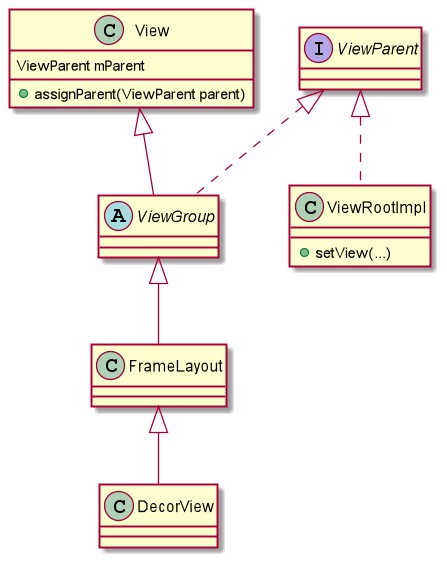
View中的mParent成员变量通常来说指的是当前View的父容器ViewGroup,但是有一个特殊,对于顶层DecorView来说它的mParent是ViewRootImpl。
/**
     * The parent this view is attached to.
     * {@hide}
     *
     * @see #getParent()
     */
    @UnsupportedAppUsage(maxTargetSdk = Build.VERSION_CODES.P)
protected ViewParent mParent;mParent通过方法assignParent(ViewParent parent)被赋值:
/*
     * Caller is responsible for calling requestLayout if necessary.
     * (This allows addViewInLayout to not request a new layout.)
     */
    @UnsupportedAppUsage
    void assignParent(ViewParent parent) {
        if (mParent == null) {
            mParent = parent;
        } else if (parent == null) {
            mParent = null;
        } else {
            throw new RuntimeException("view " + this + " being added, but"
                    + " it already has a parent");
        }
}①在DecorView添加到Window中的流程一文最后,通过ViewRootImpl的setView()方法设置传递过来的DecorView,在该方法中会给DecorView的mParent指定为当前ViewRootImpl,ViewRootImpl实现了ViewParent接口。
/**
     * We have one child
     */
    public void setView(View view, WindowManager.LayoutParams attrs, View panelParentView,
            int userId) {
        synchronized (this) {
            if (mView == null) {
                mView = view;
                ...
                view.assignParent(this);
                ...
            }
        }
}②将View添加到ViewGroup中,通常使用addView(View child)等方法,最后会调用内部的addViewInner()方法,将添加进来的子View的mParent设置成当前所在容器:
private void addViewInner(View child, int index, LayoutParams params,
            boolean preventRequestLayout) {
        ...
        // tell our children
        if (preventRequestLayout) {
            child.assignParent(this);
        } else {
            child.mParent = this;
        }
        ...
    }
为了方便理解,简化关系图如下:
2、View、ViewGroup与ViewParent
在开头提到requestLayout()方法是定义在ViewParent接口中的方法
public interface ViewParent {
        /**
         * Called when something has changed which has invalidated the layout of a
         * child of this view parent. This will schedule a layout pass of the view
         * tree.
         */
        public void requestLayout();

        ...
}在View类中有同样方法签名的requestLayout(),这本和ViewParent接口中的requestLayout()没什么关系。
public class View {

        /**
         * Called when something has changed which has invalidated the layout of a
         * child of this view parent. This will schedule a layout pass of the view
         * tree.
         */
        public void requestLayout(){

        }

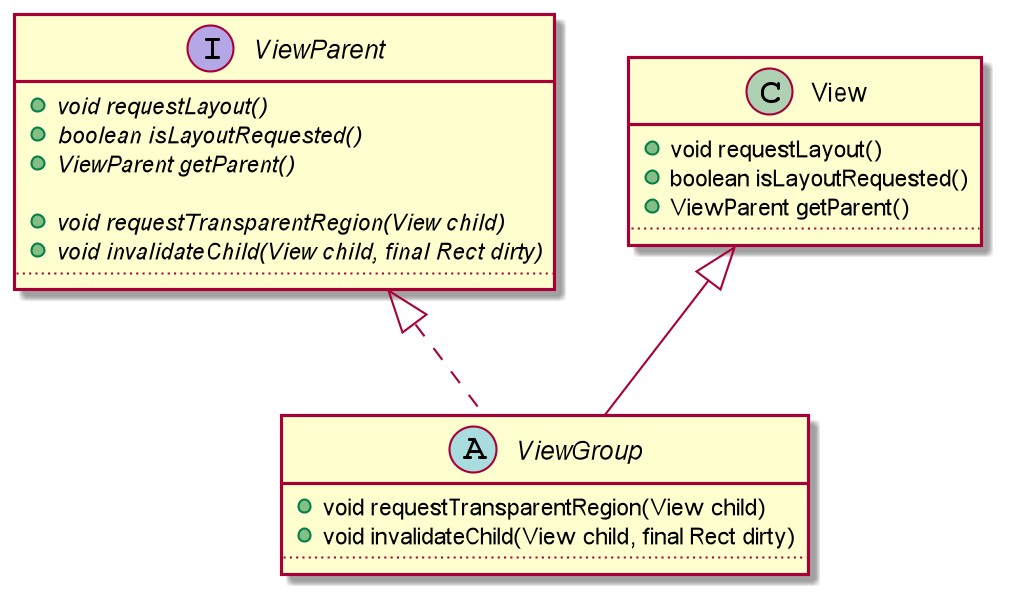
}但是,ViewGroup继承子View并且实现ViewParent接口,本该实现接口中的方法,但已经从View通过继承拥有了部分接口方法的实现,所以无需再在ViewGroup中实现。
public abstract class ViewGroup extends View implements ViewParent, ViewManager {
        ..
    }
类的部分方法及继承关系图,如下:
3、requestLayout() 流程
前面都搞清楚,回到主流程,继续往下看。
首先,在requestLayout()请求中会给View添加两个标志位: PFLAG_FORCE_LAYOUT和PFLAG_INVALIDATED。
...
        //添加两个标志位: PFLAG_FORCE_LAYOUT和PFLAG_INVALIDATED
        mPrivateFlags |= PFLAG_FORCE_LAYOUT;
        mPrivateFlags |= PFLAG_INVALIDATED;
...添加的这两个标志在View之后的测量、布局、绘制流程中起到关键作用:
public final void measure(int widthMeasureSpec, int heightMeasureSpec) {
        ...
        //提取标志位PFLAG_FORCE_LAYOUT,是否强制布局
        final boolean forceLayout = (mPrivateFlags & PFLAG_FORCE_LAYOUT) == PFLAG_FORCE_LAYOUT;
        ...
        final boolean needsLayout = specChanged && (sAlwaysRemeasureExactly || !isSpecExactly || !matchesSpecSize);
        if (forceLayout || needsLayout) {
            ...
            //走到熟悉的onMeasure()方法
            onMeasure(widthMeasureSpec, heightMeasureSpec);
            ...
            //最后再给标志位中添加PFLAG_LAYOUT_REQUIRED
            mPrivateFlags |= PFLAG_LAYOUT_REQUIRED;
        }
        ...
}在measure()测量过程中添加的PFLAG_LAYOUT_REQUIRED标志位,也会在后续的layout()布局中起作用:
public void layout(int l, int t, int r, int b) {
        ...

        //判断有PFLAG_LAYOUT_REQUIRED,将执行onLayout()
        if (changed || (mPrivateFlags & PFLAG_LAYOUT_REQUIRED) == PFLAG_LAYOUT_REQUIRED) {
            ////走到熟悉的onLayout()方法
            onLayout(changed, l, t, r, b);

            ...

            //onLayout完成之后,清除PFLAG_LAYOUT_REQUIRED标志
            mPrivateFlags &= ~PFLAG_LAYOUT_REQUIRED;
        }

    }
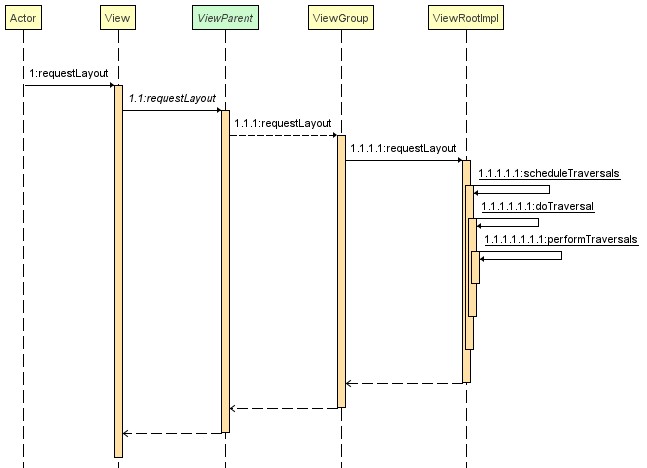
然后通过父View mParent,类似责任链模式,层层向上传递,requestLayout()请求最终是到ViewRootImpl中去处理。
...
        //通过mParent父View,层层向上传递requestLayout()
        if (mParent != null && !mParent.isLayoutRequested()) {
            mParent.requestLayout();
        }
...ViewRootImpl同样实现了ViewParent接口,不像ViewGroup那样“幸运”,ViewParent接口中的方法都需要在ViewRootImpl中实现。requestLayout()方法在ViewRootImpl中的实现如下:
@Override
    public void requestLayout() {
        if (!mHandlingLayoutInLayoutRequest) {

            //必须在主线程调用requestLayout()
            checkThread();

            //requestLayout()中将mLayoutRequested设置为true
            mLayoutRequested = true;
            scheduleTraversals();
        }
}先通过checkThread()判断是否在UI线程,然后将mLayoutRequested设置为true,随后用scheduleTraversals()方法开启异步遍历。重新执行一遍View绘制的三大流程:measure、layout、draw。导致requestLayout()方法通常会触发View的onMeasure、onLayout、onDraw。
另外还有一个forceLayout()方法,并不会像requestLayout()那样层层向上调用请求立即重新布局,而是设置好标志位等待在下一次布局过程中刷新。
/**
     * 强制在下一个布局过程中布局此视图。
     * 此方法不会像上调用 requestLayout() 或 forceLayout()。
     */
    public void forceLayout() {
        if (mMeasureCache != null) mMeasureCache.clear();
        mPrivateFlags |= PFLAG_FORCE_LAYOUT;
        mPrivateFlags |= PFLAG_INVALIDATED;
}看到这里本篇关于requestLayout()请求流程就可以结束,因为之前已经在View的绘制流程一文知道后续的流程。
还有一个开发者熟悉的方法invalidate(),详见View的invalidate()流程一文。


