View的invalidate()流程
自定义View的时候常用到invalidate()方法,为了刷新View以重新绘制。
/**
     * 使整个View视图无效。 如果视图可见,onDraw(Canvas) 将在将来的某个时间点被调用。
     * <p>
     * 必须从 UI 线程调用。 要从非 UI 线程调用,用 postInvalidate()
     */
    public void invalidate() {
        invalidate(true);
}和requestLayout()不同的是,调用invalidate()后只会回调调用View的draw()方法;而调用requestLayout()则会从上到下重新测量、布局一遍。
应根据实际情况选择使用invalidate()还是requestLayout(),如果只需要刷新View,View的布局没有发生改变,仅需要用invalidate()即可;如果View的大小、布局、LayoutParams发生改变,则应当用requestLayout()请求重新测量布局。
有时还会看到这两伙伴常组合在一起使用,比如在ListView中:
public void setDivider(@Nullable Drawable divider) {
        ...
        requestLayout();    //先请求重新布局
        invalidate();       //再重绘View
    }
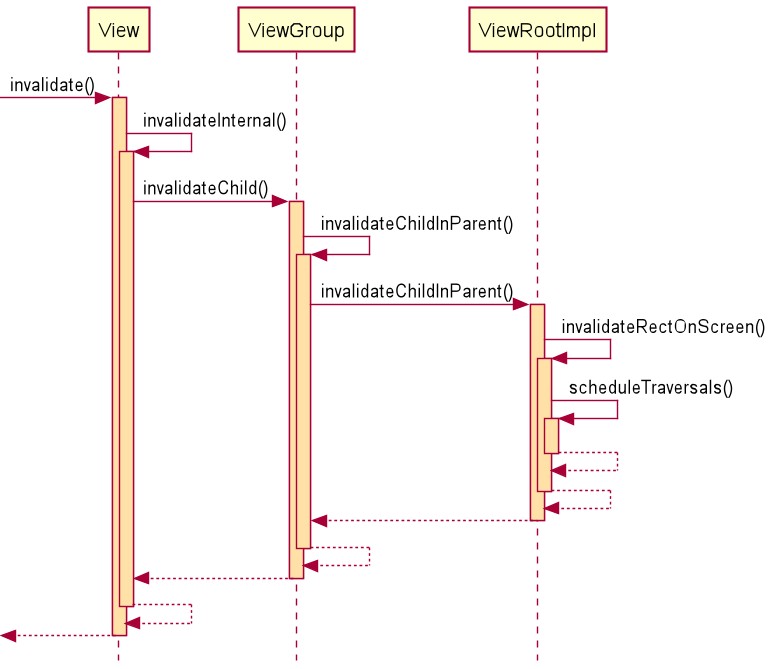
1、invalidate()方法流程
从invalidate()方法调用默认invalidateCache参数true,使此View的绘图缓存也失效。当然这也是默认的选择,因为带参数的invalidate(boolean invalidateCache)是hide方法。
/**
     * @hide
     */
    public void invalidate(boolean invalidateCache) {
        //传入的参数是当前View的上下左右区域
        invalidateInternal(0, 0, mRight - mLeft, mBottom - mTop, invalidateCache, true);
}调用内部的invalidateInternal()方法,在该方法中有如下几个操作:重置View缓存,设置PFLAG_INVALIDATED标志位、向上传递invalidate;
void invalidateInternal(int l, int t, int r, int b, boolean invalidateCache,boolean fullInvalidate) {
        //mGhostView是Overlay中的View,如果存在mGhostView,那么只绘制mGhostView视图
        if (mGhostView != null) {
            mGhostView.invalidate(true);
            return;
        }

        //如果View不可见且未运行动画,则直接跳过invalidate
        if (skipInvalidate()) {
            return;
        }

        // 重置缓存
        mPrivateFlags4 &= ~PFLAG4_CONTENT_CAPTURE_IMPORTANCE_MASK;
        mContentCaptureSessionCached = false;

        //View如果没有任何变化,那么就不需要重绘
        if ((mPrivateFlags & (PFLAG_DRAWN | PFLAG_HAS_BOUNDS)) == (PFLAG_DRAWN | PFLAG_HAS_BOUNDS)
                || (invalidateCache && (mPrivateFlags & PFLAG_DRAWING_CACHE_VALID) == PFLAG_DRAWING_CACHE_VALID)
                || (mPrivateFlags & PFLAG_INVALIDATED) != PFLAG_INVALIDATED
                || (fullInvalidate && isOpaque() != mLastIsOpaque)) {
            if (fullInvalidate) {
                mLastIsOpaque = isOpaque();
                mPrivateFlags &= ~PFLAG_DRAWN;
            }

            //设置PFLAG_DIRTY标记位
            mPrivateFlags |= PFLAG_DIRTY;

            //invalidateCache默认为true,添加PFLAG_INVALIDATED标志位使缓存失效
            if (invalidateCache) {
                mPrivateFlags |= PFLAG_INVALIDATED;          //置为1,设置
                mPrivateFlags &= ~PFLAG_DRAWING_CACHE_VALID; //置为0,清除
            }

            final AttachInfo ai = mAttachInfo;
            //通过mParent,即当前View的父View,将需要重新绘制的矩形区域传递到父View
            final ViewParent p = mParent;
            if (p != null && ai != null && l < r && t < b) {
                final Rect damage = ai.mTmpInvalRect;
                //设置View的边界
                damage.set(l, t, r, b);
                p.invalidateChild(this, damage);
            }

            // 如果此View有Background,则使用View的Outline来裁剪View的内容
            if (mBackground != null && mBackground.isProjected()) {
                final View receiver = getProjectionReceiver();
                if (receiver != null) {
                    receiver.damageInParent();
                }
            }
        }
}随后进入ViewParent的invalidateChild()方法,该方法在ViewGroup中实现。此方法代码比较多,选择性忽视大部分代码,只看关键代码:
/**
     * Don't call or override this method. It is used for the implementation of
     * the view hierarchy.
     */
    @Override
    public final void invalidateChild(View child, final Rect dirty) {
        final AttachInfo attachInfo = mAttachInfo;

        if (attachInfo != null && attachInfo.mHardwareAccelerated) {
            // 启用硬件加速快速刷新
            onDescendantInvalidated(child, child);
            return;
        }

        //ViewParent就是当前ViewGroup
        ViewParent parent = this;
        ...
            do {
                ...
                //然后沿着ViewParent链向上,直到ViewRootImpl
                parent = parent.invalidateChildInParent(location, dirty);
                ...
            } while (parent != null);
        }
}在invalidateChild()方法中,通过invalidateChildInParent()层层向上传递,该方法在ViewGroup中的实现如下:
public ViewParent invalidateChildInParent(final int[] location, final Rect dirty) {
        //判断标志位,这里的两个标志位正是在invalidateInternal()方法中设置的
        if ((mPrivateFlags & (PFLAG_DRAWN | PFLAG_DRAWING_CACHE_VALID)) != 0) {
            // DRAWN 或 DRAWING_CACHE_VALID,并且将要重绘的dirty区域和父容器需要绘制的区域进行union合并

            ...

            //中间忽略了计算过程,返回当前父容器
            return mParent;
        }

        //如果没有标志位,则返回null,直接终止invalidateChild()中的do-while循环
        return null;
}不断沿着ViewParent链向上层层传递,最终到了ViewRootImpl,类似View的requestLayout()流程。invalidateChildInParent()方法在ViewRootImpl中的实现如下:
@Override
    public ViewParent invalidateChildInParent(int[] location, Rect dirty) {
        //ViewRootImpl中的UI操作都会判断是否在UI线程
        checkThread();
        ...

        //在屏幕上使指定的dirty区域失效
        invalidateRectOnScreen(dirty);

        //ViewRootImpl中的方法返回null,invalidateChild()中的do-while的循环一定会终止
        return null;
}invalidateRectOnScreen(Rect dirty)的方法定义如下:将View需要绘制的dirty区域添加到当前需要绘制的区域中,再与应用可见区域相交,最后开启遍历。
private void invalidateRectOnScreen(Rect dirty) {
        final Rect localDirty = mDirty;
        // 将需要重绘的矩形区域,放到当前mDirty中
        localDirty.union(dirty.left, dirty.top, dirty.right, dirty.bottom);

        // 与应用窗口边界相交,跳过可见区域之外的区域更新
        final float appScale = mAttachInfo.mApplicationScale;
        final boolean intersected = localDirty.intersect(0, 0,
                (int) (mWidth * appScale + 0.5f), (int) (mHeight * appScale + 0.5f));

        //如果绘制区域在可见区域之外,那么清空重绘区域,因为看不见,也不需要重绘更新
        if (!intersected) {
            localDirty.setEmpty();
        }

        //进入调度遍历阶段
        if (!mWillDrawSoon && (intersected || mIsAnimating)) {
            scheduleTraversals();
        }
}在最后走到了scheduleTraversals(),开始View树的重绘流程(因为invalidate()没有添加measure和layout的标记位,因此measure、layout流程不会执行,draw流程也只对需要重绘的视图进行绘制)。在重新绘制的时候,只有调用invalidate()的View有PFLAG_INVALIDATED标志位会重绘:
private void updateViewTreeDisplayList(View view) {
        view.mPrivateFlags |= View.PFLAG_DRAWN;

        //判断View是否有PFLAG_INVALIDATED标志
        view.mRecreateDisplayList = (view.mPrivateFlags & View.PFLAG_INVALIDATED)
                == View.PFLAG_INVALIDATED;
        view.mPrivateFlags &= ~View.PFLAG_INVALIDATED;

        //更新View的视图,依次调用draw()、onDraw()
        view.updateDisplayListIfDirty();
        view.mRecreateDisplayList = false;
}看到这里相信对后面的已经很熟悉了,详见View的绘制流程一文。invalidate()的流程图如下:
2、postInvalidate()方法流程
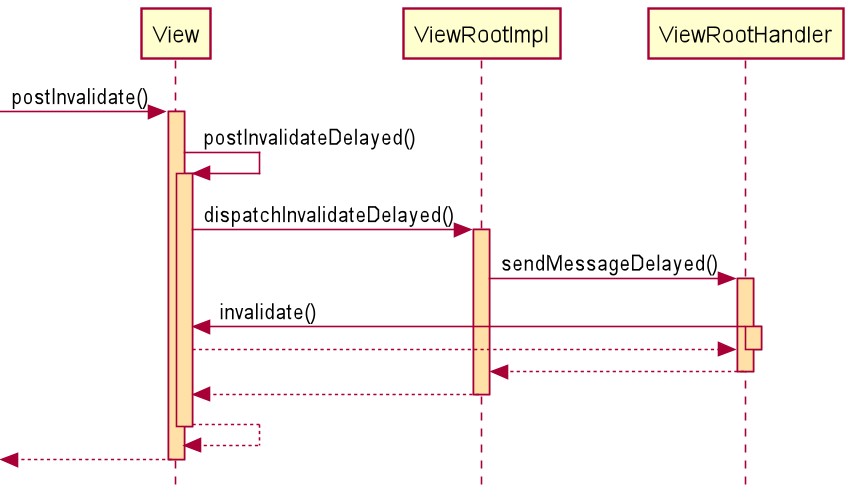
invalidate()方法方法只能在主线程调用,如果在子线程中调用,可以使用postInvalidate()方法:
public void postInvalidate() {
        //立即更新 0延迟
        postInvalidateDelayed(0);
}内部调用另一个postInvalidateDelayed(long delayMilliseconds)方法,此方法可以设置invalidate延迟时间:
public void postInvalidateDelayed(long delayMilliseconds) {
        // We try only with the AttachInfo because there's no point in invalidating
        // if we are not attached to our window
        final AttachInfo attachInfo = mAttachInfo;

        //只有当前View附着在Window上,才会走Invalidate流程
        if (attachInfo != null) {
            attachInfo.mViewRootImpl.dispatchInvalidateDelayed(this, delayMilliseconds);
        }
}通过View.AttachInfo中携带的ViewRootImpl(当View附着时其mAttachInfo会被赋值,来自ViewRootImpl初始化时创建的mAttachInfo,本篇不展开),调用其dispatchInvalidateDelayed(View view, long delayMilliseconds)方法:
public void dispatchInvalidateDelayed(View view, long delayMilliseconds) {
        //将当前View作为Message中携带的obj对象
        Message msg = mHandler.obtainMessage(MSG_INVALIDATE, view);

        //交给ViewRootImpl中的Handler处理MSG_INVALIDATE消息
        mHandler.sendMessageDelayed(msg, delayMilliseconds);
}mHandler是定义在ViewRootImpl中的ViewRootHandler,其handleMessage(Message msg)实现如下:
final class ViewRootHandler extends Handler {
        ...

        @Override
        public void handleMessage(Message msg) {
            handleMessageImpl(msg);
        }

        private void handleMessageImpl(Message msg) {
            switch (msg.what) {
                case MSG_INVALIDATE:
                    //在UI线程中调用View的invalidate()
                    ((View) msg.obj).invalidate();
                    break;
                ...
            }
        }

}最终还是回到UI线程中执行View的invalidate()方法。流程图如下