

View布局参数LayoutParams
View布局参数LayoutParams
为了计算布局实现动效和LayoutParams密切接触有一段时间,LayoutParams彻底玩明白了。
1、LayoutParams
LayoutParams直译为布局参数,是定义在ViewGroup中的静态内部类。
1.1、LayoutParams用途
LayoutParams类的注释清楚的写明此类的用途:LayoutParams是子View用来告诉它们的父布局如何放置自己。
    /**
     * LayoutParams are used by views to tell their parents how they want to be
     * laid out. See
     * {@link android.R.styleable#ViewGroup_Layout ViewGroup Layout Attributes}
     * for a list of all child view attributes that this class supports.
     */
1.2、继承关系
定义在ViewGroup中的LayoutParams类是各种子LayoutParams的基类,只定义View的两个基本属性:宽度和高度。
    /**
     * There are subclasses of LayoutParams for different subclasses of
     * ViewGroup. For example, AbsoluteLayout has its own subclass of
     * LayoutParams which adds an X and Y value.</p>
     *
     * <div class="special reference">
     * <h3>Developer Guides</h3>
     * <p>For more information about creating user interface layouts, read the
     * <a href="{@docRoot}guide/topics/ui/declaring-layout.html">XML Layouts</a> developer
     * guide.</p></div>
     *
     * @attr ref android.R.styleable#ViewGroup_Layout_layout_height
     * @attr ref android.R.styleable#ViewGroup_Layout_layout_width
*/继承抽象类ViewGroup的容器实现类非常多,比如常见的LinearLayout、RelativeLayout、FrameLayout等等。
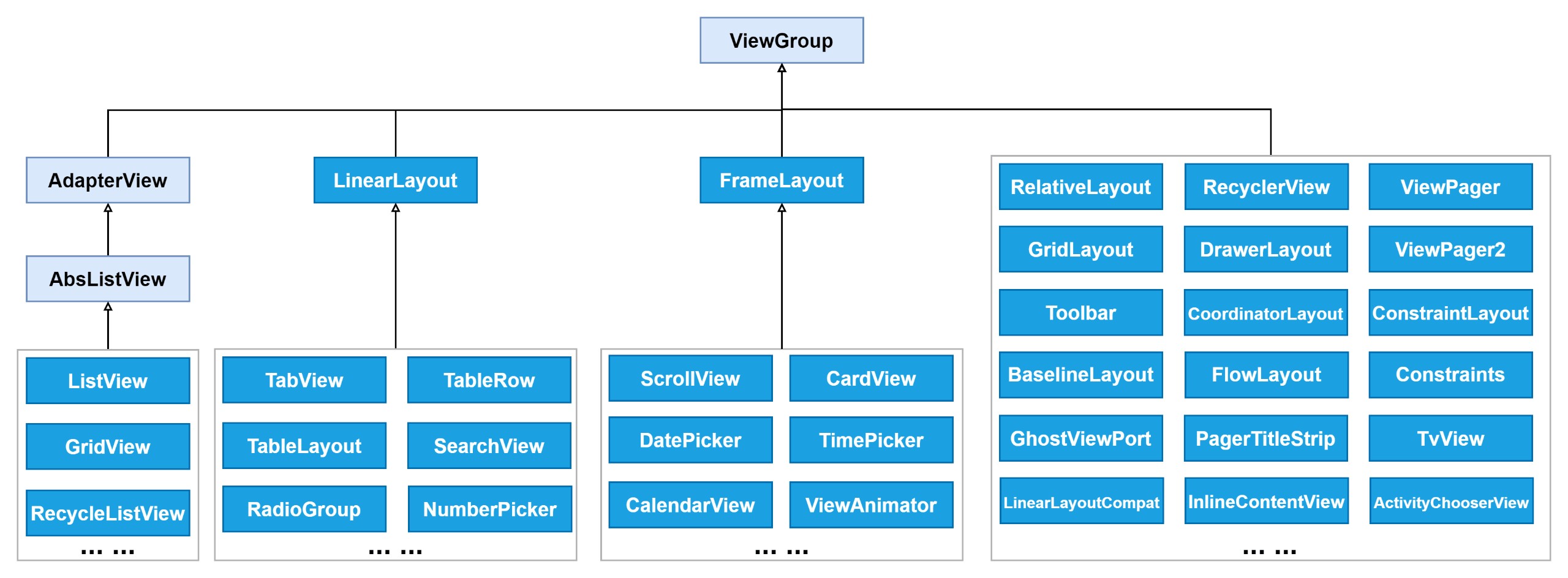
有些容器在继承ViewGroup的同时,还会继承ViewGroup.LayoutParams实现自己的LayoutParams。或者直接使用父类的LayoutParams。
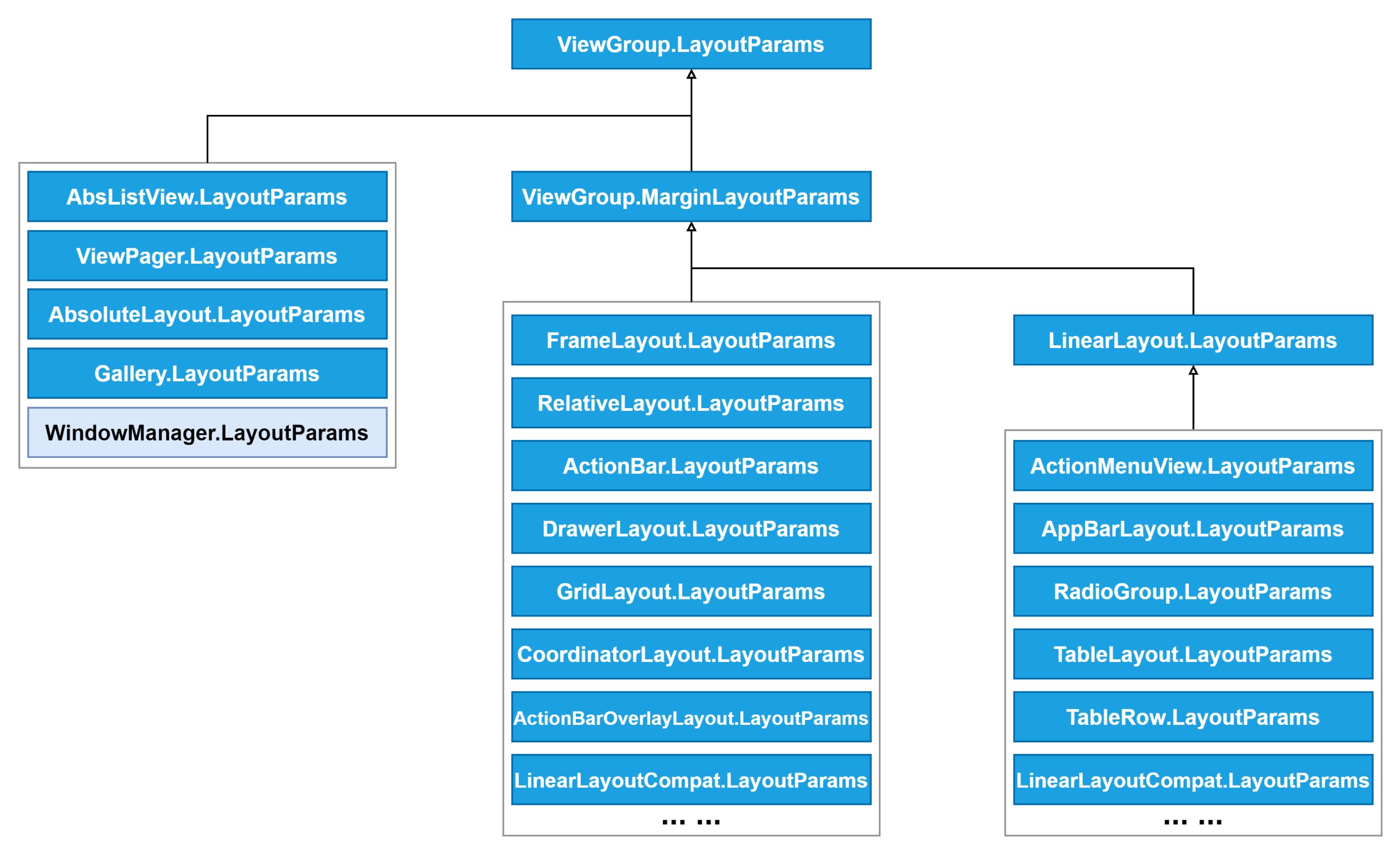
2、LayoutParams类详解
通过前面简单的了解,定义在ViewGroup中的LayoutParams基类只有宽高两个基本信息。
2.1、宽 & 高
ViewGroup中的LayoutParams基类只定义了View的两个基本属性:width和height,控件的宽和高。
        /**
         * Information about how wide the view wants to be. Can be one of the
         * constants FILL_PARENT (replaced by MATCH_PARENT
         * in API Level 8) or WRAP_CONTENT, or an exact size.
         */
        public int width;

        /**
         * Information about how tall the view wants to be. Can be one of the
         * constants FILL_PARENT (replaced by MATCH_PARENT
         * in API Level 8) or WRAP_CONTENT, or an exact size.
         */
        public int height;

        /**
         * 用于动画布局。
         */
        public LayoutAnimationController.AnimationParameters layoutAnimationParameters;
关于ViewGroup.LayoutParams中对于View宽高的说明如下,值只能是以下三种情况之一:①MATCH_PARENT、②WRAP_CONTENT、③具体的值。
    /**
     * <p>
     * The base LayoutParams class just describes how big the view wants to be
     * for both width and height. For each dimension, it can specify one of:
     * <ul>
     * <li>FILL_PARENT (renamed MATCH_PARENT in API Level 8 and higher), which
     * means that the view wants to be as big as its parent (minus padding)
     * <li> WRAP_CONTENT, which means that the view wants to be just big enough
     * to enclose its content (plus padding)
     * <li> an exact number
     * </ul>
     */
有没有很熟悉?这也是XML布局中最常用的两个属性,以layout_前缀加上布局参数的属性。看到以layout_前缀开头的属性,就应该知道这个属性来自LayoutParams。
    <TextView
        android:layout_width="match_parent"
        android:layout_height="18dp" />

    <TextView
        android:layout_width="match_parent"
        android:layout_height="wrap_content" />
2.2、MATCH_PARENT和WRAP_CONTENT
ViewGroup.LayoutParams中定义了两个描述MATCH_PARENT和WRAP_CONTENT的常量。对于已废弃的FILL_PARENT直接忽略,用MATCH_PARENT替代。
        /**
         * Special value for the height or width requested by a View.
         * FILL_PARENT means that the view wants to be as big as its parent,
         * minus the parent's padding, if any. This value is deprecated
         * starting in API Level 8 and replaced by {@link #MATCH_PARENT}.
         */
        @SuppressWarnings({"UnusedDeclaration"})
        @Deprecated
        public static final int FILL_PARENT = -1;

        /**
         * Special value for the height or width requested by a View.
         * MATCH_PARENT means that the view wants to be as big as its parent,
         * minus the parent's padding, if any. Introduced in API Level 8.
         */
        public static final int MATCH_PARENT = -1;

        /**
         * Special value for the height or width requested by a View.
         * WRAP_CONTENT means that the view wants to be just large enough to fit
         * its own internal content, taking its own padding into account.
         */
        public static final int WRAP_CONTENT = -2;
2.3、LayoutParams的三个构造方法
ViewGroup.LayoutParams有三个公有构造方法,用来构造ViewGroup.LayoutParams实例。LayoutParams子类也要实现这三个父类构造方法。
        /**
         * Creates a new set of layout parameters. The values are extracted from
         * the supplied attributes set and context. The XML attributes mapped
         * to this set of layout parameters are:
         *
         * <ul>
         *   <li><code>layout_width</code>: the width, either an exact value,
         *   {@link #WRAP_CONTENT}, or {@link #FILL_PARENT} (replaced by
         *   {@link #MATCH_PARENT} in API Level 8)</li>
         *   <li><code>layout_height</code>: the height, either an exact value,
         *   {@link #WRAP_CONTENT}, or {@link #FILL_PARENT} (replaced by
         *   {@link #MATCH_PARENT} in API Level 8)</li>
         * </ul>
         *
         * @param c the application environment
         * @param attrs the set of attributes from which to extract the layout
         *              parameters' values
         */
        public LayoutParams(Context c, AttributeSet attrs) {
            TypedArray a = c.obtainStyledAttributes(attrs, R.styleable.ViewGroup_Layout);
            setBaseAttributes(a,
                    R.styleable.ViewGroup_Layout_layout_width,
                    R.styleable.ViewGroup_Layout_layout_height);
            a.recycle();
}用已知的宽、高构造ViewGroup.LayoutParams对象。LayoutParams子类中也有类似的构造方法。
        /**
         * Creates a new set of layout parameters with the specified width
         * and height.
         *
         * @param width the width, either {@link #WRAP_CONTENT},
         *        {@link #FILL_PARENT} (replaced by {@link #MATCH_PARENT} in
         *        API Level 8), or a fixed size in pixels
         * @param height the height, either {@link #WRAP_CONTENT},
         *        {@link #FILL_PARENT} (replaced by {@link #MATCH_PARENT} in
         *        API Level 8), or a fixed size in pixels
         */
        public LayoutParams(int width, int height) {
            this.width = width;
            this.height = height;
}用已有的LayoutParams作为参数构造新的LayoutParams对象,俗称复制构造函数。
        /**
         * Copy constructor. Clones the width and height values of the source.
         *
         * @param source The layout params to copy from.
         */
        public LayoutParams(LayoutParams source) {
            this.width = source.width;
            this.height = source.height;
}还有一个无参构造方法,框架内部使用,应用开发者无法使用,了解一下即可。
        /**
         * Used internally by MarginLayoutParams.
         * @hide
         */
        @UnsupportedAppUsage
        LayoutParams() {
        }
3、派生LayoutParams
不能直接使用ViewGroup.LayoutParams类,往往使用其子类。在第1.2节中就已经提到过,在众多继承ViewGroup的容器类中,也有不少派生LayoutParams类。

3.1、MarginLayoutParams
绝大部分派生LayoutParams并不是直接继承自ViewGroup.LayoutParams,而是继承自ViewGroup.MarginLayoutParams。给原本只有width和height的布局参数,增加了四个额外的参数:left、top、right、bottom,表示View上下左右四个方向的空白边距。
    public static class MarginLayoutParams extends ViewGroup.LayoutParams {

        public int leftMargin;

        public int topMargin;

        public int rightMargin;

        public int bottomMargin;

        private int startMargin = DEFAULT_MARGIN_RELATIVE;

        private int endMargin = DEFAULT_MARGIN_RELATIVE;
        ... ...
}这也是除了2.1节中提到的两个属性之外,在XML布局中常用到的几个layout_属性:
    <TextView
        android:layout_width="match_parent"
        android:layout_height="match_parent"

        android:layout_margin="30dp"

        android:layout_marginHorizontal="20dp"
        android:layout_marginVertical="20dp"

        android:layout_marginLeft="10dp"
        android:layout_marginTop="10dp"
        android:layout_marginRight="10dp"
        android:layout_marginBottom="10dp"

        android:layout_marginStart="10dp"
        android:layout_marginEnd="10dp" />
后来为了更好的支持RTL,带有强烈固定方向含义的left和right被start和end取代。建议不要用含有left和start的属性,而应该用含有start和end的属性,可以更好的支持RTL。
最后,来看一下ViewGroup.MarginLayoutParams的构造函数,从这里面可以更加清晰了解到前面布局中设置的几个margin属性设置流程:
①如果设置了layout_margin,那么用这个作为四个方向的统一边距值,即便设置了其它四个属性也不会生效。
②如果设置了垂直layout_marginVertical,那么layout_marginTop和layout_marginBottom属性将不起作用。
③同样的,如果设置了水平layout_marginHorizontal,那么layout_marginLeft和layout_marginRight属性将不起作用。
④layout_marginStart和layout_marginEnd不受除layout_margin之外的属性影响。
        public MarginLayoutParams(Context c, AttributeSet attrs) {
            super();
            TypedArray a = c.obtainStyledAttributes(attrs, R.styleable.ViewGroup_MarginLayout);
            setBaseAttributes(a,
                    R.styleable.ViewGroup_MarginLayout_layout_width,
                    R.styleable.ViewGroup_MarginLayout_layout_height);
            int margin = a.getDimensionPixelSize(
                    com.android.internal.R.styleable.ViewGroup_MarginLayout_layout_margin, -1);

            //如果设置了layout_margin,那么用这个作为四个方向的统一边距值,即便设置了其它四个属性也不会生效。
            if (margin >= 0) {
                leftMargin = margin;
                topMargin = margin;
                rightMargin= margin;
                bottomMargin = margin;
            } else {
                int horizontalMargin = a.getDimensionPixelSize(
                        R.styleable.ViewGroup_MarginLayout_layout_marginHorizontal, -1);
                int verticalMargin = a.getDimensionPixelSize(
                        R.styleable.ViewGroup_MarginLayout_layout_marginVertical, -1);
                if (horizontalMargin >= 0) {
                    leftMargin = horizontalMargin;
                    rightMargin = horizontalMargin;
                } else {
                    leftMargin = a.getDimensionPixelSize(
                            R.styleable.ViewGroup_MarginLayout_layout_marginLeft,
                            UNDEFINED_MARGIN);
                    if (leftMargin == UNDEFINED_MARGIN) {
                        mMarginFlags |= LEFT_MARGIN_UNDEFINED_MASK;
                        leftMargin = DEFAULT_MARGIN_RESOLVED;
                    }
                    rightMargin = a.getDimensionPixelSize(
                            R.styleable.ViewGroup_MarginLayout_layout_marginRight,
                            UNDEFINED_MARGIN);
                    if (rightMargin == UNDEFINED_MARGIN) {
                        mMarginFlags |= RIGHT_MARGIN_UNDEFINED_MASK;
                        rightMargin = DEFAULT_MARGIN_RESOLVED;
                    }
                }
                startMargin = a.getDimensionPixelSize(
                        R.styleable.ViewGroup_MarginLayout_layout_marginStart,
                        DEFAULT_MARGIN_RELATIVE);
                endMargin = a.getDimensionPixelSize(
                        R.styleable.ViewGroup_MarginLayout_layout_marginEnd,
                        DEFAULT_MARGIN_RELATIVE);
                if (verticalMargin >= 0) {
                    topMargin = verticalMargin;
                    bottomMargin = verticalMargin;
                } else {
                    topMargin = a.getDimensionPixelSize(
                            R.styleable.ViewGroup_MarginLayout_layout_marginTop,
                            DEFAULT_MARGIN_RESOLVED);
                    bottomMargin = a.getDimensionPixelSize(
                            R.styleable.ViewGroup_MarginLayout_layout_marginBottom,
                            DEFAULT_MARGIN_RESOLVED);
                }
                if (isMarginRelative()) {
                   mMarginFlags |= NEED_RESOLUTION_MASK;
                }
            }
            ...
        }
3.2、自定义LayoutParams
开发者可以继承ViewGroup.LayoutParams抽象类或者ViewGroup.MarginLayoutParams类,实现自己的LayoutParams布局参数。
    public class QuibblerView extends ViewGroup {

        ...

        public static class LayoutParams extends ViewGroup.MarginLayoutParams {
            int front;
            int behind;

            public LayoutParams(Context c, AttributeSet attrs) {
                super(c, attrs);
                TypedArray a = c.obtainStyledAttributes(attrs, R.styleable.QuibblerView_Layout);
                front = a.getLayoutDimension(R.styleable.QuibblerView_Layout_layout_front, "layout_front");
                behind = a.getLayoutDimension(R.styleable.QuibblerView_Layout_layout_behind, "layout_behind");
                a.recycle();
            }

            public LayoutParams(int width, int height) {
                super(width, height);
            }

            public LayoutParams(ViewGroup.LayoutParams source) {
                super(source);
            }
        }

}再或者省点事,继承现有容器的LayoutParams,只需新增属性方法实现功能。比如直接继承LinearLayout中的LinearLayout.LayoutParams,在很多继承自LinearLayout的容器中也常常看到这样的做法:直接使用父容器的LayoutParams,或者继承父容器的LayoutParams。
    public static class LayoutParams extends LinearLayout.LayoutParams {

        public LayoutParams(Context c, AttributeSet attrs) {
            super(c, attrs);
        }

        public LayoutParams(int width, int height) {
            super(width, height);
        }

        public LayoutParams(ViewGroup.LayoutParams source) {
            super(source);
        }
}为了让自定义布局参数更方便些,再自定义一些xml属性。关于自定义</declare-styleable>属性详见《自定义View属性》一文。
    <declare-styleable name="QuibblerView_Layout">
        <attr name="layout_front" format="dimension" />
        <attr name="layout_behind" format="dimension" />
    </declare-styleable>
在LayoutParams构造方法中解析设置的xml属性:
        public static class LayoutParams extends ViewGroup.MarginLayoutParams {
            int front;
            int behind;

            public LayoutParams(Context c, AttributeSet attrs) {
                super(c, attrs);
                TypedArray a = c.obtainStyledAttributes(attrs, R.styleable.QuibblerView_Layout);
                front = a.getLayoutDimension(R.styleable.QuibblerView_Layout_layout_front, "layout_front");
                behind = a.getLayoutDimension(R.styleable.QuibblerView_Layout_layout_behind, "layout_behind");
                a.recycle();
            }
            ...
        }
4、使用LayoutParams
开发者无需自己构造LayoutParams设置给View,给View设置LayoutParams是该View所在父容器的责任,在随后文章中会详细讲到。
4.1、获取View的布局参数
通常是直接通过View的getLayoutParams()方法获取View中已有的布局参数:
ViewGroup.LayoutParams layoutParams = view.getLayoutParams();
每个View中都定义了一个ViewGroup.LayoutParams类型的属性成员mLayoutParams;
    public ViewGroup.LayoutParams getLayoutParams() {
        return mLayoutParams;
    }
4.2、修改布局参数
然后重新设置一些布局参数,如宽高、margin等。对于ViewGroup.LayoutParams布局参数也只有宽高属性可以设置。
    layoutParams.height = height ;
    layoutParams.width = width ;
如需设置额外的属性,需要将从View拿到的ViewGroup.LayoutParams类型转换成View所在父布局中LayoutParams的类型或其超类。比如,在LinearLayout容器中的View,其布局参数类型为LinearLayout.LayoutParams。可以进行如下操作:
    LinearLayout.LayoutParams layoutParams = (LinearLayout.LayoutParams) view.getLayoutParams();
    layoutParams.setMargins(left, top, right, bottom);
    layoutParams.bottomMargin = 20;
    layoutParams.gravity = Gravity.END;
4.3、设置View的布局参数
最后,将设置过的LayoutParams再重新设置给View。有些开发者会遇到不设置不生效的情况,或者不二次设置也能生效。
view.setLayoutParams(layoutParams);
先说第一种情况,在setLayoutParams(layoutParams)方法中,调用了requestLayout()刷新重新布局,使新的LayoutParams生效。关于requestLayout()详见View的requestLayout()流程一文。
    public void setLayoutParams(ViewGroup.LayoutParams params) {
        if (params == null) {
            throw new NullPointerException("Layout parameters cannot be null");
        }
        mLayoutParams = params;
        resolveLayoutParams();
        if (mParent instanceof ViewGroup) {
            ((ViewGroup) mParent).onSetLayoutParams(this, params);
        }
        requestLayout();
}为什么不调用setLayoutParams(layoutParams)方法,也能使修改后的LayoutParams生效?是因为LayoutParams是在布局阶段之前设置的,比如在onCreate()中进行操作,即便没有再次setLayoutParams(layoutParams),也会在后续的布局阶段生效。
相关资料:
reference/android/view/ViewGroup.LayoutParams
reference/android/view/ViewGroup.MarginLayoutParams
