
探究onAttachedToWindow和onDetachedFromWindow
ProgressBar,是很多开发者一开始接触安卓开发就使用过的控件,用来显示加载进度。查看ProgressBar源码,在onAttachedToWindow()方法中开启进度条加载动画:
@Override
    protected void onAttachedToWindow() {
        super.onAttachedToWindow();
        if (mIndeterminate) {
            startAnimation();
        }
        if (mRefreshData != null) {
            synchronized (this) {
                final int count = mRefreshData.size();
                for (int i = 0; i < count; i++) {
                    final RefreshData rd = mRefreshData.get(i);
                    doRefreshProgress(rd.id, rd.progress, rd.fromUser, true, rd.animate);
                    rd.recycle();
                }
                mRefreshData.clear();
            }
        }
        mAttached = true;
}在与之对应的onDetachedFromWindow()方法中停止动画:
@Override
    protected void onDetachedFromWindow() {
        if (mIndeterminate) {
            stopAnimation();
        }
        if (mRefreshProgressRunnable != null) {
            removeCallbacks(mRefreshProgressRunnable);
            mRefreshIsPosted = false;
        }
        // This should come after stopAnimation(), otherwise an invalidate message remains in the
        // queue, which can prevent the entire view hierarchy from being GC'ed during a rotation
        super.onDetachedFromWindow();
        mAttached = false;
}onAttachedToWindow()和onDetachedFromWindow()类似Activity的onCreate()和onDestroy()。作为成对匹配的方法:可以在attach的时候做一些初始化、启动操作;在detach的时候释放资源、暂停操作。
非常有必要了解onAttachedToWindow()和onDetachedFromWindow()这两个方法的来龙去脉。
1、View的onAttachedToWindow、onDetachedFromWindow
在View类中就定义了onAttachedToWindow()和onDetachedFromWindow()这两个方法,它们不是继承来的。子类重写的时候注意需要调用super父类方法。
/**
     * This is called when the view is attached to a window.  At this point it
     * has a Surface and will start drawing.  Note that this function is
     * guaranteed to be called before {@link #onDraw(android.graphics.Canvas)},
     * however it may be called any time before the first onDraw -- including
     * before or after {@link #onMeasure(int, int)}.
     *
     * @see #onDetachedFromWindow()
     */
    @CallSuper
    protected void onAttachedToWindow() {
        if ((mPrivateFlags & PFLAG_REQUEST_TRANSPARENT_REGIONS) != 0) {
            mParent.requestTransparentRegion(this);
        }
        mPrivateFlags3 &= ~PFLAG3_IS_LAID_OUT;
        jumpDrawablesToCurrentState();
        AccessibilityNodeIdManager.getInstance().registerViewWithId(this, getAccessibilityViewId());
        resetSubtreeAccessibilityStateChanged();
        // rebuild, since Outline not maintained while View is detached
        rebuildOutline();
        if (isFocused()) {
            notifyFocusChangeToImeFocusController(true /* hasFocus */);
        }
    }

    /**
     * This is called when the view is detached from a window.  At this point it
     * no longer has a surface for drawing.
     *
     * @see #onAttachedToWindow()
     */
    @CallSuper
    protected void onDetachedFromWindow() {
    }
1.1、onAttachedToWindow流程
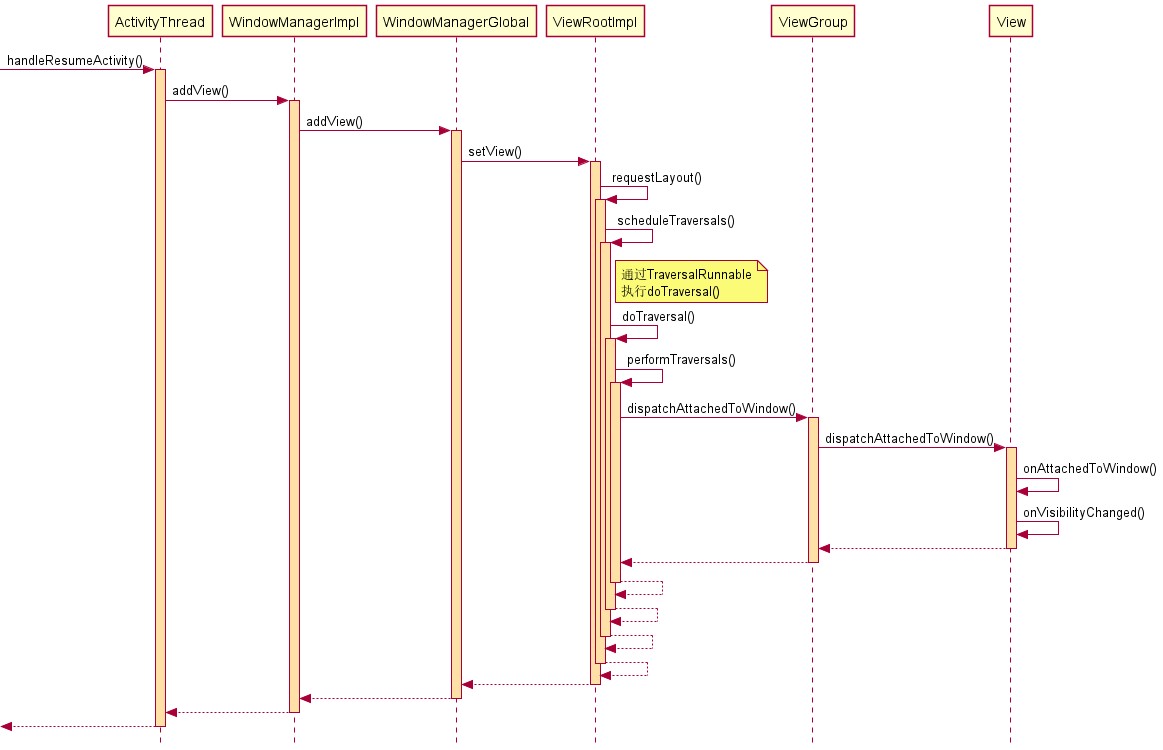
找到源码的切入点,从Activity的resume开始:当View被添加到ViewRootImpl的时候,会通过dispatchAttachedToWindow(AttachInfo info, int visibility)方法逐级分发View被添加到Window的事件。
源码就不贴上来了,用PlantUML“手写”View的onAttachedToWindow()回调时序图如下:
1.2、onDetachedFromWindow流程
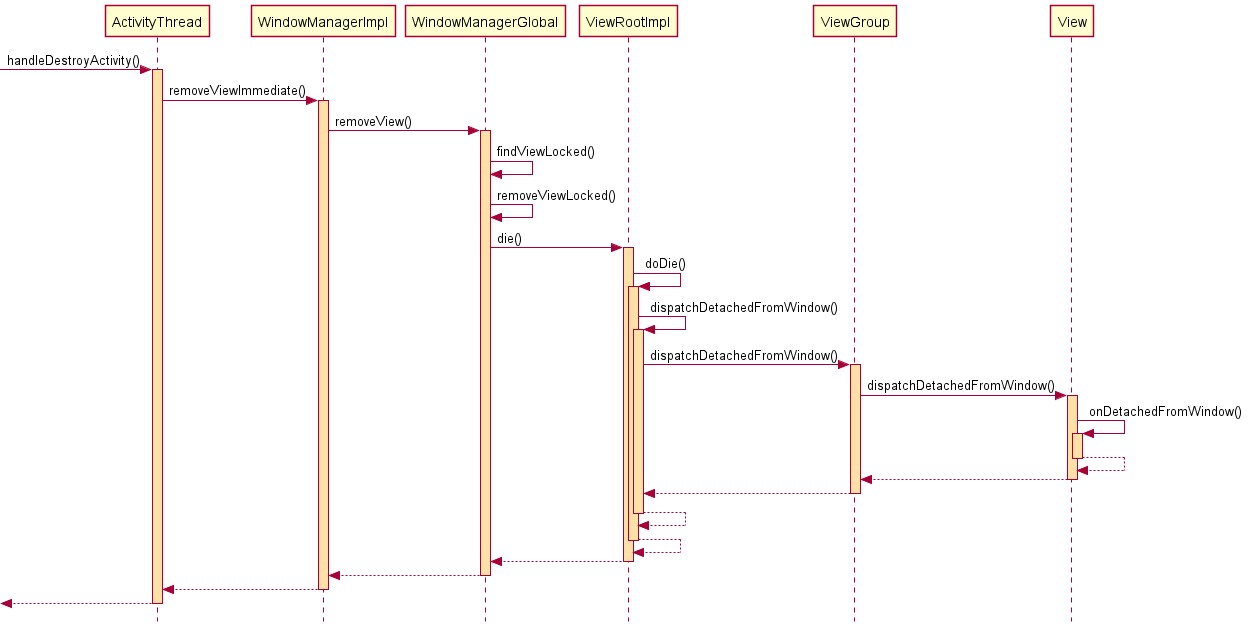
对应的,是在Activity销毁destroy时会将View从ViewRootImpl移除,通过dispatchDetachedFromWindow()完成事件分发给每个View。
源码较多太占篇幅,对应的时序图简化如下:
2、Activity的onAttachedToWindow、onDetachedFromWindow
在Activity中也有一对onAttachedToWindow()和onDetachedFromWindow()方法,是Activity实现Window.Callback接口而定义的空方法:
/**
     * Called when the main window associated with the activity has been
     * attached to the window manager.
     * See {@link View#onAttachedToWindow() View.onAttachedToWindow()}
     * for more information.
     * @see View#onAttachedToWindow
     */
    public void onAttachedToWindow() {
    }

    /**
     * Called when the main window associated with the activity has been
     * detached from the window manager.
     * See {@link View#onDetachedFromWindow() View.onDetachedFromWindow()}
     * for more information.
     * @see View#onDetachedFromWindow
     */
    public void onDetachedFromWindow() {
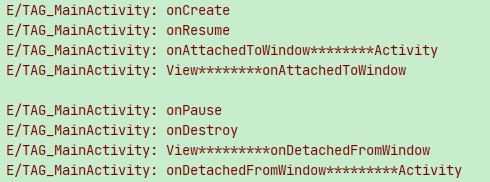
}Activity的onAttachedToWindow()比View的onAttachedToWindow()早;Activity的onDetachedFromWindow()比View的onDetachedFromWindow()晚;通过Log可以验证:
2.1、onAttachedToWindow流程
Activity的onAttachedToWindow()从哪里回调的呢?在DecorView的onAttachedToWindow()中回调:
@Override
    protected void onAttachedToWindow() {
        //先回调View的onAttachedToWindow()
        super.onAttachedToWindow();

        //Window中的Callback正是Activity,Activity实现了Window.Callback接口
        final Window.Callback cb = mWindow.getCallback();

        //再这里回调Activity的onAttachedToWindow()
        if (cb != null && !mWindow.isDestroyed() && mFeatureId < 0) {
            cb.onAttachedToWindow();
        }

        ...
}在DecorView添加到Window的流程一文中提到相关成员的初始化:
@Override
    public void handleResumeActivity(IBinder token, boolean finalStateRequest, ...) {
            ...
            //获取Activity中的Window
            r.window = r.activity.getWindow();

            //获取DecorView
            View decor = r.window.getDecorView();
            decor.setVisibility(View.INVISIBLE);

            //获取WindowManager
            ViewManager wm = a.getWindowManager();

            ...
            //将DecorView添加到Window中
            wm.addView(decor, l);
            ....
}其中Activity中的Window在attach()创建的时候就初始化为PhoneWindow,并且给PhoneWindow设置的Window.Callback就是当前Activity:
@UnsupportedAppUsage
    final void attach(Context context, ActivityThread aThread...) {
        attachBaseContext(context);

        mFragments.attachHost(null /*parent*/);

        //创建一个PhoneWindow
        mWindow = new PhoneWindow(this, window, activityConfigCallback);
        mWindow.setWindowControllerCallback(mWindowControllerCallback);

        //给Window设置Callback,就是当前Activity
        mWindow.setCallback(this);
        ...
    }
2.2、onDetachedFromWindow流程
同样的,Activity的onDetachedFromWindow()方法也是借助DecorView回调:
@Override
    protected void onDetachedFromWindow() {
        //ViewGroup分发onDetachedFromWindow()
        super.onDetachedFromWindow();

        //拿到当前Window的Activity
        final Window.Callback cb = mWindow.getCallback();

        //回调Activity的onDetachedFromWindow()方法
        if (cb != null && mFeatureId < 0) {
            cb.onDetachedFromWindow();
        }

        ...
    }
再看一下Log,各周期执行情况和前面所看源码顺序一致:


