
Drawable中的形状:Shape
Drawable在安卓开发中非常常见,常用来作为View的背景。但是光会简单的用法还不够,需要对这个图像体系有一个整体系统的认知,详见《Android Drawable》。和Drawable有关的就是Shape图形,在自定义Drawable也接触过<shape />标签,见《ShapeDrawable:Android自定义背景》。
1、Shape
Shape定义通用的图形“形状”。和Shape形状相关的类都在android.graphics.drawable.shapes包中。
1.1、形状基类
Shape是抽象的形状基础类,系统实现的有如下几种形状:ArcShape、OvalShape、PathShape、RectShape、RoundRectShape。
其中的draw()方法需要子类去实现绘制具体的“形状”,自定义形状的子类还必须要实现clone()方法,返回实例。
/**
     * Draws this shape into the provided Canvas, with the provided Paint.
     * <p>
     * Before calling this, you must call {@link #resize(float,float)}.
     *
     * @param canvas the Canvas within which this shape should be drawn
     * @param paint  the Paint object that defines this shape's characteristics
     */
    public abstract void draw(Canvas canvas, Paint paint);
1.2、方法
①float getWidth():形状宽度
②float getHeight():形状高度
③resize(float width, float height):重新调整形状的大小
④boolean hasAlpha():形状是否有透明度,默认true
⑤onResize(float width, float height):当resize()调用的时候回调该方法,积累实现为空方法
⑥getOutline(Outline outline):计算形状的轮廓返回Outline对象。 默认实现不执行任何操作。
2、ArcShape
ArcShape创建弧形。圆弧形状以指定角度开始,并顺时针旋转,绘制了饼图。
2.1、创建ArcShape
需要传入起始角度,以及旋转角度。
/**
     * ArcShape constructor.
     *
     * @param startAngle the angle (in degrees) where the arc begins
     * @param sweepAngle the sweep angle (in degrees). Anything equal to or
     *                   greater than 360 results in a complete circle/oval.
     */
    public ArcShape(float startAngle, float sweepAngle) {
        mStartAngle = startAngle;
        mSweepAngle = sweepAngle;
    }
2.2、示例
自定义一个View,借助ShapeDrawable绘制Shape形状。后面演示都会这样,只需要替换形状Shape对象类型即可。
@Override
    protected void onDraw(Canvas canvas) {
        super.onDraw(canvas);
        //构造Shape,并将其作为参数用来构造ShapeDrawable。只是演示方便,千万不要在onDraw()方法中创建对象
        Shape shape = new ArcShape(0, 300);
        ShapeDrawable drawable = new ShapeDrawable(shape);
        //设置ShapeDrawable
        drawable.setBounds(0,0,200,200);
        //拿到ShapeDrawable的Paint进行设置
        Paint paint = drawable.getPaint();
        paint.setStyle(Paint.Style.FILL);
        paint.setColor(Color.RED);
        paint.setAntiAlias(true);

        //将Drawable绘制在View的canvas图层上
        drawable.draw(canvas);
    }
3、OvalShape
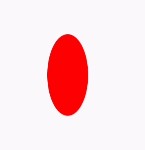
OvalShape定义一个椭圆形。
3.1、构造
无参构造,椭圆根据Drawable的大小自动调整。宽高相同的时候即为圆形。
public OvalShape() {}3.2、示例
如下:
protected void onDraw(Canvas canvas) {
        super.onDraw(canvas);
        Shape shape = new OvalShape();
        ShapeDrawable drawable = new ShapeDrawable(shape);
        drawable.setBounds(0,0,100,200);
        Paint paint = drawable.getPaint();
        paint.setStyle(Paint.Style.FILL);
        paint.setColor(Color.RED);
        paint.setAntiAlias(true);
        drawable.draw(canvas);
    }
4、PathShape
PathShape路径形状,可以绘制更复杂的图像。关于Path详见《路径Path的使用》。
5、RectShape
RectShape矩形形状。最常见的Shape形状,大多数的按钮、背景都是用该形状,通常还会结合radius加上圆角。
5.1、构造
无参构造,椭圆根据Drawable的大小自动调整。宽高相同的时候即为正方形。
public OvalShape() {}5.2、示例
如下。

6、RoundRectShape
RoundRectShape是用来创建一个圆角矩形。
6.1、构造
构造方法参数稍微复杂一些,详细说明如下
/**
     * RoundRectShape constructor.
     * <p>
     * 指定外部(圆形)矩形和可选的内部(圆形)矩形。
     *
     * @param outerRadii 一个包含8个半径值的数组,用于outer roundrect。
     *                   前两个浮动用于左上角(其余两对对应于顺时针方向)。
     *                   对于外部矩形上没有圆角,传递null。
     * @param inset      指定从内部矩形到外部矩形每边的距离的矩形,可为null。
     * @param innerRadii 包含8个半径值的数组,用于内部圆矩形的前两个浮动用于左上角(其余两对对应于顺时针方向)。
     *                   对于内部矩形上没有圆角,传递null。
     *                   如果inset参数是null,则忽略此参数.
     */
    RoundRectShape(float[] outerRadii,RectF inset,float[] innerRadii)
参考资料:


